AI Email Agents: How They Work and Why They Matter
You check one email, and five more pop up.
Some require quick replies, while others deserve more thoughtful consideration. And before you know it, it’s lunchtime and you haven’t touched your actual work.
Sound familiar?
This is why AI email agents are gaining traction.
Not because they’re flashy or futuristic, but because they take real pressure off your plate. They organize messages, draft replies, and handle the repetitive tasks that consume hours without making a noticeable impact.
In this guide, I’ll explain what AI email agents actually do, how they work, and how they can make email feel less like a time-sink and more like something you finally have under control.
With Postcards Email Builder you can create and edit email templates online without any coding skills! Includes more than 100 components to help you create custom emails templates faster than ever before.
Free Email BuilderFree Email TemplatesWhat Is an AI Email Agent?
An AI email agent is a smart assistant powered by a machine learning algorithm that takes action like a real person. For example, Gmail’s “Help me write” feature helps users by reading and responding to emails accordingly to the prompts entered.
Also, there are more advanced AI email agents, also known as autonomous email agents or AI email copilots. These don’t just draft responses; they understand the intent, interact with backend systems, and take action (like pulling order status or updating records).
Tools like Ada’s AI-powered email support or Zowie, which is specifically built for e-commerce, are great examples of AI agents that can read customer messages, pull real-time data, and respond automatically.
That’s a major reason why the global AI-powered email assistant market is projected to reach $4.52 billion by 2029. This shows how fast businesses are investing in smarter email solutions.
How AI Email Agents Work?
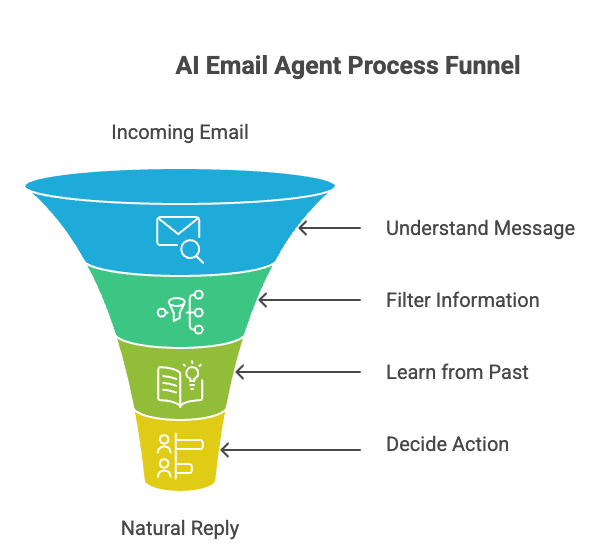
Let’s see how these AI email agents work at the backend:
Understands the message: When an email arrives, the AI reads it and interprets what the sender intends to convey. This is called intent detection. It uses natural language processing (NLP) to determine what the email is about.
For example, if an email says, “Where’s my order? It was supposed to arrive two days ago.” The AI spots that this is about a delivery delay.
Filters out the important information: The AI extracts relevant details from your CRM (e.g., HubSpot) or analytics to understand who the customer is and what has been happening.
With Startup App and Slides App you can build unlimited websites using the online website editor which includes ready-made designed and coded elements, templates and themes.
Try Startup App Try Slides AppOther ProductsLearns from what’s worked before: It looks at old emails and campaigns to see what worked and what didn’t. For example, if people often ignore specific subject lines or buttons, agents avoid them.
If emails with the subject line “Update on your issue” get more replies than “Issue #8934,” the AI learns to pick the one that works better.
Knows what to do: Once it understands the email based on the info it gets, the AI decides what to do next. For example, it can write a reply that sounds natural and reflects your tone of voice.
What Are the Benefits of Using AI Email Agents
It’s 2025 and if you still don’t use an AI agent to speed up your manual email tasks, here’s why you should consider using it now:
- It takes care of routine tasks like replying to common questions and sorting messages, so you don’t have to repeat the same things.
- It keeps your inbox clean by filtering out spam and flagging the emails that need your attention.
- It works 24/7, which means it can respond to messages and send updates even when you’re asleep or away from your desk.
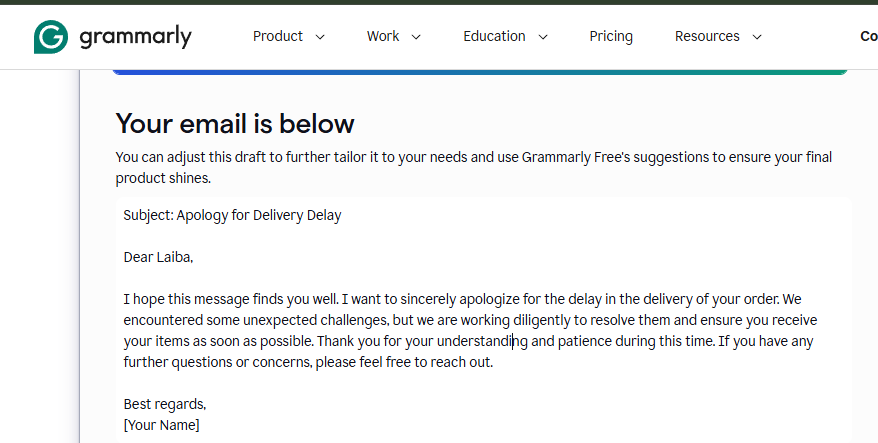
- It helps you write better emails by drafting clear and professional responses. Take a look at an example from Grammarly.
- It learns your tone and habits over time, so the emails it writes start to sound more like you.
- It personalizes emails automatically by adding names, order history, or preferences, without you having to type any of it yourself.
AI Email Agents vs. Traditional Email Automation
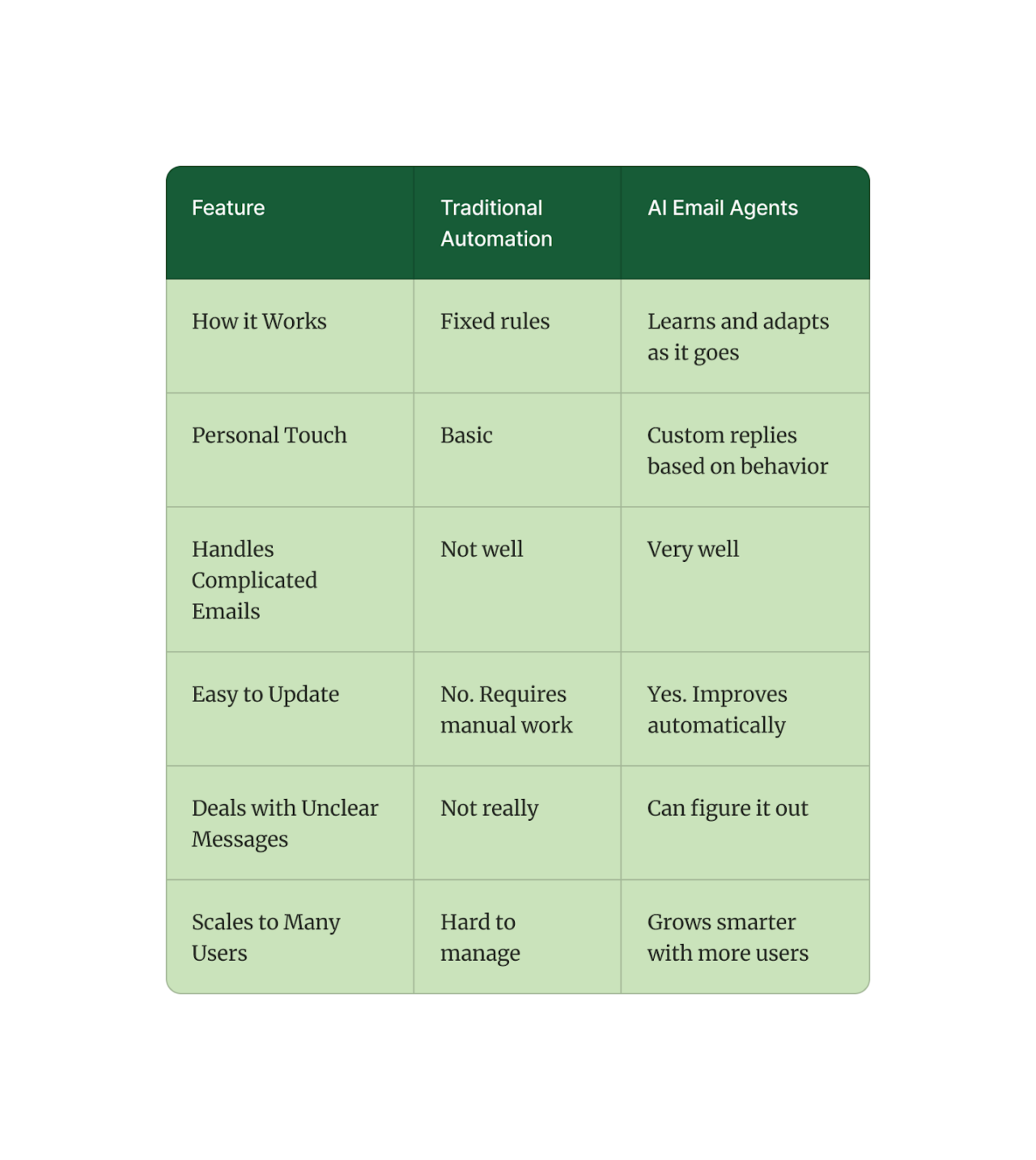
Traditional email automation uses fixed rules. They are great for simple, repetitive tasks, but struggle when conversations get out of context.
AI Email Agents understand language and context. They can read emails, infer intent, and respond in a human-like manner.
Let’s understand this with a scenario.
Let’s say you run a fast-growing online store. Customers send you emails every day asking about orders, shipping delays, product recommendations, and even refund requests.
Now you want to automate replies, so you try two different approaches:
1. Traditional Email Automation
You set up a basic email automation tool and create rules like: “If an email contains ‘order status’, send this message.”
But one day, a customer writes:
“Hi, I haven’t received my order. It’s been over 2 weeks. Can you check on it?”
The system recognizes the “order” and sends a generic reply: “Your order is on its way!”
This email reply would make the customer feel ignored because the message doesn’t match their concern.
2. AI Email Agent
Now, if you try an AI email agent and the same email comes, your agent would read it, understand the delay, sense frustration, and may reply something like:
“I’m really sorry about the delay. I’ve flagged your order for priority review and will update you within 2 hours.”
This assures the customer that they’re being heard and shows a sense of responsibility on the sender’s part as well.
Key Features to Look for in AI Email Agents
If you go online to search for the best AI email agent, you’ll come across so many options. Each one would have multiple features.
So it’s important to choose the right one.
And to choose the right AI email agent, look for the following features:
Quick Replies to Incoming Emails
Customers expect fast responses. Whether it’s a basic question about shipping or a follow-up on a support ticket, your AI agent should respond within seconds. This way, your inbox keeps moving, even when you’re in meetings or off the clock.
Suppose you’re in back-to-back meetings, and a customer emails:
“Hey, can I change the delivery address?”
Instead of seeing it hours later, the AI agent immediately sends a helpful response right away without any stress.
Handles Multiple Questions in One Thread
Real people rarely send one-line emails. They might ask about pricing, availability, and return policy—all in the same message.
Your AI should be able to identify each question and respond to all of them.
Let’s say a customer writes:
“Do you ship internationally? Also, is there a discount for bulk orders?”
A good AI agent would provide a complete and organized reply instead of skipping the second question.
Understands Conversations
The best tools can carry on a natural back-and-forth. That means the AI doesn’t fire off robotic answers; it follows the thread, remembers what’s already been said, and adjusts based on the customer’s tone or intent. It feels like you’re having a real conversation.
If a customer says:
“Thanks, but I’m still confused about the refund policy.”
So, instead of repeating the same help document, the AI agent would rephrase the answer with greater clarity to provide further assistance, just as a real team member would.
Connects to Your Existing Tools
You shouldn’t have to rip out your current tools only to try AI. The best agents seamlessly integrate with what you already use, such as Gmail, Outlook, or your support CRM.
Let’s say you’re using a legacy email system that your team knows inside out. So, instead of forcing a switch, the AI should integrate smoothly to help your team work faster without altering their existing workflow.
What Are the Challenges and Considerations for AI Email Agents
AI, like everything else, isn’t perfect. It can boost productivity and save time, but it still comes with risks.
Here are some key challenges to keep in mind when using AI email agents.
- They process sensitive customer data, so privacy and security must be top priorities to avoid misuse or legal issues.
- AI can sometimes misunderstand the message and respond in a way that feels cold, off-topic, or inappropriate.
- They may confidently respond with incorrect or made-up information, known as “hallucination,” which can lead to confusion.
- Relying too heavily on AI can remove the human touch, so ensure that AI handles routine tasks while humans retain control over complex or emotionally charged conversations.
Ready to Handle Emails in a New Way?
If you’re still spending hours replying to the same kinds of emails every day, it’s probably time to let an AI email agent take some of that off your shoulders.
But why stop there?
With Designmodo’s Postcards, you can take email creation even further. Not only do you get access to professionally designed email templates that are easy to customize, but you also get a built-in AI Assistant that helps improve your writing.
It’s like having a second pair of eyes on your writing. You can shorten long messages, fine-tune your tone, or make sure your text fits a specific word limit and all without starting from scratch.
The result? Emails that look great and read even better with half the effort.
FAQs
Are AI Email Agents Only for Customer Support?
Not at all. They’re used by marketers, sales teams, founders, developers, and recruiters for everything from outreach to internal updates.
How Do I Make Sure the AI Keeps Improving Over Time?
Regularly review and edit its drafts, give feedback where needed, and connect relevant data sources (like past emails or CRM). That’s how most agents learn from your corrections.
Is it Acceptable to Use AI to Write Emails?
Yes, you can use AI to generate emails. It can draft clear, quick responses based on your input or incoming messages. All you have to do is review before sending, especially for sensitive topics.
Is Postcards’ Built-in AI Assistant Free?
The AI Assistant feature of Postcards is available only for Pro plan users.