How to Write Email Copy That Sells: Proven Copywriting Techniques
If you think an email marketing strategy is all about the same catchy phrases, then you’re wrong. That’s not how you make them click-worthy now because people’s attention spans are shrinking.
So if you want your copy to convert, then it has to be strategic, to the point, and interesting above all.
To achieve that, you will need to follow a combination of psychology tactics, nail the subject line, personalize, and persuade.
In this guide, I’ll show you exactly how to write an email copy that sells.
The Psychology Behind Emails That Convert
The emails that get results aren’t always the ones with clever wording or attractive designs. What makes them work is how they use simple psychological triggers that push people to act.
Here are three triggers you can build into almost any email:
- Urgency: Let readers know they need to act soon. A subject line like “Last chance to grab…” grabs attention right away.
- Scarcity: Add a detail like “Only 3 left” to make people feel they could miss out (that little push from FOMO).
- Social proof: Show that others already trust or love what you’re offering. A line like “5,000 people have added this to their cart” builds confidence.
Why does this work so well?
With Postcards Email Builder you can create and edit email templates online without any coding skills! Includes more than 100 components to help you create custom emails templates faster than ever before.
Free Email BuilderFree Email TemplatesBecause it touches two primary emotions: the desire not to miss out and the inclination to make the “safe” choice. If others have already bought it, it feels like the right move.
And a simple way to pull this all together is with the AIDA formula:
Attention: Grab attention with a bold opening line.
Interest: Talk about the benefits, not the features.
Desire: Use proof to make them want it.
Action: End with a clear, “Do this now” call-to-action (CTA).
Emotional vs. Rational Appeal
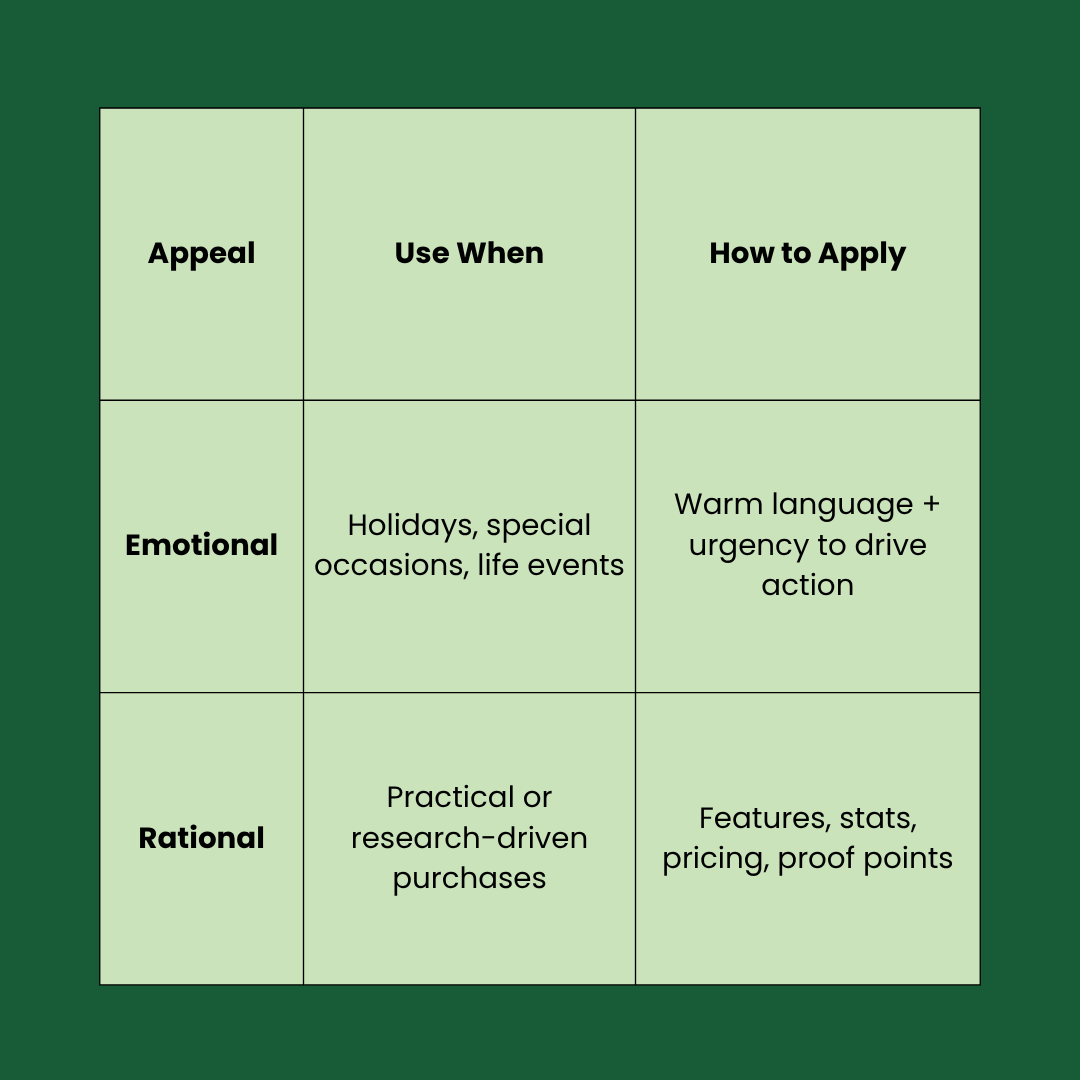
AIDA gives your email structure, but it’s not enough. To connect with readers, you also need the right appeal. This could be either emotional or rational, depending on who you’re talking to and the context.
When to lean on emotion
Emotional copy works best when people are primed to feel something. For example, moments like Valentine’s Day, Father’s Day, the wedding season, or campaigns for maternity products.
In such cases, you have to speak to the heart. To do so, use warm, heartfelt language and pair it with a touch of urgency so your readers feel the moment and act accordingly.
When to lean on logic
With Pulsetic you’ll be instantly notified the moment your website, API, or server becomes unavailable. Monitor uptime from multiple global locations and respond to incidents before your users are affected.
Create beautiful status pages in minutes to keep customers informed during outages and build trust with transparent communication.
Start Monitoring for FreeRational copy works when buyers want facts, not feelings. If someone’s making a practical purchase, they’ll want to see the benefits and proof before deciding. So, highlight your features, show off stats, share pricing details, or mention milestones that prove your product or service delivers.
Marketing Email Copywriting Techniques & Tips Based on Main Email Components
1. Subject Lines to Grab Attention
43% of people open brand emails based on the subject line alone.
Why?
Because it’s the first thing readers notice on their lock screen, in their inbox, or as a notification. So, it’s your one shot to get them to open the email.
Here are a few proven approaches you can use to earn the click:
- Ask a question: Start a mini-conversation and spark curiosity.
Example: “Looking for the best UX design tool?” - Create urgency: Push readers to act fast with time-sensitive words.
Example: “24 hours left: Don’t miss out!” - Build curiosity: Leave enough mystery to encourage a click.
Example: “The secret ingredient for the best cupcakes…” - Personalize it: Make the email feel like it’s just for them. To do so, use their name or reference their interests.
Example: “John, your exclusive invite is here.” - Highlight an offer: Get straight to the benefit when promoting discounts or deals.
Example: “Get 50% off these summer picks.”
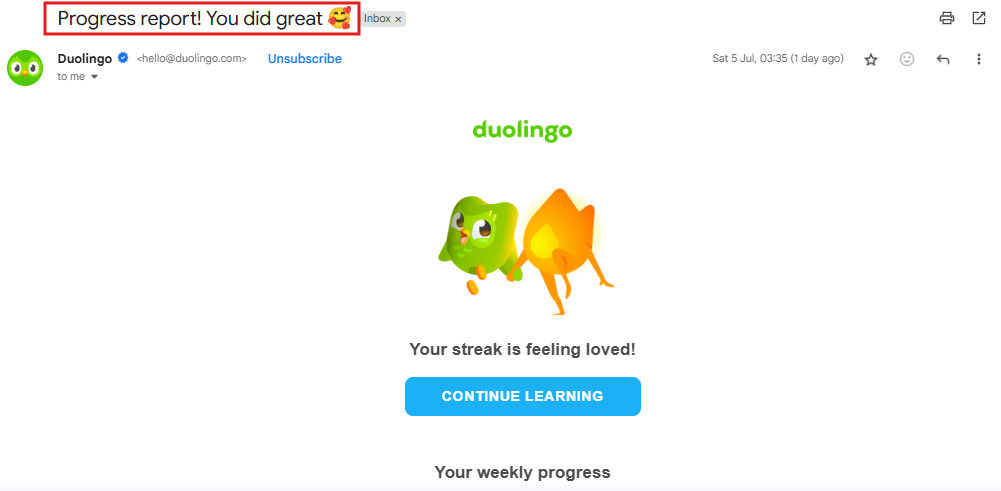
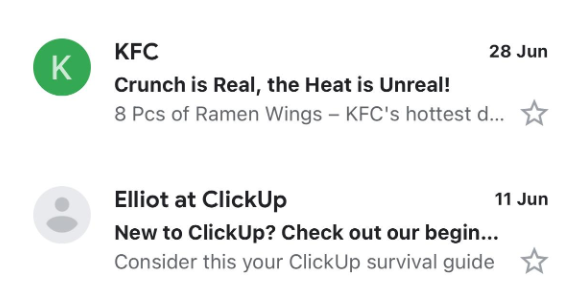
See how Duolingo’s subject line adds a sense of encouragement for readers:
Here’s another example from TEMU:
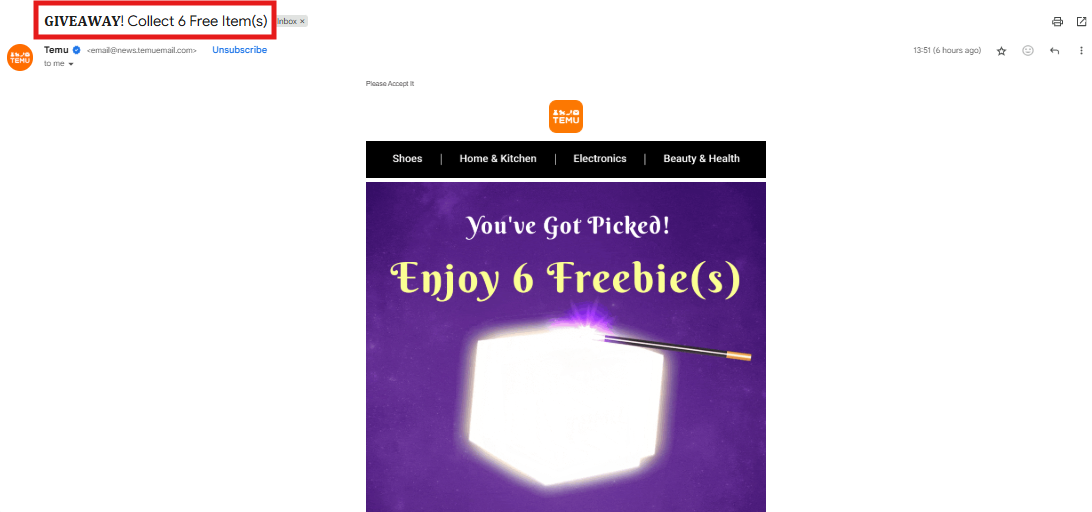
The subject line of this email immediately grabs attention by pairing urgency (“Giveaway!”) with a clear offer (“6 free items”).
Dos When Writing Subject Lines for Your Marketing Emails
- Keep subject lines short (50-70 characters)
- For B2B, longer can work (around 16 words)
- User power words and numbers
- Match the subject line to the email content
- Personalize with the first name for a friendly touch
Don’ts When Writing Subject Lines for Your Marketing Emails
- Avoid ALL CAPS or too many exclamation marks
- Don’t use spam trigger words (e.g., 100% guaranteed)
- Skip vague lines like “Check this out” – hint at real value instead
- Don’t overload with emojis (one is fine)
- Avoid clickbait or misleading lines (kills trust and can trigger unsubscribes)
2. Preview Text That Complements Your Subject Line to Engage
The email preview text (or email preheader text) is the short snippet that appears immediately after your subject line in the inbox.
It’s a second chance to grab attention before someone decides to open or ignore your email.
And it works.
About 36% of marketers personalize this text because it helps hook readers right after the subject line and nudges them to click.
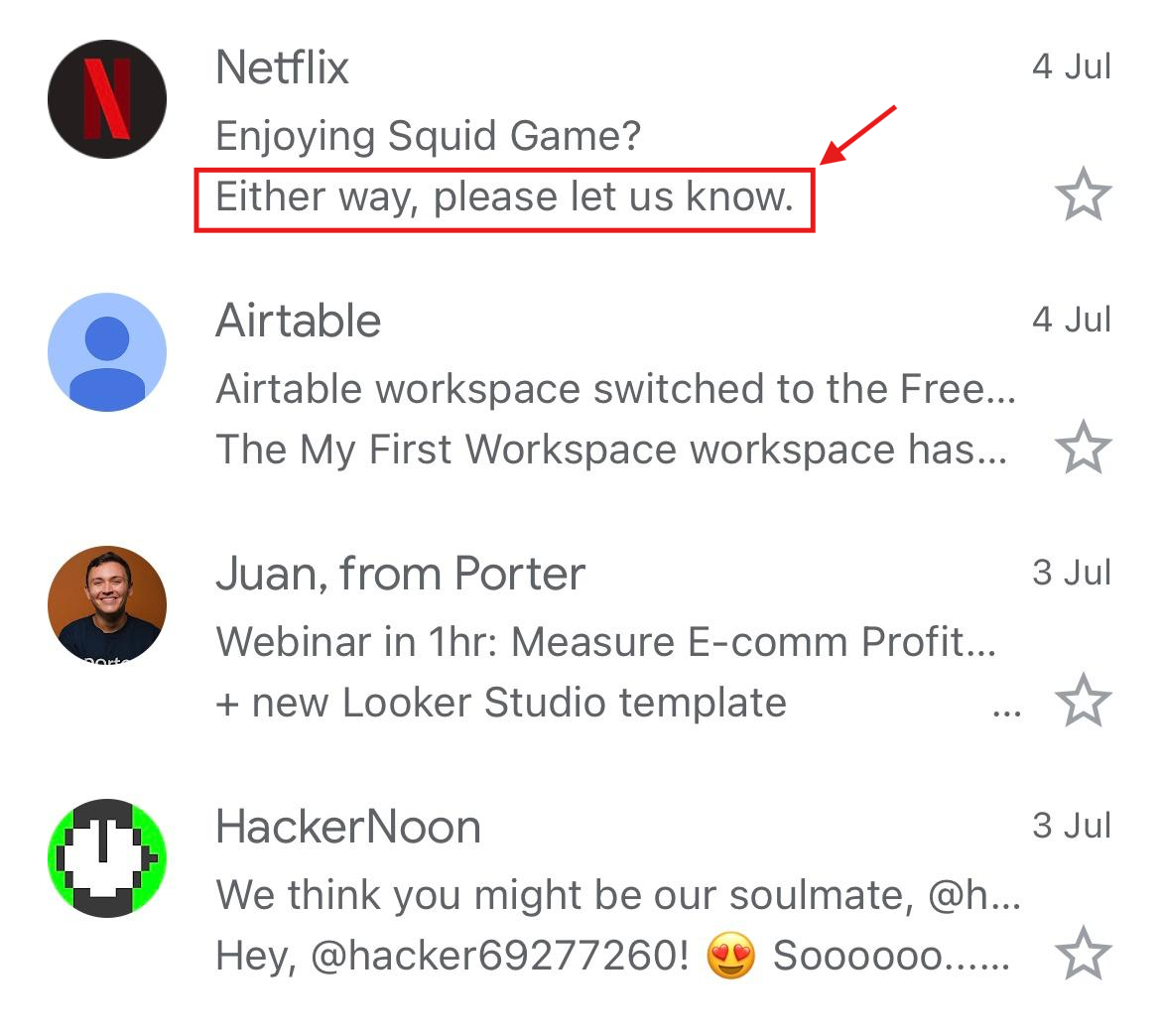
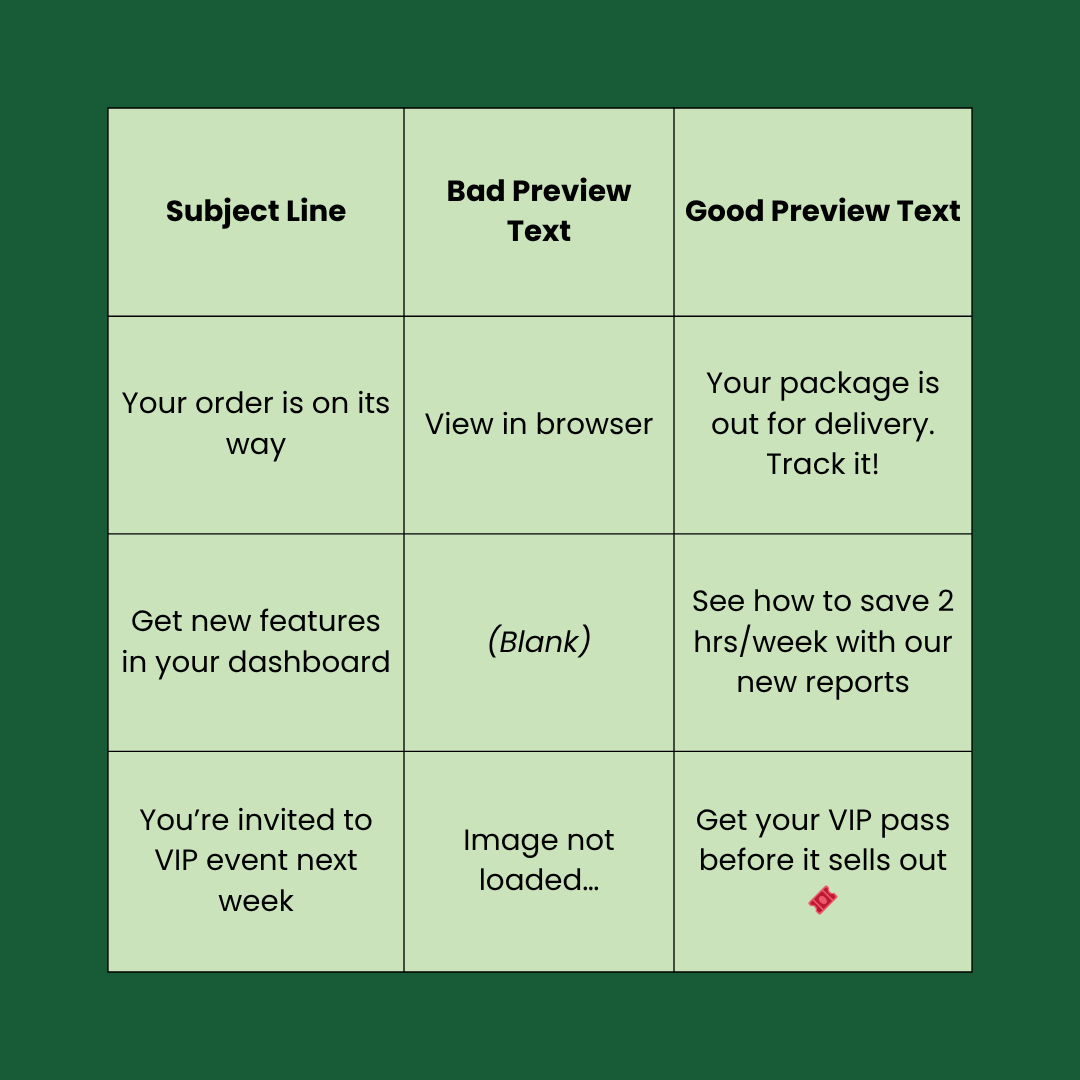
Good vs Bad Preview Texts
Bad preview text feels generic and unhelpful. It does nothing to make someone want to open your email.
But on the other hand, good preview text looks like a natural extension of your subject line. It adds context and gives readers a reason to click.
Let’s look at a few examples to understand how you can pair your preview text with subject lines:
Preview Text Formatting Rules
Here are a few tips to make sure your preview text looks polished and drives opens:
- Keep it the right length: Aim for 35–40 characters on mobile and 40–90 characters on desktop so the key message shows without getting cut off.
- Match your tone: Keep the style consistent with your brand and email copy.
- Place it correctly: Add preview text using your email tool’s “preview” field, or hide it at the top of your email body using:
<div style="display:none;">...
Note: Many email clients pull the first visible text from your email body to use as the preview snippet. So, if you don’t choose it manually, your email client might select a CTA button text like “View in browser” and put it up as preview text, which gives a bad UX.
3. Body Copy To Build Desire and Drive Action
Once your subject line and preview text grab attention, your email body has one job: turn that curiosity into conversions.
But you must know that the best email copy doesn’t shout “Buy now.” Instead, it guides readers toward action by giving them something valuable first; this could be a story or proof that your subscribers can trust.
Here’s how to do it:
Start with Storytelling
Stories help readers picture how your product fits into their lives. They’re quick, relatable, and stick in people’s minds.
Instead of saying: “Our software saves you 3 hours a week.”
Try this:
“Sarah cut her weekly reporting time in half using our dashboard. She spent those saved hours finally launching her team’s passion project.”
This creates a mental picture.
Readers can see themselves in Sarah’s shoes, which makes your offer feel more real and desirable.
People trust people. In fact, 88% of people trust recommendations from people they know. That’s why word of mouth and its perception matter so much.
So include a short testimonial or quote when you want to make big claims. You can pair it with a real result (“Increased conversions by 36% in 30 days”) to keep it credible and natural.
This can completely change how readers perceive your product, as it helps them feel confident that choosing you is the right decision.
Write Features in The Form Of Benefits
Listing features doesn’t convince anyone. You have to show the real-world value behind each feature so your viewers understand how it helps them.
Here’s an example:
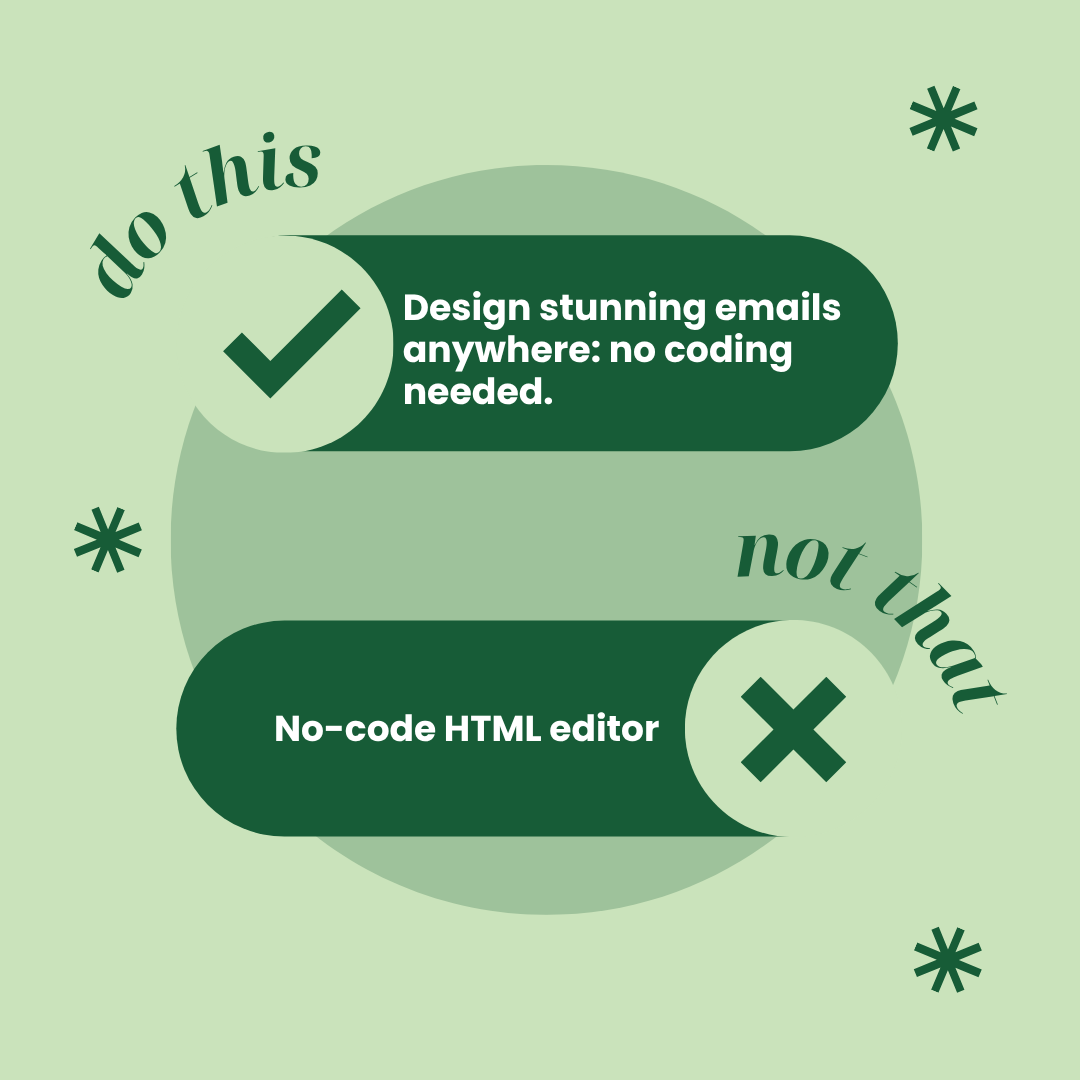
The rule we used here is to specify what the users will get from our product. We addressed their pain point (coding) and connected the dots with the benefit of our product so they feel the value immediately.
4. Call-to-Action to Complete the Last Step
After completing the rest of your copy, a major step is to optimize CTAs, as this is where users will click and reach your landing page.
Here are two examples of CTAs that work, and why:
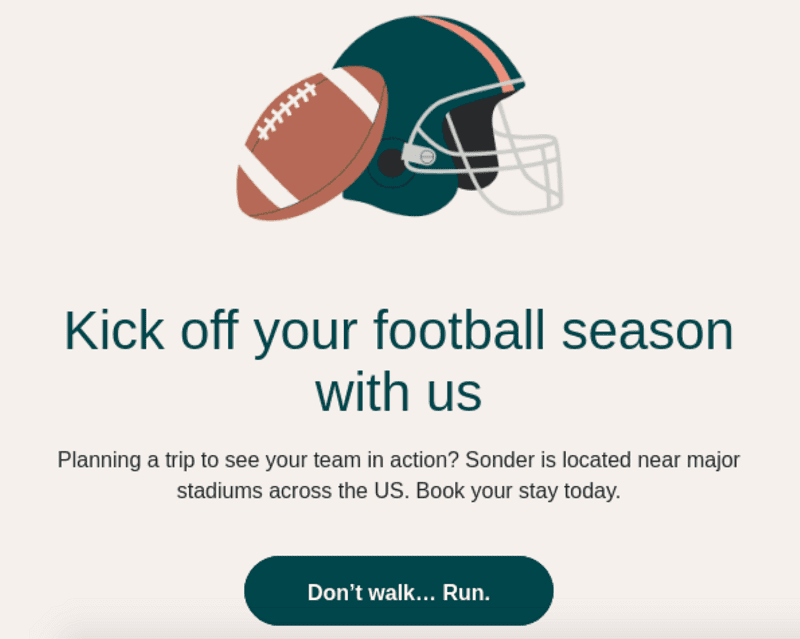
Source: Brevo
- “Don’t walk… Run”: This CTA stands out because it feels urgent and playful. It matches the email’s tone and headline, creating a sense of energy without being pushy.
See the Full Version of This Email Template
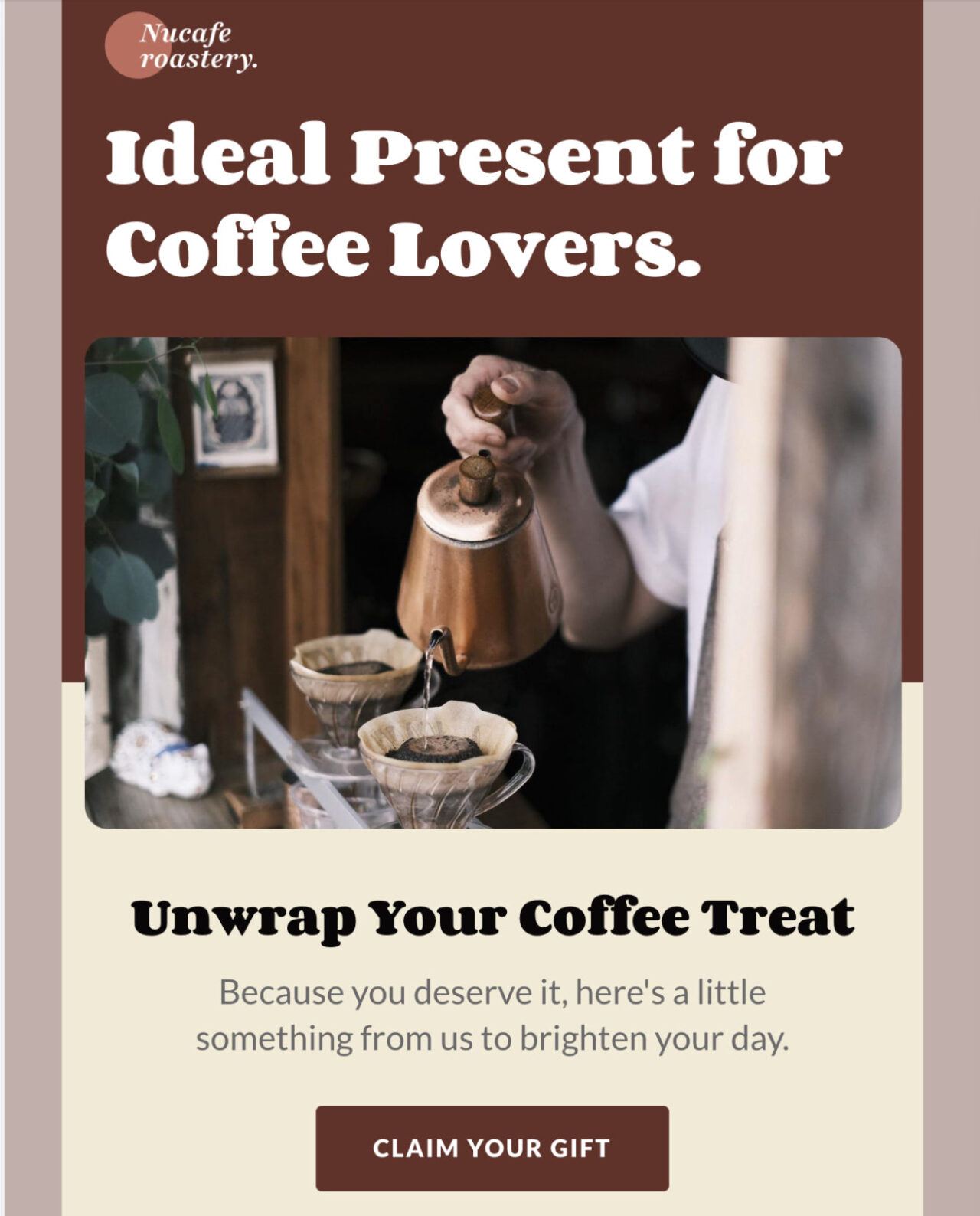
- “Claim Your Gift”: This CTA looks good to read because it’s short and clear. It’s especially suitable for cart abandonment emails because the wording makes readers feel like they’re about to lose something if they don’t click.
CTA Placement, Design, and Frequency
There’s no one perfect formula for CTAs, but a few simple rules can make yours stand out and get more clicks:
- Stick to 2 CTAs max: More than that can confuse readers or distract them from the main action you want them to take. Multiple CTAs only work when your email supports different actions, like “Learn More” and “Buy Now.”
- Use buttons (not just links): Button-based CTAs boost clicks because they are more eye-catching, stand out visually, are easier to spot when people skim emails, and indicate where the user should click next.
- Make your buttons accessible: Use color contrast that meets WCAG Level AAA standards so your CTA stands out for everyone.
- Don’t overload people with choices: One strong primary CTA, paired with one supporting link or button, is usually enough. Too many options can confuse your subscribers.
- Keep the wording short and action-driven: Aim for under five words. Use active, benefit-focused language like “Get Started,” “See Plans,” or “Claim Offer.”
Bonus Tip: Pair Persuasive Copy With Beautiful Email Designs
Strong copy draws readers in, but design determines whether they will stay engaged long enough to click.
So, if you have a cluttered layout or off-brand visuals, it can distract readers and negatively impact your conversions.
That’s why a good email design should:
- Guide the reader’s eye through the message in a natural flow
- Highlight CTAs and key offers so they stand out
- Stay consistent with your brand identity and tone to build trust
If you don’t have an in-house designer, you don’t need to start from scratch. You can use the Postcards email editor to customize our ready-to-edit email templates according to your needs.
Flowly Template: Perfect For SaaS Companies
Take a look at this Flowly template by Designmodo:

Edit This Email Template in Postcards
Its sleek, dark theme with soft purple gradients immediately sets a tech-forward tone that suits SaaS tools and digital platforms.
It’s visually clean yet highly informative as each section flows naturally.
You can add your key features to it, and users would immediately know what you’re offering. Then, use the bright CTA buttons for linking to your landing page.
Shoperia Template: Perfect For E-commerce Brands
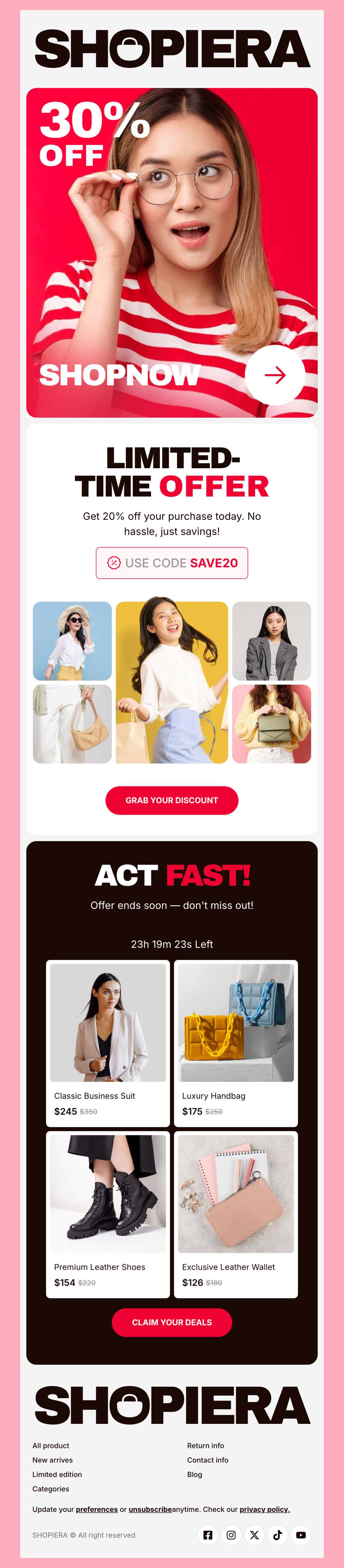
Now take a look at this example:
Edit This Email Template in Postcards
This one is suitable for e-commerce brands that want to sell fast and smart. It has bold colors, punchy headlines, and a limited-time offer callout to create urgency.
This makes it perfect for time-sensitive promotions, seasonal sales, and last-minute deals. So, if your goal is to convert interest into action, then opt for this mobile-friendly template.
The Formula to Convert: Good Email Copy + Great Email Design
Email copy that sells is helpful, but it works even better when paired with professional design. And what could be a better way to achieve this than templates?
To make your next campaign easier:
- Start with a promotional email template that fits your brand
- Adjust the colors and visuals to match your style
- Add your optimized copy and CTAs
And that’s it. You’re good to go!
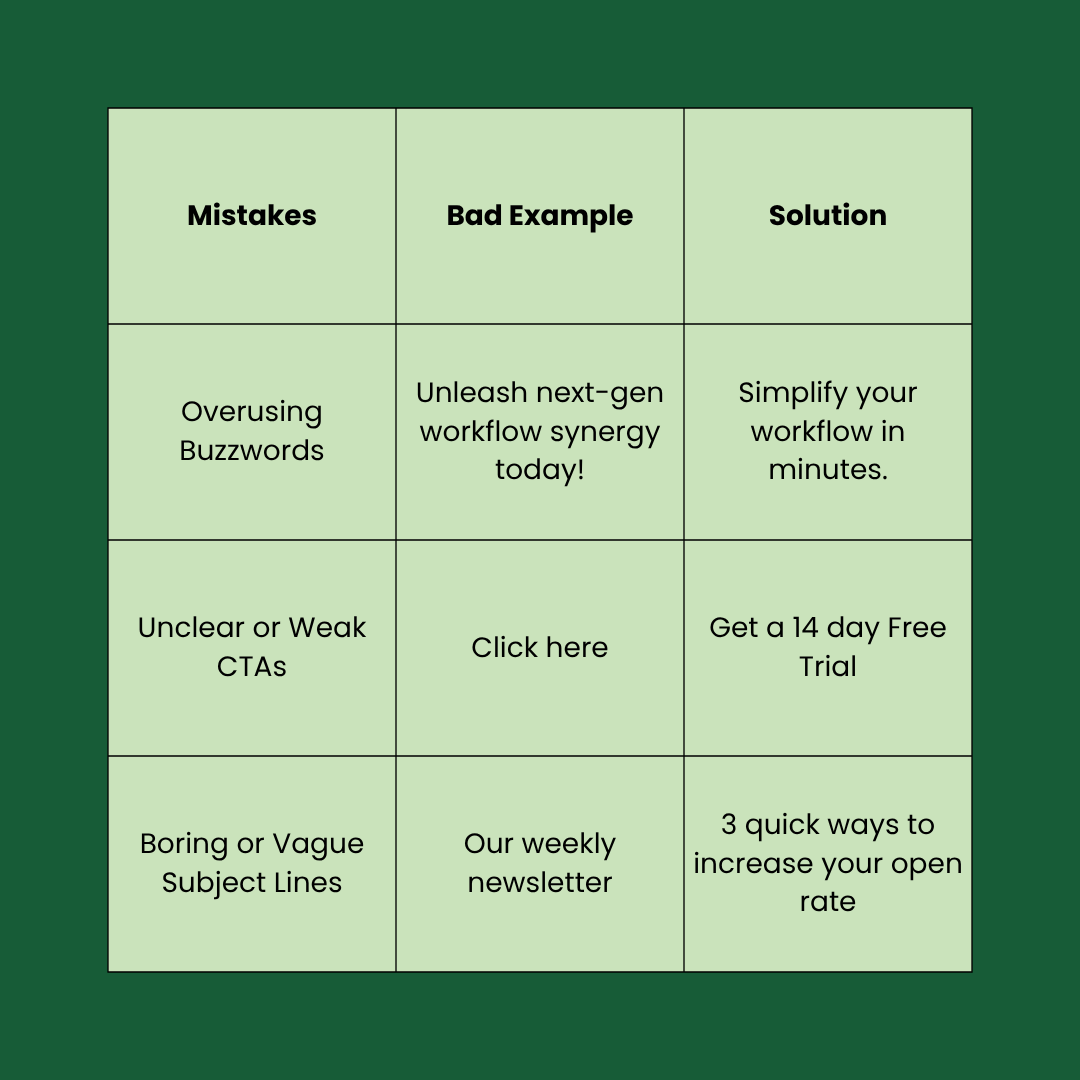
Common Mistakes to Avoid in Email Copywriting
Here are some common mistakes to avoid in email copywriting with examples and their solutions:
FAQs
What Is the Meaning of Email Copy?
Email copy is the content written in your emails that informs and persuades your readers to take action, like buying, clicking, or learning more about your brand.
How to Use AI to Write an Email?
You can use Postcard’s AI Assistant feature to generate attractive email content. It is available in the Pro plan and helps you to create engaging and effective email text, so you can have polished emails in seconds.
What Is Copywriting Psychology?
Copywriting psychology uses social and emotional triggers like urgency, curiosity, and social proof to encourage people to think fast and act after reading your message.