How to Express Urgency in an Email (With Examples & Templates)
Have you ever sent an email that clearly needed a quick reply and got radio silence? It happens more often than it should. Not because people are ignoring you, but because your message didn’t sound urgent enough.
Inboxes are crowded, so people skim through them. And if your email doesn’t show urgency credibly, it’ll sit unopened.
That’s why there’s a specific way to write urgent emails that work without sounding panicked.
In this post, I’ll explain how to express urgency in an email the right way and give you practical tips for writing urgent emails.
Why Urgency Is Important in Emails
Your email is probably one of a hundred in someone’s inbox. That’s why standing out isn’t easy. However, urgency can be helpful when used in the right way.
Not in a clickbait, all-caps kind of way, but in a purposeful way that tells your reader, “Hey, this needs your attention now, and here’s why.”
With Postcards Email Builder you can create and edit email templates online without any coding skills! Includes more than 100 components to help you create custom emails templates faster than ever before.
Free Email BuilderFree Email TemplatesIn fact, urgency draws upon two key psychological triggers:
- Loss aversion: people are naturally more motivated to avoid losing something than they are to gain something new.
- Time sensitivity: it pushes the brain to prioritize certain tasks over others. And when urgency feels real, it can help drive faster responses.
When to Use Urgency in an Email
Urgency only works when it’s genuine. So, let’s look at some scenarios where you can use urgency in emails:
Project Deadline Follow-Up
You can use this template when a project is blocked due to pending input. Keep it brief and tie urgency to real timelines like this:
Subject: Quick Review Needed by EOD to Meet Launch Schedule
Hey [Name],
We’re aiming to finalize everything for [project name] today. If you could take a quick look at [asset/file/task] and share your feedback by EOD, we’ll be able to move ahead without delay.
Let me know if you have questions or need anything clarified!
Best,
[Your Name]
With Pulsetic you’ll be instantly notified the moment your website, API, or server becomes unavailable. Monitor uptime from multiple global locations and respond to incidents before your users are affected.
Create beautiful status pages in minutes to keep customers informed during outages and build trust with transparent communication.
Start Monitoring for FreeLast-Minute Meeting Confirmation
If you’re finalizing logistics or dealing with busy execs, you may need to send an urgent email to get a simple yes/no. For example:
Subject: Confirming Attendance for Today’s Strategy Call
Hi [Name],
I wanted to confirm if you’re still good for today’s strategy call at [time]. We’ll be finalizing decisions for [project/topic], so your input will be valuable.
Just reply with a quick “yes” if you’re attending.
Thanks!
[Your Name]
Time-Sensitive Discount or Offer
If you sell products or services, you can offer discounts or short-term offers with urgent emails like this:
Subject: Last Chance!! 20% Off Ends at Midnight
Hey [Name],
Quick reminder: our limited-time 20% off offer on [X] expires tonight. If you’ve been thinking about it, now’s the time to grab it.
Click here to activate your discount > [CTA Button or Link]
[Your Name]
Polite Payment Reminder
If you work with clients remotely, you will also need to send payment reminders. For that, you can try something like this, which is polite yet shows urgency:
Subject: Friendly Reminder – Invoice Due Today
Hi [Name],
Hope you’re doing well! Just a quick heads-up that the payment for [invoice # or project] is due today. You can complete it using the link below:
[Payment Link]
If there’s any issue or delay, shoot me a message—happy to help.
Thanks so much,
[Your Name]
How to Write an Urgent Email
A good urgent email has two main parts:
- Subject line that shows urgency.
- Body that keeps it to the point.
Let’s see how you can write these.
Writing the Perfect Subject Line for Urgent Emails
47% of people open their emails based solely on the subject lines. That’s why the subject line is your first (and sometimes only) chance to grab attention. Because when people scan their inbox, it’s the subject line that determines whether they open or ignore your message.
So, here are a few tips to write urgent email subject lines:
- Be specific about the action or deadline, as vague language can make your message easy to ignore.
- Use time-sensitive words like “today,” “this week,” or “before EOD” to create a natural sense of urgency.
- Avoid dramatic or spammy phrases like “urgent!!!” or “act now” because they reduce credibility and often get marked as junk.
- Mention the consequence of not acting—this helps the reader understand why they need to prioritize your email.
- Use brackets to highlight importance and draw attention to the subject line without coming across as pushy.
- Put the most important or time-sensitive detail at the beginning of the subject line to make sure it doesn’t get missed.
- Keep subject lines short—ideally under nine words—so they’re easy to read on mobile and don’t get cut off.
Structuring the Body of the Urgency Email
You’ve won half the battle if the reader has read your subject line and opened your email. But now your email body needs to guide them smoothly toward the action you want them to take.
So, every line should serve a purpose; fluff, no rambling.
Here’s a simple structure that works:
- Start with context: Remind them what this is about and why it matters.
- Make your request/message clear: Don’t bury it in a paragraph; state it directly.
- Include a deadline: Be specific. “ASAP” is vague; “by 3 PM today” is clear.
- Close with next steps: Offer to help, clarify, or follow up if needed.
Here’s an example of a perfect urgent email:
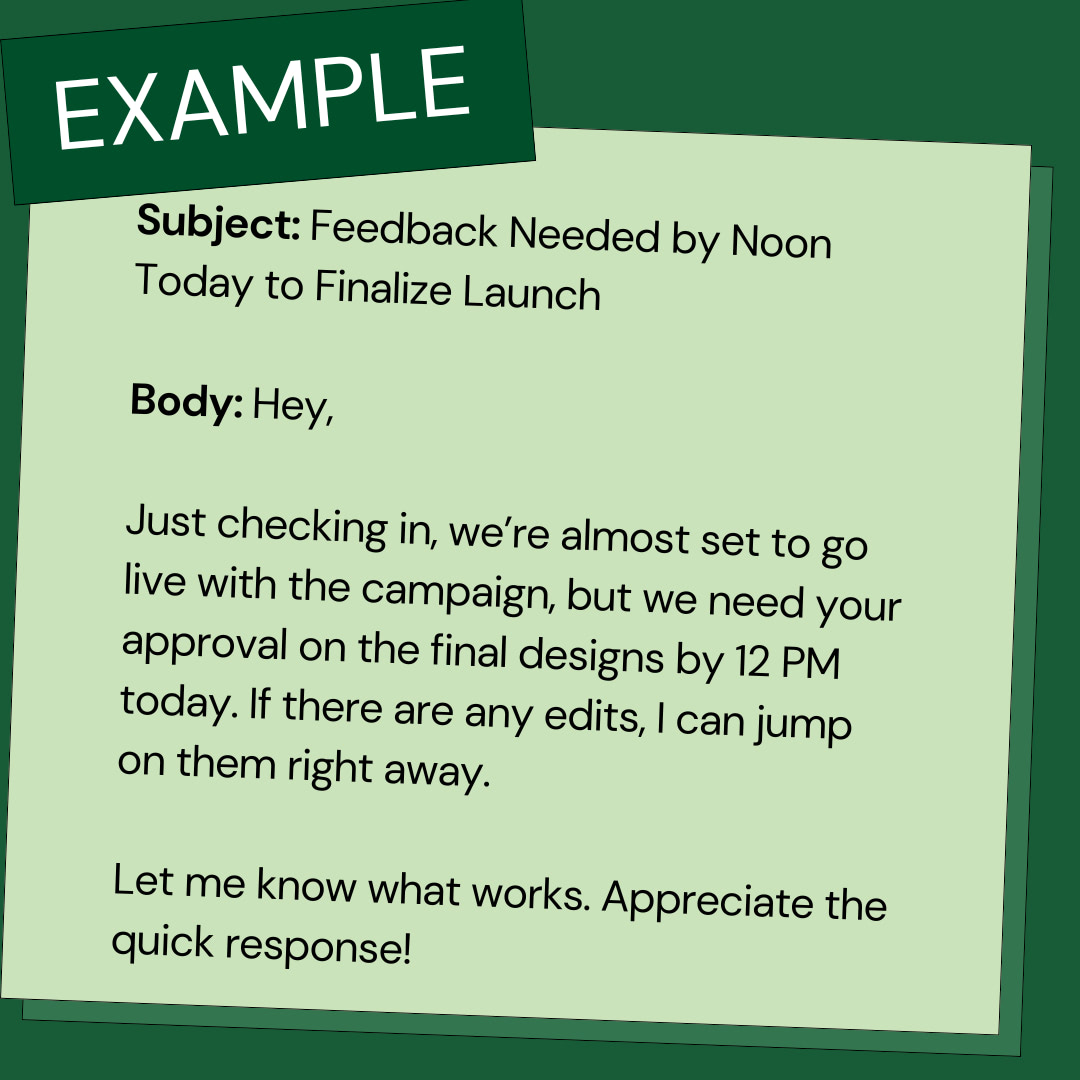
✅ Its headline conveys urgency, and the body is structured effectively without any unnecessary content.
5 Email Template Examples for Urgent Scenarios
Let’s look at some ready-made urgency email templates that you can use to send in urgent scenarios:
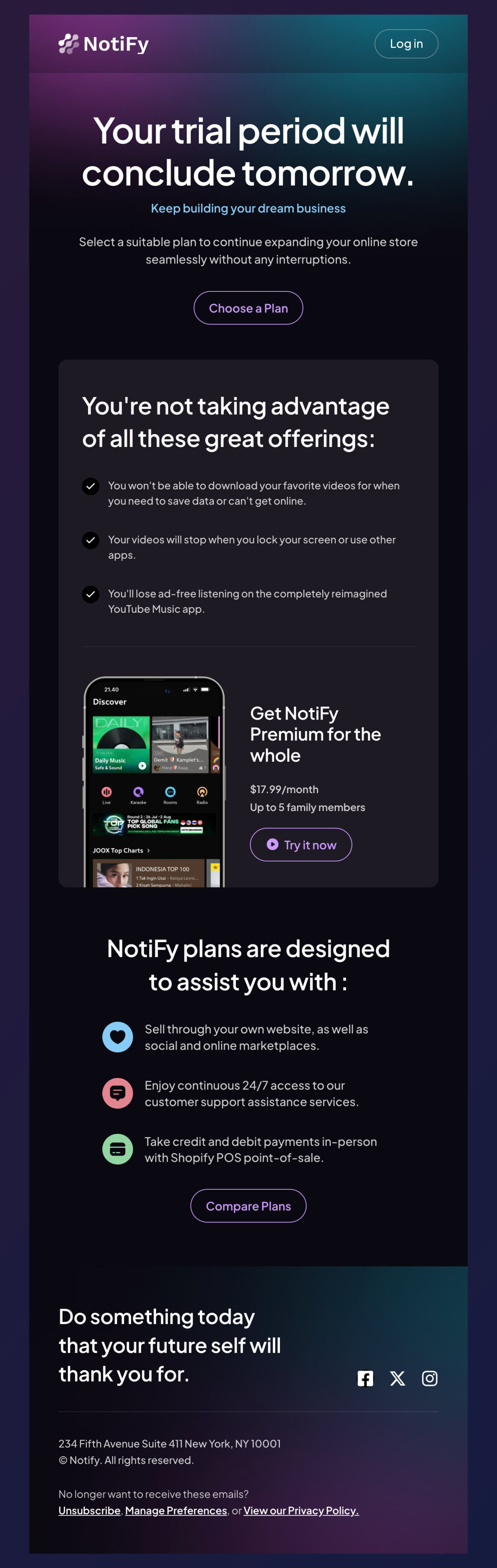
1. Trial Period Ending Email Template
See how beautifully this email template by Designmodo conveys the urgency. It’s perfect whenever you want to remind your customers that their trials are ending, so they can renew as soon as possible.
Edit this email template in Postcards
You can tweak its copy according to your brand’s TOV and send it to your customers. And that’s it, no need to design from scratch!
2. Discounted Offers Email Template
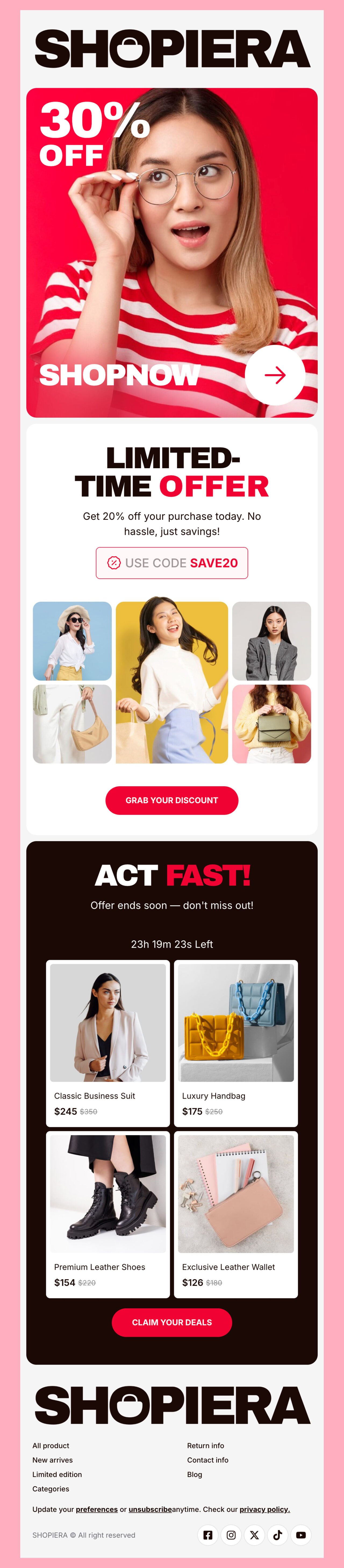
Check out this template from Shopiera.
Edit this email template in Postcards
The big discount and strong call-to-action tell the customers to act quickly. So, it’s great if you want to send exclusive discounts to customers.
3. Limited-Time Deals Email Template
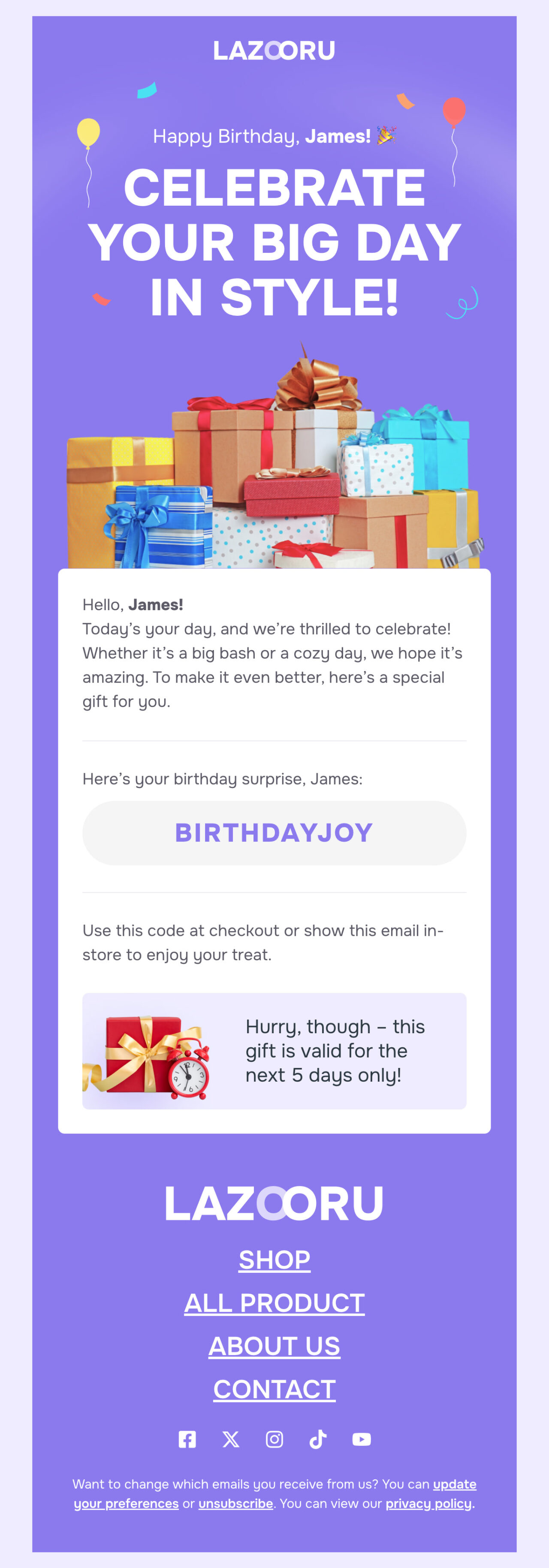
You can also use this template to send limited-time offers to your customers. See how nicely this birthday email from Lazooru conveys a sense of urgency.
Edit this email template in Postcards
It reminds the customer to use their gift as soon as possible because it’s only valid for 5 days.
4. Event-Based Sales Push
This one’s great for short, time-bound campaigns such as Cyber Monday or Black Friday. You can reuse this template across different promotions without starting from scratch each time.

Edit this email template in Postcards
In fact, the message of the email is also clear: something good is ending soon, and they’ll miss out if they wait.
Best Practices for Polite and Effective Urgency
Here are a few key strategies that can help you maintain urgency in emails without losing the reader’s trust:
Be Clear
Vague phrases like “as soon as possible” don’t create urgency. Be specific with timeframes: “by 3 PM today” or “before tomorrow’s client call” clearly communicates what is expected.
Respect Their Time
Avoid guilt-tripping or demanding tones. Use language like:
- “When you get a moment today…”
- “To keep us on track…”
- “If you could review by [X time], we’ll be good to go.”
These phrases communicate urgency without being harsh.
Follow Up
Didn’t hear back? No problem. You can take a follow-up. But make sure you give them enough breathing room. A polite follow-up 24-48 hours later with a gentle reminder is better than multiple nudges in one day.
Use the Right Words (and Avoid the Wrong Ones)
Here are some helpful phrases to use in urgent emails:
✅ Try:
“Quick heads-up…”
“Final call for…”
“Just checking in before [deadline]…”
“To avoid delays, we’ll need…”
❌ Avoid:
“This is extremely urgent!!!”
“Why haven’t you replied?”
“Don’t ignore this.”
“Immediate action REQUIRED!!!”
Even if your message is time-sensitive, yelling at someone through the screen won’t help. Your goal should be to guide, not pressurize.
Start Sending Visually Good Urgent Emails
You now know what it takes to write a perfect urgent email. But doing it all from scratch would be time-consuming. Try Designmodo’s ready-to-use email templates. Our Postcards email editor helps you customize each template to suit your specific needs.
So what are you waiting for?
Give it a shot!
You may also want to read:
How to Reply to an Appreciation Email: Tips & Examples
Best Ways to Embed Social Media Posts in Emails with Pro Tips
FAQ
How Can I Express Urgency in an Email Without Sounding Aggressive?
Stick to clear, specific deadlines and polite language. And don’t use too many exclamation marks or emotional appeals.
What’s the Best Time to Send an Urgent Email?
Mid-morning on weekdays (between 8 AM and 12 PM or 12 PM to 4 PM) often sees the highest open and response rates. So, send emails a bit early and avoid late evenings or weekends unless absolutely necessary.
Can I Use Emojis in Urgent Emails?
Yes, but sparingly. Emojis like ⏰ or ⚠️ can help grab attention in subject lines, but make sure they fit your audience and the context.
How Often Can I Send Urgent Follow-Ups?
Once is fine. Twice if it’s truly critical. Beyond that, you risk being perceived as pushy or impatient. So, make sure your initial email is clear and well-justified before following up.





![Best Transactional Email Services: Email API and SMTP Providers Compared [2026]](https://designmodo.com/wp-content/uploads/2026/05/transactional-email-templates-3-404x263.jpg)