Best New Product Launch Email Templates to Use in 2026
A product launch email is one of the fastest ways to turn a new product into clicks and early sales. If the message is clear and focused, people notice it and act on it.
So, if you are planning a launch, the goal is simple. Show what the product is, why it’s important, and what to do next.
In this guide, you will see the types of emails to send, how to write them step by step, and new product launch email templates you can use right away.
Key Takeaways
- Keep your product launch email clear and focused on one action so the reader knows exactly what to do.
- Use a sequence of emails, starting with a teaser, then announcement, and follow with reminders to drive action.
- Show value quickly, use simple language, and make every part of the email easy to understand.
- Use Designmodo’s ready-made email templates to save time and keep your email structure clean and effective.
What Is a Product Launch Email?
A product launch email is how you introduce a new product and drive immediate action. It tells people what’s new and what they should do next, like clicking through or making a purchase.
You should send these emails at different stages of a launch:
With Postcards Email Builder you can create and edit email templates online without any coding skills! Includes more than 100 components to help you create custom emails templates faster than ever before.
Free Email BuilderFree Email Templates- Before the launch: Teaser emails build curiosity and get people ready
- On launch day: Announcement emails share the full details and push for action
- After the launch: Follow-ups remind, re-engage, and convert those who didn’t act
4 Types of Product Launch Emails
The most common types of product launch emails are:
A teaser email is the first touchpoint. You send it before the launch to build interest and get people paying attention.
At this stage, you don’t have to explain everything. You hint at a problem and suggest something new is coming. For this, you can send a small preview rather than a full reveal because your only goal would be to make them curious enough to wait for the next email.
You can include a:
- Short hook around a problem
- Hint of what’s coming
- Waitlist or early access option
If you are about to launch a new email automation tool, send a teaser that highlights a common pain point like “managing emails takes too much time.” Then you hint that a simpler solution is coming. This would be quite effective because it builds curiosity without overwhelming the reader, and it gives them a reason to watch for your next email.
2. Announcement Email
An announcement email is where you introduce the product clearly. Send it when you are ready to show what you’ve built, because now your reader wants answers:
- What is this product?
- How does it help?
- Why should they care?
Start your email with what the product is, then show the problem it solves, and add a few strong benefits instead of listing everything.
You can include:
With Pulsetic you’ll be instantly notified the moment your website, API, or server becomes unavailable. Monitor uptime from multiple global locations and respond to incidents before your users are affected.
Create beautiful status pages in minutes to keep customers informed during outages and build trust with transparent communication.
Start Monitoring for Free- A clear headline
- What the product does
- Key benefits
- One strong call to action
If you have built a tool that helps users automate emails in minutes, use a new product announcement email template to explain it clearly. Show how it saves time and reduces manual work. This way, the reader quickly understands what the product does and how it fits into their daily work.
3. Launch Day Email
A launch day email is sent when the product goes live. At this point, your audience already knows about the product. Now they need a reason to act right away, so your message should feel immediate and clear.
Tell them the product is live and show what they can do with it. Try to make it easy to click and get started.
You can include:
- A “now live” message
- A quick reminder of value
- A direct call to action
- Optional urgency (limited access, early offer)
If your product just went live, tell readers they can now access the tool and start using it immediately.
4. Reminder or Last Chance Email
A reminder email is sent after the launch to bring people back. So send it when you want to capture those who didn’t act earlier.
Since a lot of people delay decisions, this email is perfect for them as it gives a clear reason to act now.
You can include:
- A reminder of what they’re missing
- A key benefit
- A deadline or urgency
- One clear action
If you offered early access or a limited-time benefit, this is where you remind readers before it ends. Show what they will miss if they don’t act.
How To Write A High-Converting Product Launch Email
A high-converting launch email is clear, focused, and easy to act on. Each part of the email has a specific role, and when they work together, the reader moves smoothly from interest to action.
Here’s how to structure it:
Subject Line
34% of recipients look at the subject line first so it should quickly show value or spark curiosity. In fact, 47% of people open emails based on the subject line alone, while 69% mark emails as spam based only on it. This shows how much impact a few words can have.
The average subject line is about 6 words long, so keep your subject lines short and clear by focusing only on one idea.
If writing subject lines feels difficult, use our AI Subject Line Generator to get clear and engaging ideas quickly.
Hook
The hook is the first line of your email — it keeps the reader reading. So start with something that connects to a problem or need. This helps the reader feel that the email is relevant to them.
If your audience struggles with managing multiple tools, start there. Point out how messy or time-consuming it feels. This helps the reader see their own situation in your words and want to know what comes next.
Value Proposition
The value proposition explains what your product does and why it would be important for the reader. Since this is the core of your message, keep it simple and focus on benefits by showing how the product helps the reader achieve something or solve a problem.
If your product brings all tasks into one place, explain how that saves time and reduces switching between tools. This would connect directly to the problem you mentioned earlier and shows a clear improvement.
Call To Action
The CTA tells the reader what to do next, so it needs to be clear and easy to follow. Focus on one main action and make it stand out so the reader can move forward without hesitation.
If your product is live, your CTA should guide them straight to trying it. Something like “Try It Now” works because it is direct and removes any confusion. If you are still in early access, “Get Early Access” sets the right expectation and keeps the flow consistent.
Tips To Write Good Product Launch Emails
A good product launch email guides the reader from interest to action without confusion. So here are some tips to follow:
- Show how the product helps readers by connecting it to a real need.
- Use short sentences and remove anything extra.
- Avoid complex terms to keep it easy to read.
- Give a reason to act now, like a deadline or limited access.
- Use small details, like a name or behavior, to make it relevant.
- Try different versions of your email and use the one that performs better.
Product Launch Email Examples
We collected some of the best real-world product launch email examples to help you understand how your emails could look in reality:
Look at the email example from Elemtor below. It does not reveal full details, which makes the reader want to know more.
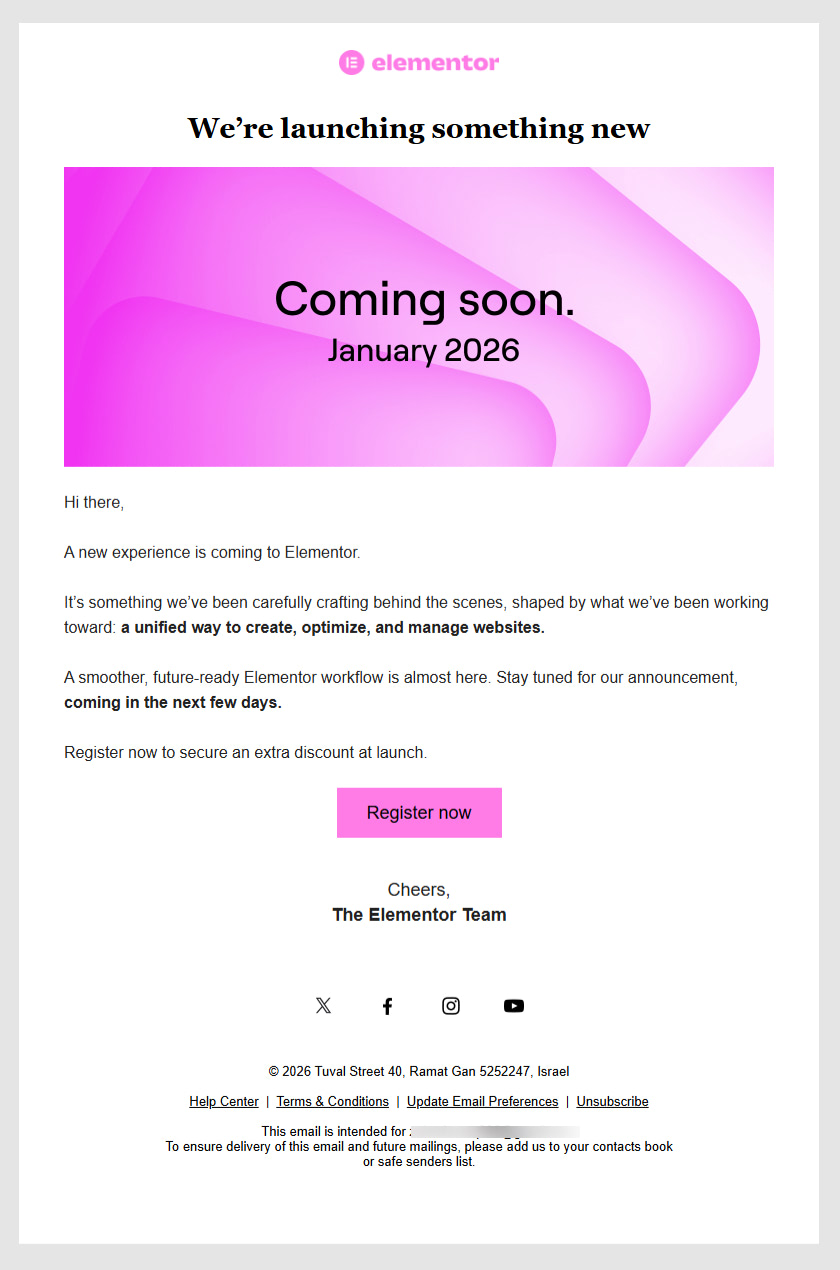
It uses a simple “Coming soon” message with a launch timeline, which creates anticipation. The copy hints at what is coming but does not explain everything, which keeps the reader interested.
Designmodo Announcement Email Example
Here is an example of an announcement email from Designmodo.
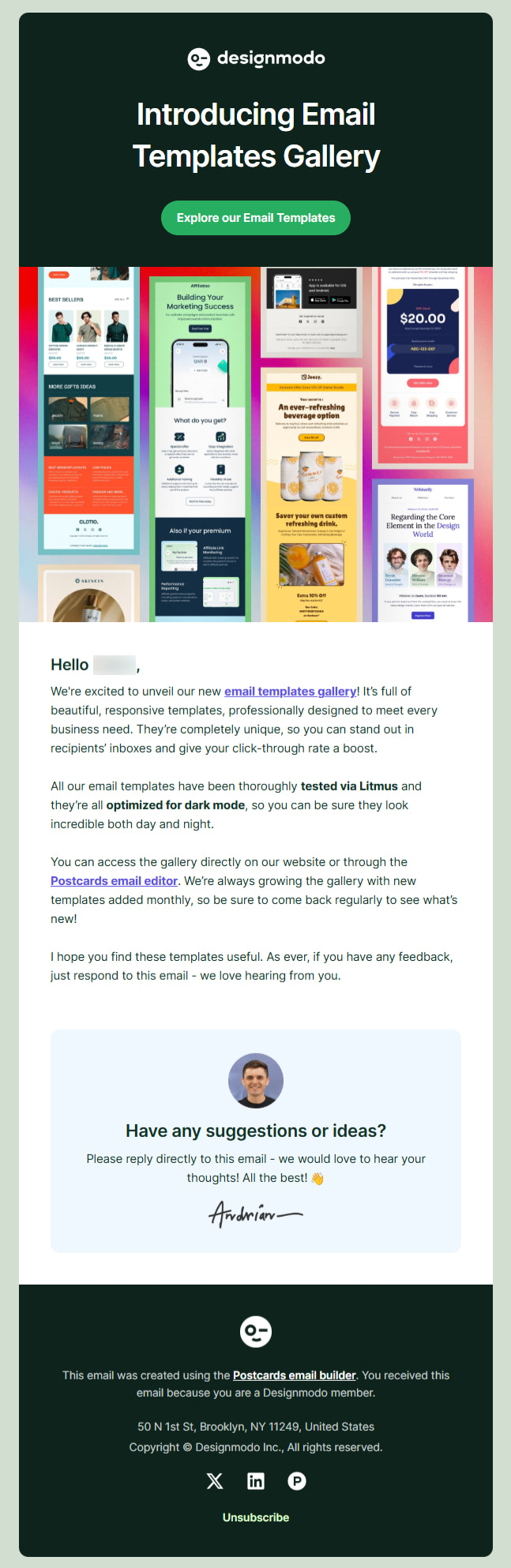
This email clearly introduces a new product and shows its value right away. It starts with a strong headline that tells you what is being launched. Then it quickly explains what you get from it, like ready-made templates and optimized design.
TechSmith Reminder Email Example
TechSmith’s reminder email shows urgency, which pushes the reader to act.
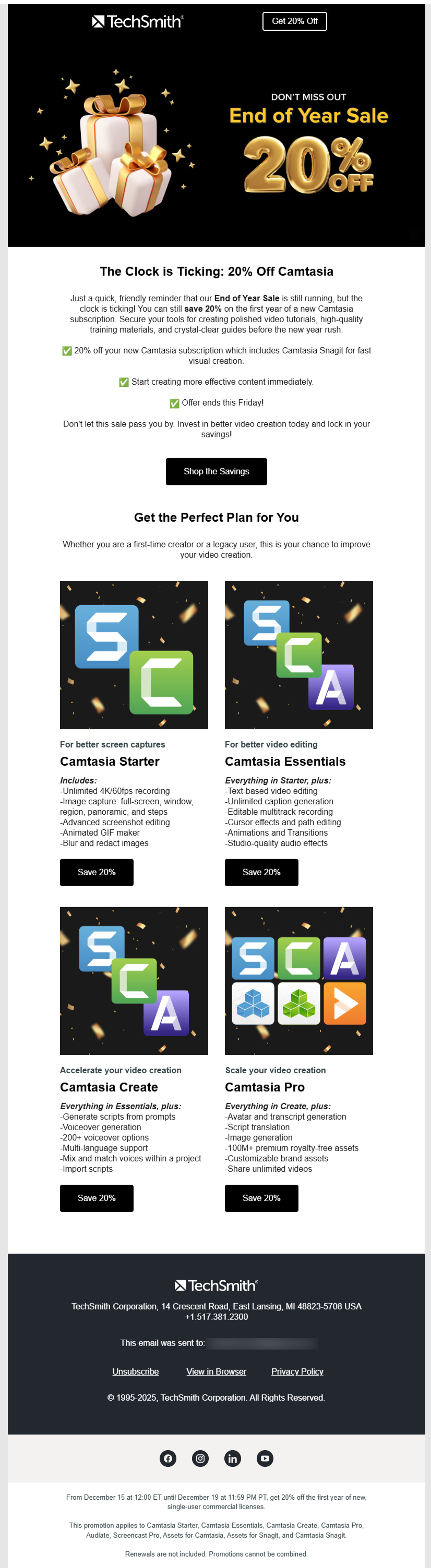
It highlights a limited-time offer and makes it clear that the deadline is near. This gives the reader a reason to act now. In fact, the message repeats the main benefit, which is the discount, so the value is easy to understand.
DataCamp Product Launch Email Example
This product launch email from Datacamp introduces a new set of courses and shows how they help the reader.
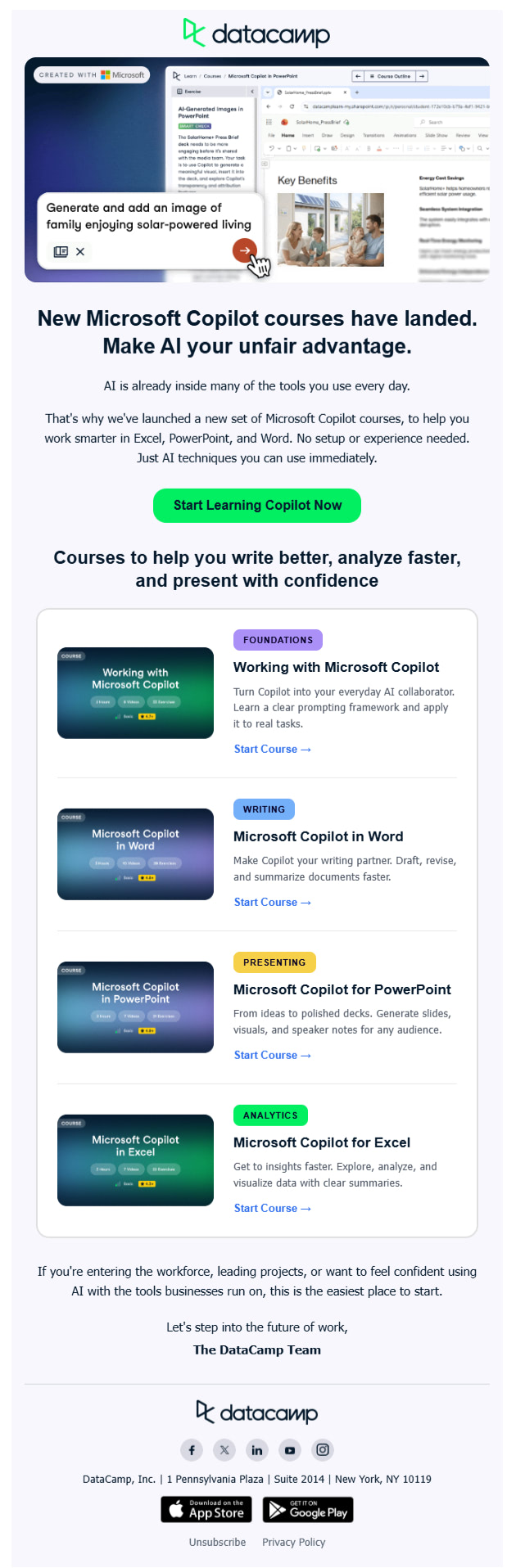
It starts with a clear headline that explains what is new. Then it connects the product to a real need, which is to learn AI skills. The email is structured in sections, which makes it easy to scan. Each course is shown with a short description, so the reader can quickly understand what they will learn.
Product Launch Email Templates You Can Use
Designmodo offers free, ready-made email templates you can use for product launch emails.
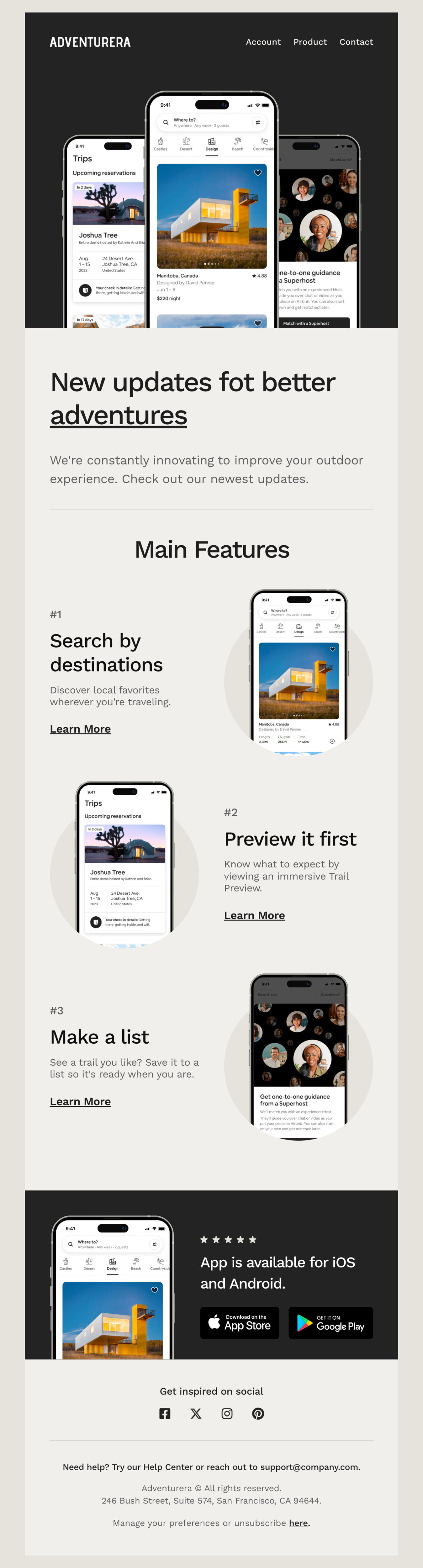
1. Adventurera
Edit this email template in Postcards
If your product has multiple features, this template helps you show everything without making it feel heavy.
The top section gives a clear view of the product, so the reader understands it right away. As you scroll, each feature is explained in a simple way with a supporting visual. This makes it easy to understand without reading long text.
2. Realprint

Edit this email template in Postcards
If you want people to act before launch, this template works well for pre-orders.
It focuses on early access and limited pricing. As the reader moves through the email, they see why acting early is important. The product is also shown in use, which builds trust and makes it feel more real.
The CTA appears more than once, so the reader can act at any point.
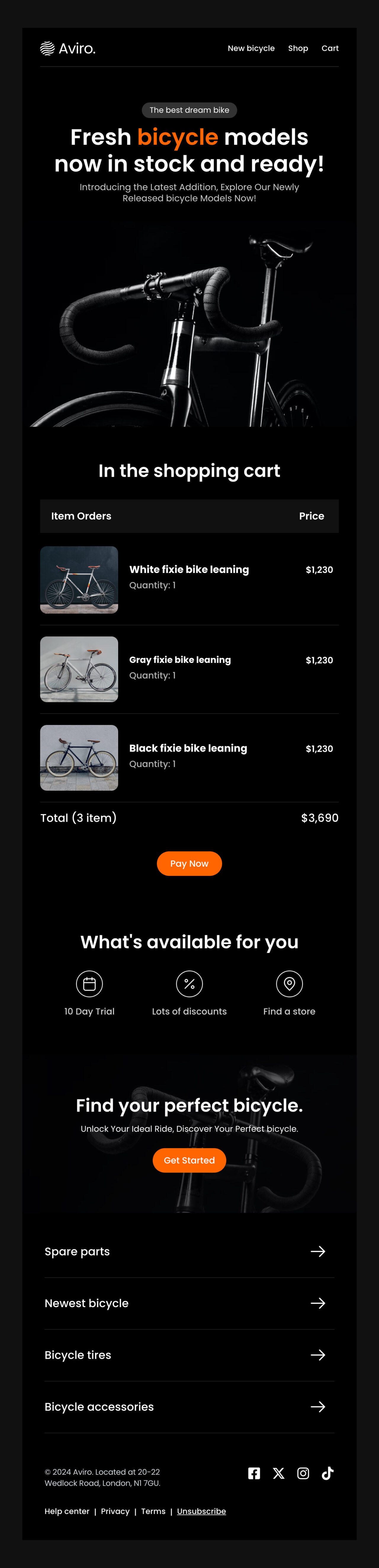
3. Aviro
Edit this email template in Postcards
This template is perfect when your product is live and ready to buy.
It uses a strong visual and a clear headline to grab attention. The layout is simple, so the reader can quickly see the product and move toward buying.
4. NotiFy

Edit this email template in Postcards
This template is best for reminders and last chance emails.
It clearly shows what is about to expire, like a trial or limited access. The message brings attention back to what the reader will miss if they don’t act.
It highlights key benefits and guides the reader toward upgrading or continuing.
Build Your Product Launch Emails With Designmodo
You can build a product launch email in minutes using ready-made templates instead of starting from scratch.
With the Postcards email builder, you use simple drag-and-drop blocks to create your email. All you have to do is choose a template, add your content, and adjust it for your launch.
The structure is already done for you, so it saves time and keeps your email clear and effective.
FAQs
How Many Emails Should A Product Launch Campaign Include?
Product launch campaigns include around 3 to 5 emails, covering the teaser, announcement, launch day, and follow-up stages.
When Should You Send A Product Launch Email?
You should send emails before the launch to build interest, on launch day to drive action, and after the launch to follow up and convert.
Can You Use Templates For Product Launch Emails?
Yes, you can. In fact, templates are helpful because they save time and help you maintain a clean and structured email design.
What Should You Avoid In A Product Launch Email?
You should avoid long blocks of text, multiple calls to action, and unclear messaging that makes it harder for the reader to decide what to do.