Most Essential Parts of an Email According to Marketers & Designers
Every day, people send and receive billions of emails, and by 2027, that number is projected to hit 408.2 billion daily.
But here’s the real question: what makes an email stand out in such a crowded inbox?
To find out, we surveyed Postcards users and asked them which parts of an email matter most.
In this article, we’ll share the results of our survey, feature some of the prominent user opinions, and highlight the most critical aspects of an email, as perceived by marketers and designers.
The Most Essential Parts of an Email
Here are the components that our users consider to be the most crucial parts of an email, in order of importance:
1. Subject Line
When we asked customers which part of an email mattered most, the subject line came out on top. For many, it’s the single detail that determines whether they’ll open or ignore a message.
With Postcards Email Builder you can create and edit email templates online without any coding skills! Includes more than 100 components to help you create custom emails templates faster than ever before.
Free Email BuilderFree Email TemplatesThis is what Drew Sebesteny, Owner/Creative Director at Balloonfish, thinks:
“There are really two parts that make a marketing email sing. First, you need a compelling or intriguing subject line to convince people to click the email in their inbox. Once they’ve clicked, it’s the combination of a clean, personality-infused design and relevant, easy-to-digest content that keeps them reading. Missing any one of those pieces can make things fall flat in a hurry.”
That’s not surprising. Why?
Because the subject line is the very first thing a recipient sees, and it sets the expectation for what’s inside.
So here’s what we suggest to keep your subject lines eye-catching:
- On mobile, only 33–50 characters are displayed, and on desktop, approximately 70. So keep it short and clear.
- Make it specific, so the reader knows what to expect when they open the email.
For example: Instead of writing “Meeting”, write “Project Update: Meeting on Thursday”.
2. Email Body
According to our survey, the email body was the second most important element after the subject line.
Respondents explained that this is where the real value lies. It’s the place to explain why you’re reaching out, deliver your message, and provide the details readers need to take action.
With Pulsetic you’ll be instantly notified the moment your website, API, or server becomes unavailable. Monitor uptime from multiple global locations and respond to incidents before your users are affected.
Create beautiful status pages in minutes to keep customers informed during outages and build trust with transparent communication.
Start Monitoring for FreeAnd you can do this however you like, either through text or visuals. But remember that visuals are often easier to understand than plain text.
In fact, this is what Robert Ritzl, CEO of Ritzl, thinks:
“We generate offers for different hotel software. So the email body is the most important thing for us to help make offers from the hotel to guests. Having fields and images makes the email body clear and easy to update.”
That’s why clarity and structure matter so much.
But email design consistency also came up as a key factor. If your email body looks disconnected from the landing page or website, it can hurt trust.
Marin Yordanov, an email marketing expert, puts it perfectly:

“Apart from the actual content or offer, design consistency between the email and the website/landing page is crucial. If the email doesn’t follow branding guidelines and the branding colors or fonts are the default ones that were provided by the email marketing platform/software, the recipient might feel confused or even potentially scammed.”
That’s why keeping your branding from colors and fonts to overall design consistent makes the body look clear and trustworthy.
3. Call-To-Action (CTA)
A strong CTA is the third most important part of an email.
Several respondents pointed out that even the best subject line and body don’t work if the message doesn’t guide them on what to do next.
A CTA can be of different forms: a button, a hyperlink, or even a bolded sentence. But the goal is the same: tell readers exactly what action to take next.
Why does this matter so much?
Because our respondents confirmed that they’re far more likely to engage when the next step is obvious and easy to follow.
4. Pre-Header: The “Second Chance” Our Respondents Value
While the subject line grabs attention, the pre-header acts as a quick preview, which gives readers one more reason to click open.
You should think of it as your second chance to make a first impression.
Why?
Because a well-written pre-header helps them decide between opening an email right away or leaving it for later.
Here’s an example of a good pre-header text:
- Subject: Your Order Has Shipped
- Pre-header: Track your package and see the delivery date
See how smoothly the pre-header guides the receiver about the email.
5. Email Opening Line
Email opening lines (aka greetings or salutations), though often overlooked, can set the tone for the entire email. They come right after the subject line and before the email body. So make sure you don’t miss it.
A simple, personal salutation helps the message feel human and people are more likely to engage when addressed directly.
Even a short “Hi Charles,” or “Dear Mr. Drake,” makes the email feel more personal and respectful.
6. Email Closing or Sign-offs
A closing makes your email feel complete. Without one, the message can seem unfinished.
In fact, simple sign-offs work best, such as:
- Regards,
- Thank you,
- Sincerely,
These may look like small details, but they show respect and leave a positive impression.
7. Email Signature
An email signature may seem unimportant at first, but it isn’t. It tells the reader who you are and how to reach you without having to ask.
According to our responders, a good email signature would include:
- Your full name
- Your job title and company (if relevant)
- Contact details like phone number or website
- Sometimes the company logo
Bonus: Relevance – The True Heart of an Email
At the end of the day, the emails that really work are the ones that feel relevant. If your message doesn’t speak to what the reader actually needs or cares about, it won’t matter how nicely email is written.
Paulo Moura, Owner & Manager at Quinta do Rapozinho, summed it up perfectly:
“As marketers, our job is to address real needs and offer solutions. Transactional emails should clearly communicate products, services, prices, or status updates. On the marketing side, chasing top-of-mind awareness can be risky and may result in more people unsubscribing. With so much information and AI-driven content out there, making each email genuinely useful and relevant is now more important than ever.”
This shows that when your message feels useful and timely, readers are far more likely to open, read, and act on it.
A Holistic Approach to Email Campaigns
An email doesn’t succeed because of one single element.
What matters is how all the parts work together to give the reader a smooth experience. From the subject line that grabs attention to the closing that leaves a good impression, every part should feel connected.
Murilo Rodrigues, the managing director of Mobi Contabilidade Online, puts it nicely:
“There is not one thing that makes or breaks an e-mail. Rather, what makes it work is being able to understand very clearly what the expected outcome of that e-mail being sent is, and try to figure out what the complete experience of the recipient would look like, considering each element and tweaking them accordingly. Because, at the end of the day, your message is just another message jostling for the reader’s attention during a sliver of your audience’s time in a busy schedule.”
When everything flows naturally, the reader gets a better experience and is more likely to take action.
In fact, when you, as an email marketer, look at the email as a whole, rather than focusing on one part, it becomes easy to step into your audience’s shoes and design something that feels relevant and consistent.
Over time, that consistency builds trust and makes every message easier to engage with.
Common Mistakes in Email Parts and How to Avoid Them
Make sure you avoid the following mistakes if you want to ace your emails:
1. Subject line is too vague or too long
Fix: Keep it short & make it clear
2. The greeting is missing or starts with the wrong name
Fix: Use their name and double-check spelling
3. Opening Line is off-topic or abrupt
Fix: Start with something relevant and connect to the purpose of the email
4. Email Body is a long, dense block of text
Fix: Break into short paragraphs & include only key information
5. No sign-off or next step
Fix: End politely and clearly state the next action
6. Signature has missing details
Fix: Add your name and add contact information
You may also want to read:
- Email Marketing Campaign Pre-Launch [Checklist]
- Email Post-Launch Checklist: 15 Things to Check After Sending
Real Examples of Good Emails
Here are a few examples you can take inspiration from
Prime Video’s Email Example
Take a look at this email from Prime Video:
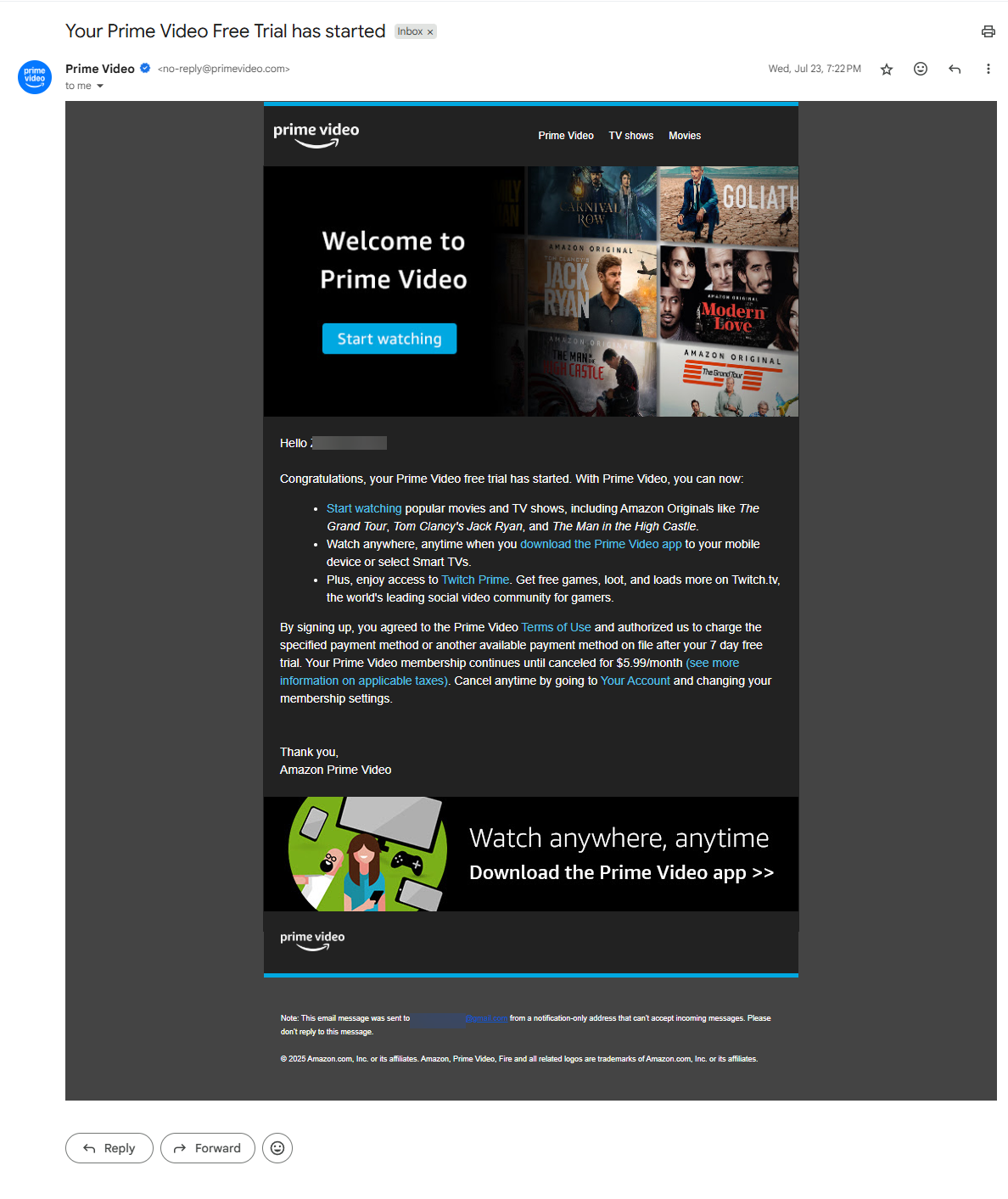
Here’s what makes this email overall good:
- The subject line is clear and specific, telling you that your free trial has started.
- The greeting feels personal, and the main message is easy to scan with short bullet points.
- The “Start watching” CTA button is bold and easy to see.
CareerFoundry’s Email Example
See another example from CareerFoundry:
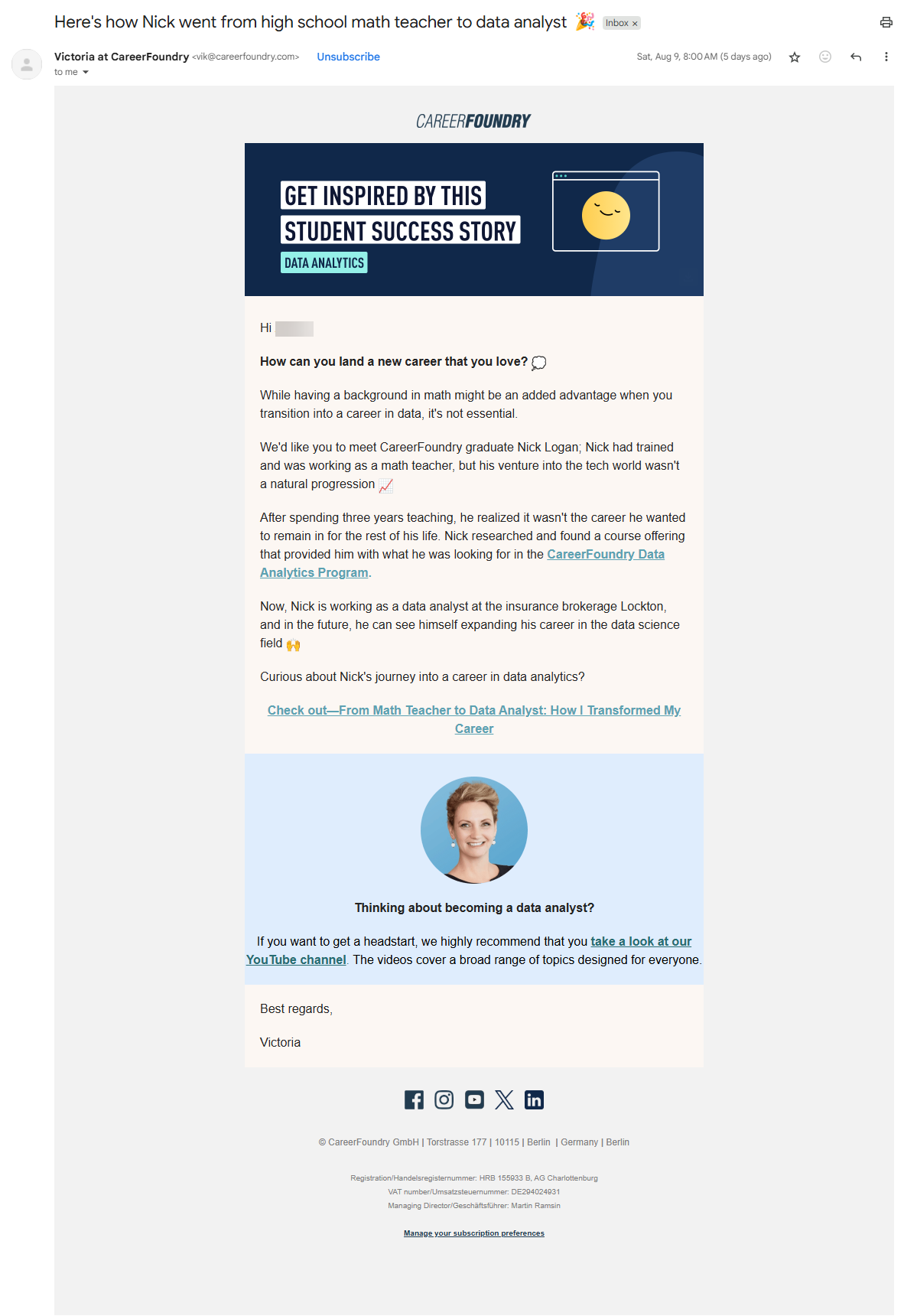
Here’s why this is a good email:
- The subject line creates curiosity about Nick’s career change story.
- The greeting is personal, and the story is short but engaging.
- Pictures and the sender’s photo make it feel friendly.
- The call-to-action link is clear and easy to see.
- The email ends with a friendly sign-off and an email footer with company info and unsubscribe options.
Lovable’s Email Example
Now look at this email from Lovable:
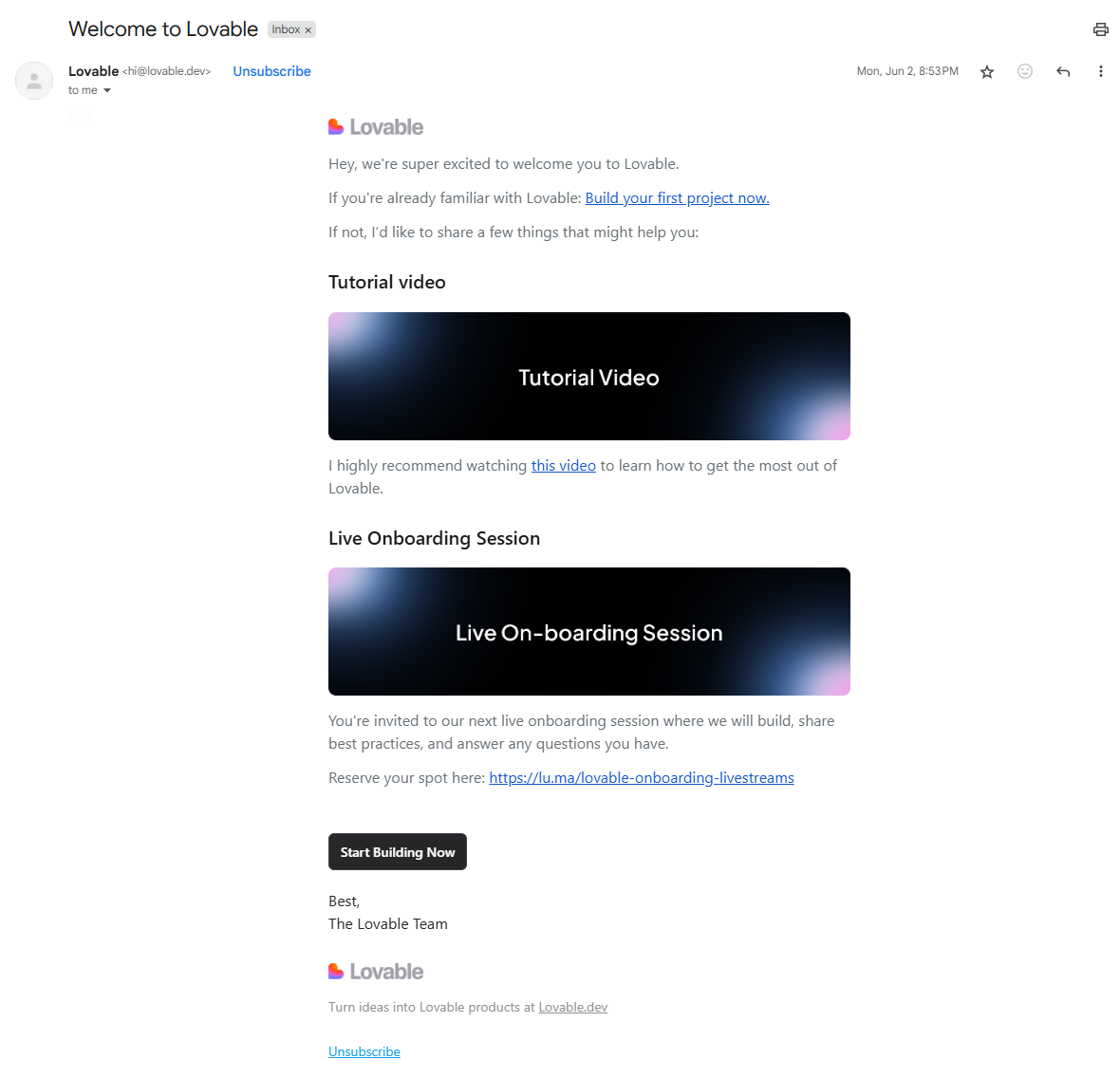
This is another email that’s not only good in one or two aspects, but has an overall good feel.
Here’s why:
- The subject line “Welcome to Lovable” is clear and tells you exactly what to expect.
- The greeting is friendly.
- The email body offers two helpful options immediately: a tutorial video and a live onboarding session. This provides the reader with a choice in how to get started.
- Links are easy to find, and the CTA button, “Start Building Now,” is clearly visible.
Review Your Old Emails and Plan Future Ones
The survey made one thing clear: every part of an email counts. From the subject line that earns the open to the closing that leaves a lasting impression, each element adds up to the reader’s overall experience.
Your next step is simple: review your last few email campaigns.
Check whether each part, subject, body, CTA, pre-header, and beyond, is clear, connected, and relevant. If not, adjust accordingly because even minor adjustments can improve openings and drive engagement.
If you want to take this even further, check out our guide on email marketing best practices for more ways to optimize your campaigns.
FAQs
What’s the Difference Between a Plain-Text Email and an HTML Email?
Plain-text emails are simple text with no styling. HTML emails include formatting, colors, and images. HTML is better for branding, but plain text feels more personal.
Also check: Plain Text vs. HTML Email Templates: What’s Best for Marketing?
What’s the Difference Between a Formal and an Informal Email?
A formal email is used for professional or official communication, such as writing to a supervisor, client, or instructor. It has a clear subject, polite greeting, complete sentences, and a respectful closing.
But an informal email is for friends, family, or close colleagues. It’s more relaxed, can be short, may use casual language, emojis, or abbreviations, and doesn’t follow strict rules.