Webinar Invitation Email Examples & Templates to Skyrocket Signups
You’ve planned a great webinar. Now you want people to be as excited about it and join you. But you are not sure where to start or how to write an invitation that feels personal and makes them want to sign up.
In this guide, I’ll walk you through that.
You’ll learn how to write clear, engaging emails, add a touch of personalization, send them at the right time, and use proven examples and templates to get more people to register and show up.
What Is a Webinar Invitation Email?
A webinar invitation email is a message you send to get people to sign up for your online event. It answers three things:
- What the session is about.
- Why it matters for the person.
- How to save a seat.
Unlike a newsletter or promotion, its only goal is to drive sign-ups. Because webinars run on a set date and time, a touch of urgency also helps. So, make sure to write a clear subject line, persuasive email copy, and add a visible sign-up button.
How to Write a Webinar Invitation Email
57% marketers host up to 50 webinars every year, which means your invites need to stand out if you want people to register. And to do so, you must know how to write captivating emails.
With Postcards Email Builder you can create and edit email templates online without any coding skills! Includes more than 100 components to help you create custom emails templates faster than ever before.
Free Email BuilderFree Email TemplatesLet’s see how you can write them.
Decide the Main Benefit
Before you write any part of your webinar email, be very clear about what people will gain if they attend.
You need to mention:
- What problem will you help them solve?
- What new knowledge or skill will they get?
- What result can they expect after applying what they learnt?
Write this as one short sentence. Keep it specific and practical. For example:
- Learn three ways to improve your email open rates.
- Discover how to set up GA4 reports that track sales accurately.
- Find out how to create social posts that drive more website visits.
Try to avoid vague lines such as “Join our amazing webinar” because they don’t tell readers why they should care and don’t provide any value.
Write a Clear Subject Line

The email subject line is the first thing people see in their inbox. In fact, 47% of people open emails only because of the subject line. That’s why it’s highly recommended to keep it under 50 characters and focus on the result or topic.
For example:
- Free webinar: How to speed up website performance
- Get more traffic with simple SEO fixes
- Last chance: Register for our GA4 workshop
Include Important Webinar Details
Your invitation should give people everything they need to decide and register. So make sure to add the following:
With Startup App and Slides App you can build unlimited websites using the online website editor which includes ready-made designed and coded elements, templates and themes.
Try Startup App Try Slides AppOther Products- Topic and title: Say what the webinar is about and choose a clear, memorable title so readers know the focus right away.
- Date and time: Share the exact day and time of the session, and always include the time zone to avoid confusion.
- Speakers: Add a short introduction of the hosts or presenters so people know who they’ll hear from.
- How to register: Place one clear call-to-action button that links directly to your sign-up page.
Write a Clear and Short Body
When someone opens your webinar invitation email, they should see why it matters and how to join. So keep the email body simple and clear.
Here’s how you can do so:
- Begin with a title to explain what the webinar is about and why it’s helpful.
- Avoid unnecessary sentences like: “We’re so excited to invite you to our amazing webinar that will change the way you work forever.” This kind of line is long and doesn’t give real information.
- Use short sentences and clear formatting to make the email easy to read.
- Present the topic, date, time, and speakers in a clean layout.
Add an Attractive Header Image
A header image helps the email stand out. You can use it in two ways:
- To set the tone or highlight the theme of your webinar, so people immediately understand the topic
- To show key details such as the title, date, time, and speakers
Select an email header or banner style that aligns with your brand and the purpose of the invitation. If you want to include details inside the header, keep the layout clean and easy to read.
A call to action (CTA) tells people exactly what to do next, so it deserves more attention than a short label. Write a CTA that removes confusion and guides readers straight to registration.
For this, you can use direct phrases such as:
- Register now
- Save my seat
- Reserve your spot
These phrases feel natural for your brand but still make the action clear.
In addition to copy, the design of the CTA also matters. So, choose a button color that contrasts with the email background and stands out. Also, give the button enough space so it is easy to tap on mobile phones.
After people register, they might still forget the date and miss your webinar. To prevent these issues, add an Add to Calendar option just below your main CTA or link in the invitation so people can save the session.
With one click, the event details go straight into their Google, Outlook, or Apple Calendar, and they can set reminders to stay on track. This small step can turn sign-ups into actual attendees.
Create Urgency
Create a little urgency to motivate people so they grab their spot instead of waiting until later.
Let them know that:
- Space is limited
- Registration closes on a specific date.
Place that message close to your call-to-action so it’s easy to see.
You could also add a live countdown showing how much time is left to register. These details help people decide faster and increase the chances they’ll join you on the day of the webinar.
Designmodo has a variety of email templates to use for this aim. You can easily choose the one that fits best for your brand and customize it accordingly.
When to Send Webinar Invitation Emails
The time you choose to send your webinar invitations can make a big difference in how many people register and attend.
If emails:
- go out too early, people may forget.
- arrive too late, the audience might already have other plans.
A clear schedule keeps your event visible and helps attendees stay engaged from registration to attendance.
Here’s a timeline you can follow:
- Initial invite (10–14 days before): Send the first email about two weeks before the event so people have time to plan and sign up.
- Reminder (3–5 days before): Follow up a few days later to reach anyone who has not registered yet.
- Final reminder (24 hours before): A short message the day before keeps the webinar fresh in their minds.
- Last call (30–60 minutes before): A quick note just before the start makes it easy for people to join on time.
When you use a thoughtful schedule like this, it gives your audience enough time to notice your webinar and makes it more likely they will attend when it goes live.
3 Webinar Invitation Email Templates to Copy
Need a starting point for your own invitations? Here are sample templates from Designmodo to help you.
1. Goeve’s Webinar Email Template

Edit this email template in Postcards
Goeve uses a big header image at the top so you know right away it’s a webinar. The headline and brief text clearly convey the focus: AI, cybersecurity, and innovation.
Speaker photos with names and titles make the event feel credible. Buttons like See all speakers and Join the experience give readers clear options to move forward.
2. Webinarify’s Webinar Email Template
Edit this email template in Postcards
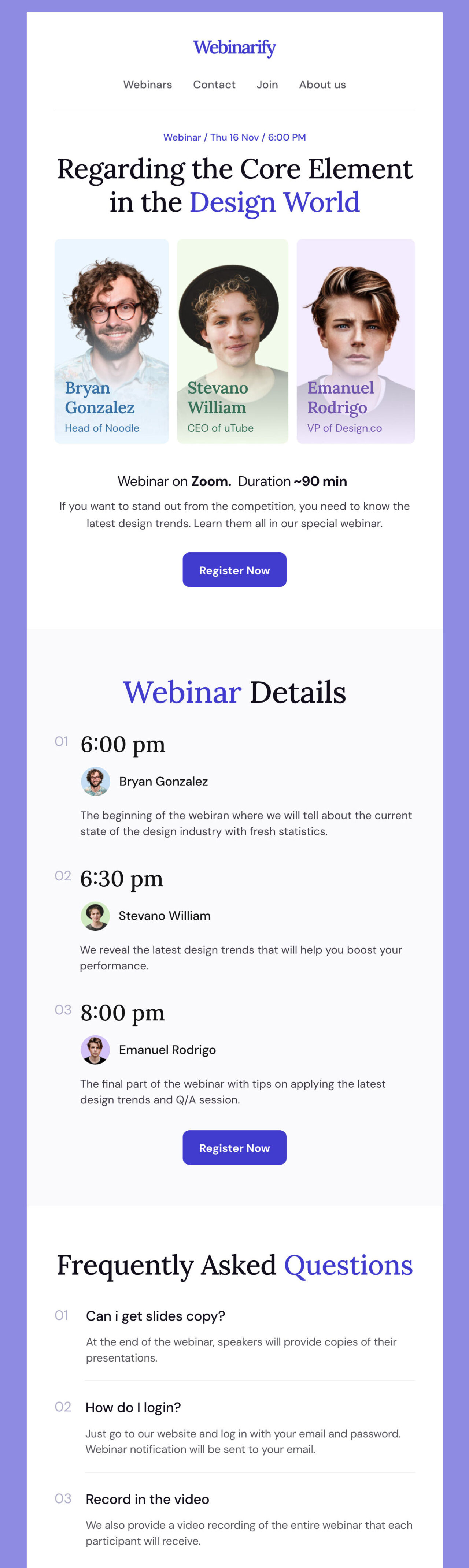
The header clearly indicates what the session is about and when it will take place.
Speaker photos with names and titles give a quick sense of who’s leading the event and why they’re credible. And the short intro explains the topic and length of the webinar.
The “Webinar Details” section breaks the schedule into clear time slots, so readers know what to expect from each speaker. In addition, a short FAQ answers common questions, and the extra video links at the bottom add value without cluttering the main message.
3. Mindcast’s Webinar Email Template
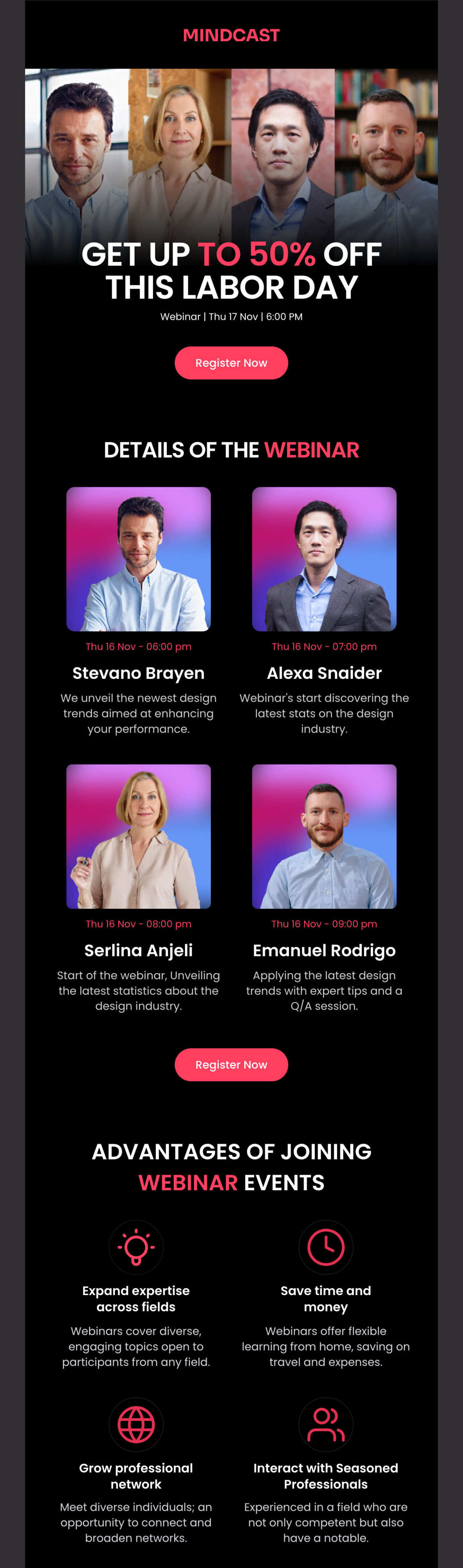
Edit this email template in Postcards
The “Get up to 50% off” line makes the invite hard to miss. Webinar details follow, with speaker photos, names, and times clearly laid out so readers know who they’ll hear from.
Inspiring Real-World Webinar Invitation Examples
Here are a few real webinar invitation examples you can take inspiration from:
1. Unspam.email
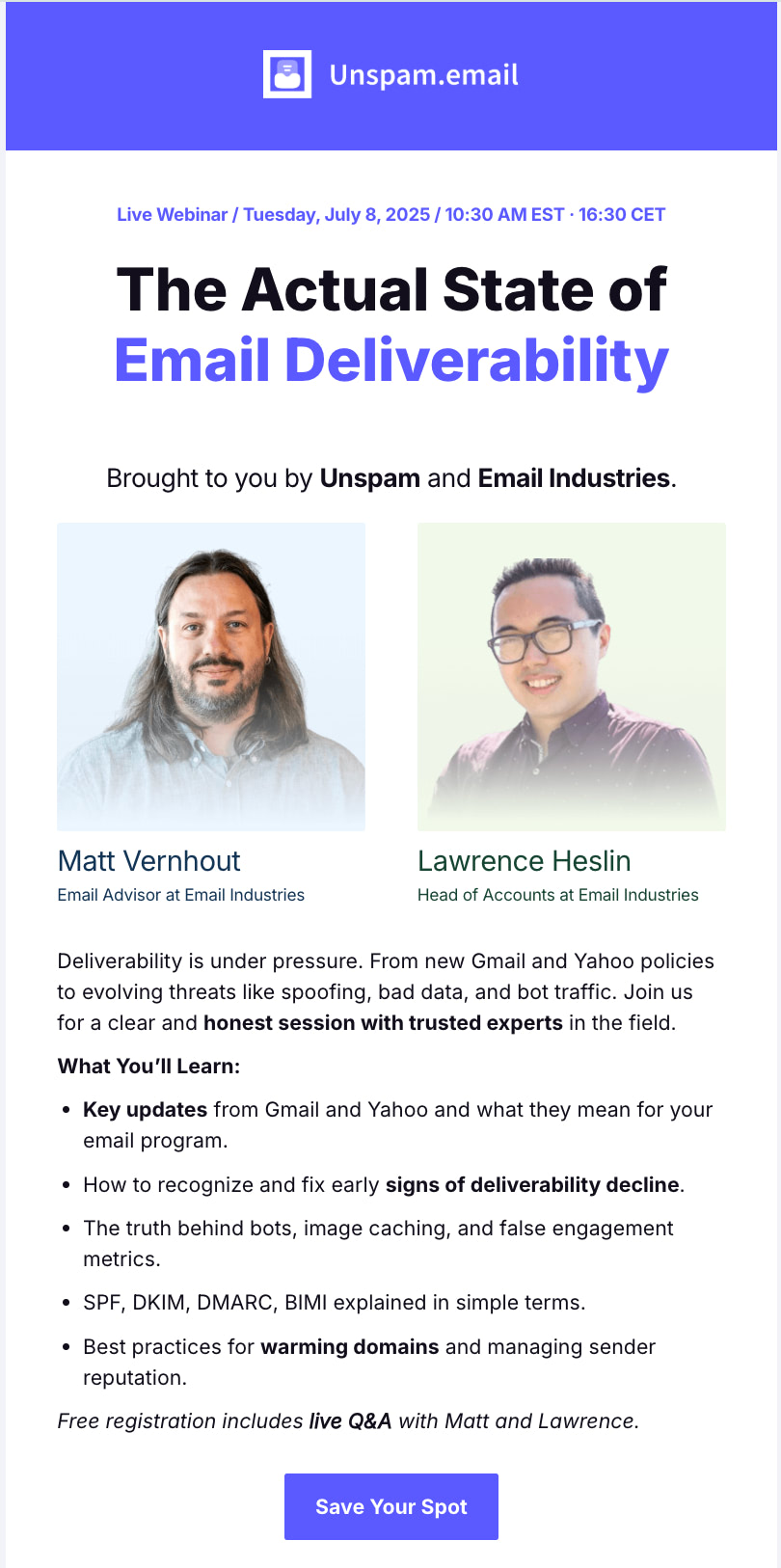
The subject line is clear and tells you exactly what the webinar is about. The message inside is written in plain language and quickly explains what the platform is, why it matters, and what participants can gain from this webinar.
The details, like the date, time, and registration link, are easy to find. At the end, there is also a small bonus mentioned, which gives people an extra reason to join. This makes the invitation more effective.
2. HubSpot
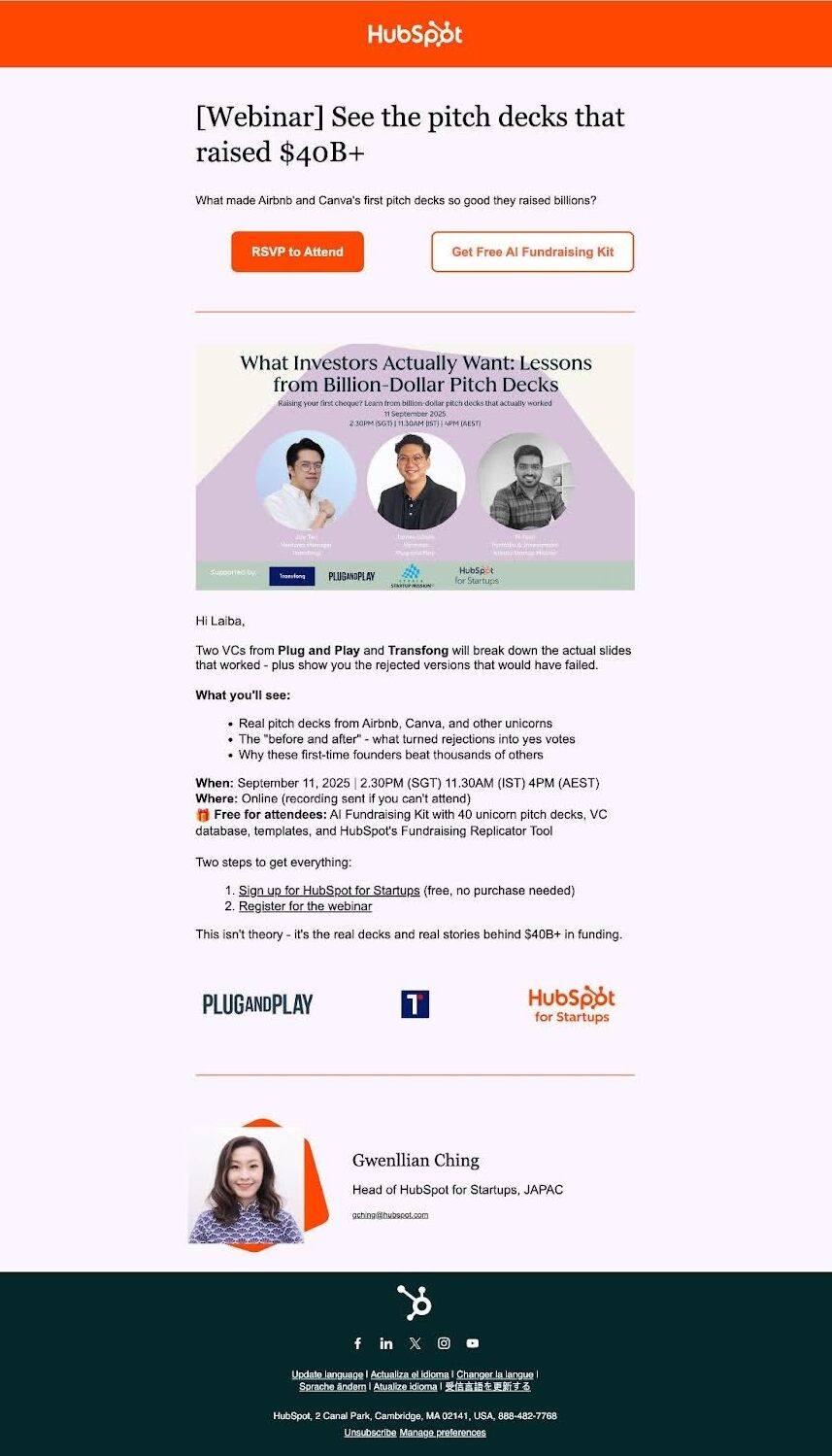
The subject line works well because it highlights a big result, $40B+ raised from pitch decks. At the top of the email, two clear call-to-action buttons make it easy to register and grab the free resource.
The email body outlines what the webinar will cover and lists the key takeaways attendees can expect to learn. The date and time are also easy to find.
That’s why this combination of clear value, useful details, and simple design makes it a strong example of a webinar invitation.
3. York IE

The subject line creates urgency by reminding readers that the event is happening tomorrow.
The header image works well because it shows the webinar title, topic, date, time, and speaker photos all in one place.
The body explains why the topic matters and introduces the speakers, making the value of attending clear. It also reassures readers that if they can’t make it live, they can still get the recording.
How to Create a Webinar Invitation Email With Designmodo
Now that you know what makes a good webinar invitation email, it’s time to create yours.
With the Postcards, an email template builder tool, you can make it super easily. All you have to do is choose a template, replace its copy with your desired content, and adjust the colors or images to match your brand.
Our Postcards editor is easy to use, and you do not need to know any code. Your email will look professional on any device, which helps you focus on inviting people instead of worrying about formatting.
FAQs
Should I Personalize My Webinar Invitation Emails?
Yes, doing so by using someone’s first name or tailoring content to their industry or role makes the email feel more relevant.
How Do I Align Webinar Invitations With Other Marketing Campaigns?
Plan your webinar invite as part of your broader marketing strategy. Mention the webinar in email newsletters, paid ads, blog posts, or social content so the message reaches people across multiple channels.
What’s the Benefit of Aligning Webinar Promotions With Other Marketing Campaigns?
When all your channels share the same message, your webinar stays visible, builds anticipation, and draws more attendees.
Absolutely. Posts on LinkedIn, Twitter, Instagram, or Facebook can expand your reach and attract people who might not receive an email invitation.