Flat UI Free – PSD&HTML User Interface Kit
We have a great surprise for Designmodo fans – our first free HTML user interface kit.
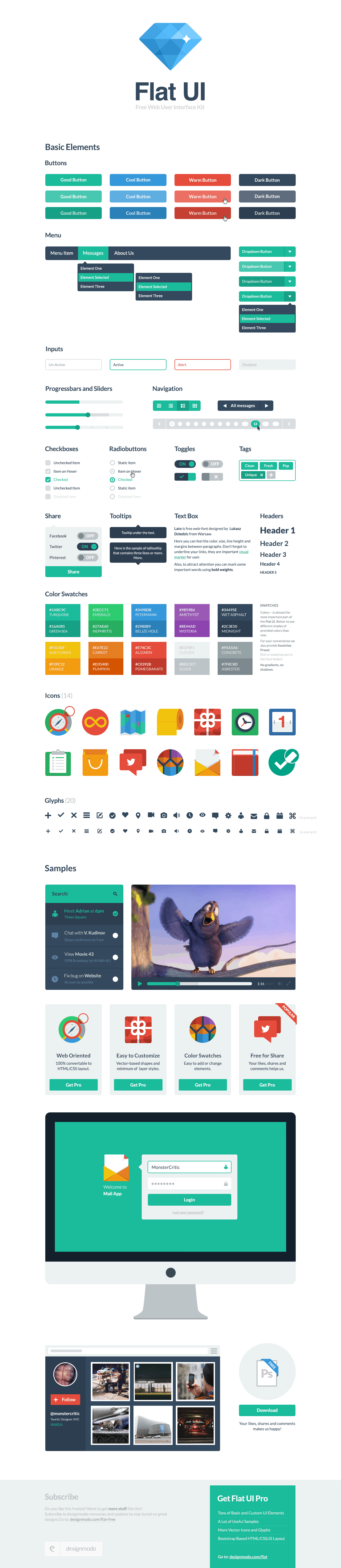
Flat UI Free is made on the basis of Twitter Bootstrap in a stunning flat-style, and the kit also includes a PSD version for designers.
We have considered your needs in developing the html version of our UI Kit, which contains the same elements as the PSD version and are perfect for creating great websites. With this UI Kit, you can spend even less time on routine work, saving that time for creativity.
Flat UI Free contains many basic and complex components which are great for designers to have at hand: buttons, inputs, button groups, selects, checkboxes and radio-buttons, tags, menus, progress bars and sliders, navigation elements and more.
Colored, stylish icons can easily be modified and used in a wide variety of projects, as they contain original layers. Glyphs are also available in psd, html/css and svg formats.
The kit also includes color swatches – no worrying over color choices here – with 10 colors that perfectly suit each other. Flat UI Free is made using the Lato typeface, which can be downloaded for free here.
Now you can buy Paid version of Flat UI here.
Flat UI Free – PSD (Graphics), includes:
- PSD files
- Layered (Shapes)
- Retina Ready
- Color swatches
- Glyphs – svg format
- Free font used – Lato
The Flat UI HTML & CSS Kit is made on the basis of Twitter Bootstrap, a comfortable and functional framework that simplifies the development of websites. The framework has been proven over the years by developers from around the world.
The HTML version of Flat UI includes:
- Twitter Bootstrap Framework based
- Retina Ready Images and Icons
- Custom form components
- Sleek CSS3 effects
- OOCSS approach
- Easy configurable color scheme
- New web-font and new web-font icons
Download Flat UI Free v.2.0
On your email was sent a letter
There is no information about this email in our database. Please subscribe by clicking on button below.
Report bugs on Github
Please use this page to report bugs on GitHub. If you want to support us, please recommend us to your friends and colleagues. We love to see all the great things you have created with Designmodo products. Please remember to share them with us!


rowruffdesign Mar 2, 12:22 am
Can’t wait for this awesome kit :D
Burak Öztırpan Mar 2, 1:48 am
awesome kit for web designers.For bootstrap really amazing.
virgilio Mar 2, 11:49 am
waiting for the download, thx
Taras Mankovski Mar 2, 3:32 pm
Do you use LESS by any chance? I’m assembling a design toolset for WordPress around Twitter Bootstrap and I want to be able to LESS to include the pieces that I need. If Flaw UI includes LESS then it will be a huge bonus for my toolset.
Taras Mankovski Mar 2, 3:33 pm
grrr… Flat not Flaw!
iurevych Mar 4, 12:57 am
For this particular Demo version we used Sass with all its power (mixins & variables). Yes we have plans to convert it to Less/Stylus/SCSS in the Pro version. If we will find some easy solution we might also improve our Demo version as well ;)
Taras Mankovski Mar 8, 7:00 pm
Look forward to the Pro version
Oliver Storm Mar 14, 11:58 am
same here. looking for pro
anardo Mar 2, 7:13 pm
I can’t wait for this UI kit. I believe it is the only one already coded…
pepperstreet Mar 3, 11:12 pm
PSD + HTML/CSS ?
Is it your future product policy or just a special one-time offer for this particular UI ?
Adrian Mar 3, 11:21 pm
Maybe will be for every future product.
pepperstreet Mar 3, 11:47 pm
o.k.
one thought and suggestion: If you work with bootstrap as a basis, you might also consider to support some side-projects. Since bootstrap core misses some important UI elements you use in your designs.
Especially the radio, checkbox and select elements lack a nice appearance. (due to their technical limitations) You could have a look at:
- Bootstrap Select by Silvio Moreto
- Fuel UX (checkbox, radios and specials)
- BootMetro (inkl. checkbox and radio styles)
- Select2 by Igor Vaynberg
- Toolbar.js by Paul Kinzett
pepperstreet Mar 3, 11:54 pm
Forgot about this very focused and simple projects by Ben Plum
http://www.benplum.com/formstone/
Hence Picker, Selecter and Stepper etc.
simon88 Mar 4, 12:29 am
Will there also be a Flat UI Paid with more elements?
Or even a full HTML / CSS Version of Square UI free for customers who have purchased Square UI?
That would be great!
Thank you very much!
Adrian Mar 4, 12:52 am
Flat UI Paid – this pack coming with more elements, HTML/CSS too.
Square UI Paid – this pack coming for HTML/CSS version too, but we are not sure how we’ll sell it.
simon88 Mar 4, 1:20 am
Thank you Adrian for your reply!
That sounds great! :-)
I am already excited about the Paid HTML / CSS Versions of Square UI Paid and Flat UI. Great Work!
Todd Dickerson Mar 4, 5:43 pm
Awesome, are we talking days? weeks? months? :-)
Adrian Mar 4, 5:47 pm
A few weeks. We’ll share this information with our subscribers :)
Todddickerson Mar 5, 1:48 am
Thanks, jumped on the list
Ina Mar 4, 2:13 am
I’m looking forward to this kit. It’s been a couple of days though, and I’ve looked around the internet and it sold out? :) :) Good stuff I guess. Can’t wait to work with it.
James Wong Mar 4, 4:51 am
Very nice! thanks for sharing :) looking forward to use it as the foundation of our company’s internal documentations.
chaitanya Mar 4, 5:15 am
Awesome and very useful kit, Thanks Adrian :)
Joko Wandiro Mar 4, 7:05 am
Thanks for awesome kit.
Robinrishi Mar 4, 7:33 am
Its just awesome, looking forward to BUY the full version. :)
Keshav Sharma Mar 4, 8:58 am
Awesome thanks for sharing :)
Haroonabbasi Mar 4, 9:30 am
Awesome, thanks guys for sharing it.
Sushant Kulkarni Mar 4, 10:12 am
Awesome Kit, thanks a lot!
Marc Gonzales Mar 4, 10:16 am
Thanks guys, it really helps :-)
Nelson Mar 4, 11:12 am
Thanks for the kit. really useful
Benjine Mar 4, 11:24 am
Thanks a mil, it is lovely.
Yurij Mar 4, 11:42 am
Great tool!) HTML framework is amazing!) Thank you Designmodo!
Barış Mar 4, 12:06 pm
Html kit was exactly what i was looking for!
Using sass/less is a perfect choice! Unfortunately bootstrap is no good for me..
Any chance that there will be a zurb foundation implementation provided soon?
iurevych Mar 4, 1:47 pm
Every custom component is a Module (check sass/modules folder) so you can just grab which one you like and move to your stylesheets folder.
I see no difference between Bootstrap(TB) and ZF when we talk about additional components that don’t exist in TB.
We will think about supporting Zurb, but not in the near future since it requires lots of efforts and it is less popular than TB.
If you have any troubles with converting it to Zurb compatible you can ask me any time @iurevych
vanessa Mar 4, 12:17 pm
just just awesome
thanks so very much :)
Sandeep Mar 4, 12:25 pm
Hello Adrian.
Simply best. I love them & also share on my twitter. Graphic Oh I love graphic.
Regards,
Sandeep pattanaik
Marco Mar 4, 12:30 pm
Hello, awesome resource!
Please check hex values of Sunflower and Carrot that are not correct on the image.
Cheers
marco
Heiko Apr 22, 3:39 pm
Has anyone found out the correct color codes yet? Because when I try the color picker (on osx), I get different values for all of them – and when I explicitely enter the hex values, I get nicer results. So: #values, please – I want to use that beautiful color scheme!
Heiko Apr 22, 3:57 pm
Maybe the answer is in https://github.com/designmodo/Flat-UI/blob/master/css/flat-ui.css :
Carrot is defined as #E67E21 and while
“sunflower” is missing, “warning” seems to be just it: #F1C40F
capitalH.ir Mar 4, 1:07 pm
Wow, this is amazing, perfect UI kit, detailed design, and for free, I wonder how your premium stuff look like, cheers guys, ur the best.
Numszky Mar 4, 1:56 pm
Great work, thank you :)
GDJ Mar 4, 2:05 pm
Color theme is amazing.. marvelous work thanks for sharing.
Angelo Mar 4, 3:01 pm
Thanks a lot for the download and your great work!!!
Michel Stomp Mar 4, 3:16 pm
Absolutely fantastic and very impressive work!
Dang Thanh Mar 4, 5:22 pm
I Love Flat UI. This is amazing. Thanks DesignModo.
Ian Mar 4, 5:31 pm
Any chance you could make the paid version responsive? I would pay for that in a heartbeat.
iurevych Mar 4, 6:18 pm
Yes, it will be responsive!
Ian Mar 4, 6:49 pm
Awesome. Looking forward to it!
Søren Larsen Pedersen Mar 12, 5:41 pm
When will this be available? :)
Srinivas Reddy Mar 4, 6:17 pm
Thanks a ton for such a nice sharing and source!!!
Tyson Stevens Mar 4, 6:40 pm
Uhhh-greed! Thank you for sharing this. Awesome!
Nick Mar 4, 6:42 pm
Thank you very much! :) Awesome work.
Víctor Hugo Velarde espindola Mar 4, 7:29 pm
excellent tool, thank you very much!!!!!!
Pim Mar 4, 8:21 pm
Pure awesomeness~ thank you so much for sharing!
Vince @ Intuit Mar 4, 9:30 pm
Dig it! This looks really good and love how you also include the HTML files. Keep em coming!
Mojtahedi Mar 4, 10:49 pm
It’s nice UI…
hope to see more of Designmodo.
;)
Rodnei Mar 4, 11:31 pm
Guys, thanks for share.
deeroksdesigns Mar 4, 11:38 pm
thanks for sharing…great work.
Robert Mar 4, 11:52 pm
Beautiful I like them.
I already “stole” the colors of the color swatches in the screenshot for a project I just started. :P
monstercritic Mar 5, 12:21 am
Thank you guys, for your comments! Appreciate this so much!
Stephanie Hider Mar 5, 1:01 am
Thanks, very cool =D
Dom Mar 5, 1:42 am
Nice. Would love to see the same thing for the bricks! Thanks for sharing.
Mark Jenkins Mar 5, 2:18 am
Awesome looking kit guys, great work on this. Look forward to seeing its release, thanks for the effort.
Mark
Tomas Mar 5, 2:54 am
Wow! Very nice job! Bravo!
aED Mar 5, 3:38 am
Cool! I just made a comment last month about releasing HTML version and now here it is! Please release the html version of your paid products fast :)
Steve Dekorte Mar 5, 5:40 am
Love the design. Will a DatePicker be included in the pro version?
Leland Mar 5, 6:23 am
Love this! Any chance you guys could add a mini calendar module?
monstercritic Mar 5, 10:03 am
Yep! Sure, we will add this with no problems.
Musharif Khan Mar 5, 8:57 am
Awesome Kit, thanks a lot!
Thibault MARTIN Mar 5, 11:24 am
Waow awesome job ! Thanks a lot ;) I love flat design.
stanley Mar 5, 12:00 pm
What are you terms of usage. Can i include you design in a premium CMS i’m selling? Thanks
Joram Mar 5, 12:30 pm
Oh nice! I love the elements of the HTML version :)
Noel Mar 5, 4:27 pm
Superb!
I love the vector icons :)
Mariusz Malachowski Mar 5, 10:15 pm
Great kit. Can’t wait for this kit.
Nilesh Manohar Mar 5, 10:23 pm
Wow!!!!!!!!!!!!!!!!!!! Just Super
Chiming Mar 6, 5:08 am
so,this web is always based on Flat UI?CLEAN AND AWESOME
Jayvan J Santos Mar 6, 6:07 am
I don’t know how many times I’m going to thank you. I’ve thanked you in all your social networks and sent you an email at your info@ mail. Haven’t heard from you guys, hopefully I hear from you soon.
D'lo DeProjuicer Mar 6, 12:39 pm
hehehe I understand exactly what you mean!!!!
D'lo DeProjuicer Mar 6, 12:31 pm
Wow this is awsome, as a young front-end dude this is the shiznit!!! I have just gotten ma claws in the depths of bootstrap and was begging to wonder what else… and Boom! I saw this by chance and am glad I did.
In S.A (South Africa) bootstrap fanbase is just starting to build, and am on top of it…. and now this! they will have hardtime catching up with me – True storry!
Thanks alot!
Lee Kowalkowski Mar 6, 1:24 pm
I really struggled to use the demo with a keyboard both with tabbing in general and with selecting check boxes and radio buttons.
simon q Mar 6, 6:13 pm
agreed, waiting for master.zip. Will buy the pro/paid version too. Any idea when it will be available for purchase. I’d love to start my next site using it.
J.Y Han Mar 6, 7:12 pm
AWESOME!!!
great design….it makes me cry….
Vinicius Dallacqua Mar 6, 7:33 pm
I followed the dribbble shots and I agree that we can find tons of good flat UIs to be inspired. And the color pallet is seems to be a trend of this year at what we can see on the examples above and here: http://www.pantone.com/pages/index.aspx?pg=21055
I have this thought that ideas are like little live beings, they migrate from person to person, therefore they do not belong to a single mind.
I hope this issue can be solved and guys at Layervault can see that they are overreacting.
Pasha A. Mar 7, 1:18 am
I love your work guys!
Its hard to be different in our “trendy” century. Why does critics doesn’t screams that 30% of crafted web layouts looks like Metro-style©? Why all cars becomes looks in one brisky style? Why all mobile phones has a square form? 2 principal reasons: usability and trend.
Its time of unifications now. So if somebody uses one tone of red color it doesnt mean i can’t use it. Or i really can’t? Why not.
And about icons. For example can u explain icon of gift? It’ll looks like a box with ribbon and knot. It’s simply to draw it. But why there are hundreds of its variations? How many defferences LV will find between its? LV needs to think about this and stop to trash my part Internet.
Thank you.
srikanth Mar 7, 6:26 pm
when i open flat-free ui psd file in photoshop it says “some text layers contain fonts that are missing. These layers will need to have he missing fonts replaced before they can be used for vector based output”.
secondly, just wanted to know how to use it exactly. even after listening to how to use. its still unclear for me.kindly help me out.
Dan Archibald Mar 7, 6:49 pm
Srikanth – check out the last paragraph from the original entry above. It will give you the link to use the Lato font. Install that first and then re-open the PSD..
“Flat UI Free is made using the Lato typeface, which can be downloaded for free here.”
srikanth Mar 8, 11:36 am
forgot to specify that mate. i even installed the font. but still no luck.
andrej.kaurin Mar 7, 8:58 pm
Did you made icons or you used some library? Icons are awesome.
Adrian Mar 7, 9:03 pm
All icons was created by our designers.
andrej.kaurin Mar 7, 9:57 pm
Would be great to publish all icons as separate library.
AP Mar 7, 10:54 pm
AGREE – You got so good publicity from VentureBeat and now you are letting that exposure go in vain. Just host the file elsewhere and satisfy what you whole-heartedly intended to inspire the internet. Thanks!
hermann Mar 8, 11:04 am
Thanks a lot for this pack. your designers did a great job, i think the psd is quite enough for now.
Nuruzzaman Sheikh Mar 8, 3:26 pm
Awesome work guys! Thanks a lot for the share!
SRIKANTH Mar 8, 3:35 pm
FLAT UI – HTML KIT :”WELCOME TO AWESOMENESS”.
AP Mar 8, 6:27 pm
Thanks for HTML – glad you were able to make it happen. Best Wishes
Prathap Mar 8, 7:12 pm
Awesome, thanks for the htmls love it very much, shared on fb and twitter.
pepperstreet Mar 8, 7:21 pm
Seems, after copyright struggles… you are back in business again ? ;-) :D
Adrian Mar 8, 8:29 pm
You know, is a joke and fake DMCA takedown…
stanley Mar 8, 8:02 pm
You seems to miss my question. Do you have any terms and conditions of usuage. I have a premium script that i want to sell but would love to use the Flat UI as the base for my design. Can i do that?
Adrian Mar 8, 8:31 pm
Hi, you could this with developers license of premium version, coming soon.
Robinrishi Mar 8, 9:05 pm
By what time/ date can we expect the Premium version to be released !!!
Adrian Mar 8, 9:09 pm
We plans in one month.
Dusan | Meks HQ Mar 8, 9:11 pm
Great!
It should be called Flatstrap :D
Felipe França Mar 8, 10:12 pm
There is any tutorial|doc to use this ui?
Adrian Mar 8, 10:40 pm
you meant photoshop tutorial? here are a few tips – http://designmodo.com/how-to-use/
Mariusz Malachowski Mar 8, 11:23 pm
Great stuff for me. Thanks a lot.
BandonRandon Mar 9, 11:42 am
This is a great UI. But I can’t seem to get “ to show up in the dropkick select menu. It looks like you may be using the Bootstrap component. Any tips would be awesome!
BandonRandon Mar 9, 11:43 am
sorry I tried back-tics but you don’t seem to allow code. The:
BandonRandon Mar 9, 11:44 am
okay Fine! The ARROW! .select-icon
Kamil Rykowski Mar 9, 1:25 pm
Hey,
I’ve found a little bug in the sass code (sass/modules/_video.sass). At line 169 you are using “background: url(‘video-js.png’)”, but that file is missing in the sources.
Luiz Fonseca Mar 9, 4:20 pm
Awesome! Great, great work!
You can’t imagine how I’m happy because you made it open source: https://github.com/designmodo/Flat-UI
I’ll see many pull requests from me, implementing modals and stuff. (and why not, LESS support! ;)
Awesomesauce! Thank you! :D
virgilio Mar 10, 2:50 pm
Plz, any tutorial how to use the HTML Kit? Thx
Mongris Mar 12, 12:06 pm
It’s awesome design. Thanks for sharing!
I am using select2 with FlatUI, so I update a external css to decorate select2 with FlatUI looks. You can check the css file from https://gist.github.com/mongris/5141297
peablog Mar 13, 5:53 pm
Awesome design!
But it takes me one hours to read this article and comments because of my poor english.
James Mar 14, 11:32 am
Nice UI Kit, however I am dealing with a problem with the select dropdowns. With nothing else on the page other than a single select input and all the css and js files from the demo page, when the dropdown menu is open, it causes most of the background to turn white. I’m not sure if this is from the flat-ui.css or from the dropkick code itself, but something is going on to make that control unusable for me.
James Mar 14, 12:08 pm
Oh, I forgot to mention that this is in Chrome for OS X.
I think I’ve traced the problem to the z-index: -100; for the .dk_options class in the flat-ui.css file. Setting this to a positive number fixed the issue with the background, but causes other problems including making it difficult to open the dropdown and the options list always being selectable even though its not visible. I’ll keep trying to find a solution, but so far it looks like a css issue.
iurevych Mar 14, 12:27 pm
Hey man, that’s a good catch. I think visibility: hidden instead of z-index: -100 might help. Don’t forget to set visibility: visible when showing select ;)
Please check cause I don’t have such issue on my side.
PS: you could also report a bug on our github repository page https://github.com/iurevych/Flat-UI/issues?state=open
James Mar 14, 8:48 pm
Replacing the z-index:-100 with visibility:hidden and then adding visibility:visible to the .dk_open .dk_options class seems to do the trick. The issue I was experiencing seemed to only occur in Chrome and on pages where the dropdown’s option list would appear vertically below the rest of the page content. I created a ticket on github with the problem and the suggested solution. I notice that there’s one other use of a negative z-index in the flat-ui.css file for the .navbar .nav ul element. I haven’t encountered a problem with this yet, but I might run some tests to see if the same sort of issue occur.
Leland Mar 19, 1:02 am
Would love to use the Birthday discount on the FLAT UI Premium set. Can we prepurchase?
Adrian Mar 19, 1:07 am
Hi Leland, for sure not.
Adrian Mar 20, 10:57 am
ANNOUNCEMENT!
Flat UI repository is available now https://github.com/designmodo/Flat-UI, github removed DMCA takedown. So you can use it, don’t worry.
Prathap Mar 21, 7:50 am
I wonder why we need 2 inputs and 2 labels for a single radio UI?
And if i use the flat ui, my developers will definitely ask me why you need these many extra elements for single on/off functionality.
Where as i have seen some scripts that create a div as ui by hiding the radio behind this.
iurevych Mar 21, 12:38 pm
I wanted to create a flexible component where you can write anything you like and it will work: “Enabled/Off” or “On/Turned off”
Waheed Akhtar Apr 4, 12:13 pm
Nice work guys. One quick question. I am designing a form and thinking to use these elements but I can’t find Select box (e.g. ) of the Form.
Wondering why its not in here?
Adam Allard Apr 7, 4:55 pm
Does anyone know how to add html page links to the teal/green drop down list? So when you select an option on the drop down you are automatically transferred to a new .Html page? thanks, Adam
Mr. Horse Apr 7, 11:04 pm
Guys! make css for htlm5 boilerplate and not just for bootstrap.
ur flat ui is awesome but i dont really wanna put bootstrap in my project. please make css independent
abitdodgy Apr 8, 12:31 am
How do you customise the color schemes? The project does not include any instructions for doing this, other than the palettes themselves. But it does not say how to apply them.
Frank Apr 8, 4:57 pm
What is it for license on this ?
Adrian Apr 8, 5:30 pm
Flat UI Free is licensed under a Creative Commons Attribution 3.0 Unported (CC BY 3.0) (http://creativecommons.org/licenses/by/3.0/).
D. Brenner Apr 15, 11:09 pm
When will pro be ready for purchase? I’m ready to give you my money!
Adrian Apr 15, 11:21 pm
Flat UI Pro expected in three weeks! Hard Working…
nfuller52 Apr 16, 1:17 am
Will pro be built around bootstrap 2.x.x or 3.x?
Adrian Apr 16, 11:20 am
We build it on top of 2.x keeping in mind future versions compatibility (3.x). We won’t touch grids. Other things that may break will be fixed for you at no charge. (updates are free for all clients).
Brad Apr 18, 12:24 am
Really like this UI kit. Just got done make a responsive WordPress theme with it. You can check it out at bragthemes.com if interested.
Martin Apr 23, 5:49 pm
Would anyone with the dropdown button for Flat UI …? I need to create a login box with form elements. Something similar to the select element, but with the input elements. For possible answers thank you in advance.
ashishmahaur Apr 26, 9:07 am
Great freebies!
Loving them all!
Jason Resnick Apr 30, 9:55 pm
Am I able to just pull the Flat UI CSS file (and the fonts) and drop it into my site that’s already using Bootstrap and it’ll work just fine? Or is it totally tied to it’s own Bootstrap? (for whatever reason)
Adrian Apr 30, 10:04 pm
You can use it free for your website.
Jason Resnick Apr 30, 10:09 pm
Oh yeah? So it’s just a matter of just doing that? Pulling the CSS and the fonts and it’ll work?
Adrian Apr 30, 10:12 pm
So, I think, in case you need to customize template for your website.
… and yes, back-link is welcome!
Jason Resnick Apr 30, 10:16 pm
Well I’m just using Bootstrap in a project and I would like to test this out without too much effort to see how it looks. Obviously if it works and looks nice, I’ll make the necessary tweaks, but I just wanted to test first.
Is it just overwriting the elements from Bootstrap or has it’s own classes that need to be defined in the markup?
Jason Resnick Apr 30, 11:27 pm
Works great actually — pretty slick. My final question is where can I find the color schemes? The folder that it says on the demo isn’t in the zip file.
I’d like to be able to swap out some of the color.
I’d be more than happy to plug this as well once I get it up and live.
Adrian Apr 30, 11:57 pm
Please download both version of pack, PSD and HTML.
Geoff May 2, 10:42 pm
I get an error when trying to download the PSD. Anyone else?
Jason Resnick May 2, 10:53 pm
Where is the link for the PSD?
Adrian May 2, 10:57 pm
Please check your email for link to download.
Geoff May 5, 3:03 pm
I actually found out it was just our work network…it doesn’t like Dropbox, downloaded it when I got home, no problems. Thanks for an amazing kit!
JAMES May 9, 9:17 am
I am having the same problem.
Steve May 7, 11:46 pm
Looking for the PSD color pack and not seeing it anywhere? Can you link me the download for it please?
Adrian May 8, 7:42 am
Hi, please check “swatches” from “assets” folder.
Steve May 8, 8:00 am
Hey Adrian, I’m only seeing css, fonts, images, js and sass folders on my download.
Adrian May 8, 8:41 am
Download both packs, PSD and HTML version. Now you have only HTML pack, check the body of article.
Vanveo May 8, 12:02 pm
Thank you, it is very useful for me :)
Greg May 21, 11:08 pm
What is the difference between free & paid versions (@each level)?
Hope you answer the questions about flat-ui being compatible with the new bs3.0
tia,
Adrian May 21, 11:57 pm
Please read the comments, to avoid repetition.
Dennis May 23, 8:48 pm
Love the kit! However when there a re multiple dropdowns on one page only the first dropdown shows and the others are removed. Please help I’ve had no luck figuring this out. Thank you so much in advance!
Adrian May 23, 10:01 pm
Submit please details about this bug here – https://github.com/designmodo/Flat-UI/issues
DWayne May 30, 1:43 am
Is this built on top of Bootstrap. When bootstrap 3 comes out can I just add this in?
Adrian May 30, 9:45 am
We will update Flat UI for Bootstrap 3.0 (after official release).
Danny Jun 7, 6:24 pm
What is the license on the free stuff?
Could I make a wordpress or joomla template and make it available for people without you guys getting angry? :)