Futurico – Free User Interface Elements Pack
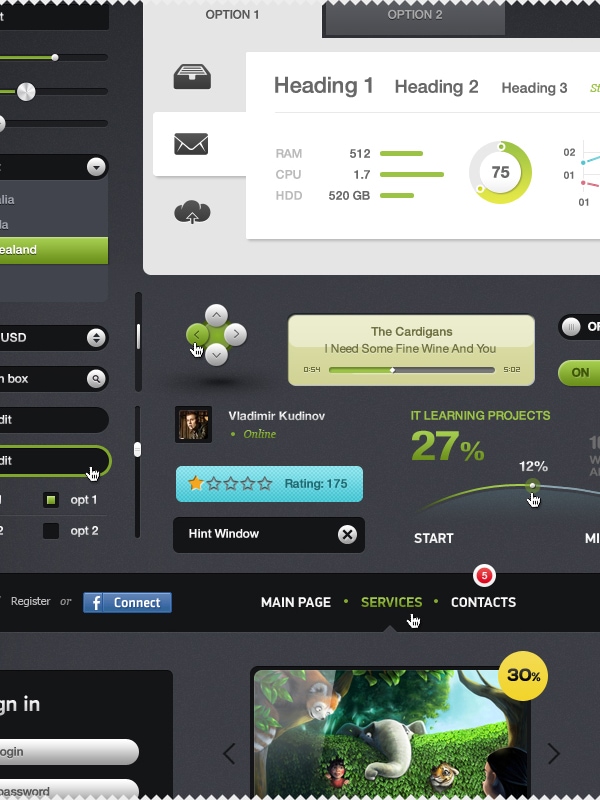
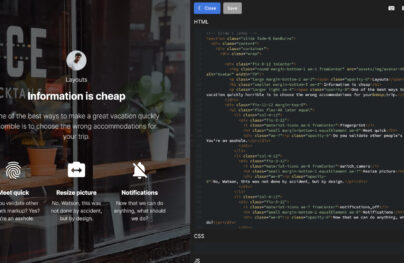
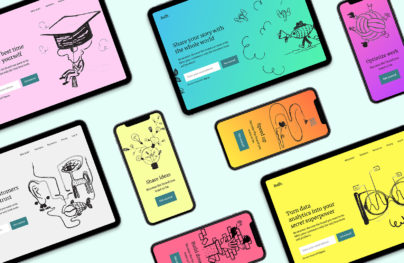
Yay! It’s time for a new free giveaway and we are happy to present a wonderfully creative collection of Futurico – Free User Interface Components (PSD). We think that these are so far the greatest user interface components we have shared with you guys and we hope you will agree with us on this.
Better see it for yourself and wait for updates because this giveaway will be totally special. We will update it every month with new cool elements so that our beloved readers will have tons of possibilities to use them.
As we have always stated, this wouldn’t be possible without the help of our designer friends and this time we would like to thank Vladimir Kudinov (Behance Portfolio) for his great help.
This truly creative designer is from a small town near the Ural Mountains – Ozersk and he’s had an interest for computers since his early years of childhood. Although his first passion was coding, he has developed a strong interest towards design and he decided to move to Moscow in order to follow his dream. He now creates what he calls “golden” works and we trust him completely because we totally love his designs. Don’t you guys?
Release Date: 21.11.2011
Last Update: 07.05.2012
Version: 1.1
== Changelog ==
= 1.1 =
Fix a few bugs.
New elements added. – Preview
Futurico – Free User Interface Elements Pack


Serj
November 21, 2011 at 9:57 pm
It’s the best kit ever! WOW!
Aaron
November 21, 2011 at 11:40 pm
Nice pack, FYI for those of you who are wondering, the license for the icons/images is:
Futurico is licensed under a Creative Commons Attribution-Share Alike 3.0 Unported License (http://creativecommons.org/licenses/by-nc-sa/3.0/).
Adrian
November 22, 2011 at 2:26 am
Nope, Futurico is licensed under a Creative Commons Attribution 3.0 Unported (CC BY 3.0) (http://creativecommons.org/licenses/by/3.0/).
Mark
February 17, 2012 at 1:20 pm
Thanks for the correction. I was wondering about the license as well.
Jon Gaulin
November 22, 2011 at 12:36 am
Wow! Very nice, I’m looking forward to using it in my next project. Thanks
Jesika
November 22, 2011 at 2:27 am
Is amazing, really best design of ui kit that I see. Congratulation, great work!
jenni has her head in the clouds
November 22, 2011 at 11:17 pm
Oh noes, dropbox has disabled the link. Can you post another?
Adrian
November 22, 2011 at 11:32 pm
done, you can download now.
taeglichanders
November 24, 2011 at 11:54 am
This is one of the most “creamy” UIs I’ve seen! Thumbs up and greetings!
Marlene Martins
November 24, 2011 at 12:19 pm
Hi!! I tweeted, but the download button didn’t work…
Adrian
November 24, 2011 at 12:26 pm
Try with other browser (Firefox), don’t use Safari or IE old versions.
Cam
November 25, 2011 at 3:41 am
Lol. That’s worrying.
Eldred
November 25, 2011 at 3:44 am
Excellent and I like the Twitter set up, do you have the simple code available to show how that is done please?
Leslie
November 25, 2011 at 11:04 am
Love this design. Saving this for when I need something clean in a UI design again.
Tib
November 25, 2011 at 11:05 am
Wow super pack thx!
JBeersfood
November 28, 2011 at 2:18 am
I tweeted for my download as instructed but the download button didn’t activate and no download started – can you please email me this UI – It looks great and i’d love to use it for my next project.
thanks
Adrian
November 28, 2011 at 2:20 am
Try with firefox, no safari or IE :)
kyrul
December 5, 2011 at 8:59 pm
wow !realy awesome collection . nice dude !
Patric Lee
December 16, 2011 at 2:49 am
Sorry, but I don’t use twitter… Can’t download it.. What a pity…
Maybe it is possible to create a download link, even if you’re not usin’ twitter… Sorry guys, for not using twitter…
BR Pat
Taylor Dodds
December 19, 2011 at 1:04 am
The word treble only has 1 ‘b’ in it
Adrian
December 19, 2011 at 1:10 am
Sorry Taylor, but i don’t understand you, what you mean?
Taylor Dodds
December 19, 2011 at 1:26 am
in the very bottom left corner of the .psd there is some audio level sliders, and some text that says “full bass and trebble” rather than treble. Just an fyi :)
Adrian
December 19, 2011 at 1:43 am
Thanks Taylor, you can edit psd and make the word correct :D Design is important in our case :)
HolLa
December 19, 2011 at 3:00 pm
It’s sad that everyone who gives away a freebe, forces others to sign in a pseudo social network to get it (or only from apple app store).
I like your Interface PSD and it´s great work, but I am not a member of Facebook, Twitter or any other so called “social network”, and that with a good reason.
Adrian
December 19, 2011 at 3:09 pm
You don’t need to signin in “pseudo social network”, just close the popup window after clicking on tweet button ;)
HolLa
December 19, 2011 at 3:16 pm
Thank You very much!!! Realy great work!!!
Dreamweaver
December 20, 2011 at 6:18 am
Does anyone know why I can’t download the file after I’ve tweeted about it many times?
Adrian
December 20, 2011 at 10:30 am
Read the comments.
Emre YILMAZ
December 23, 2011 at 4:26 pm
thank you man, that’s amazing :) i will use on my project, is it problem ?
Miah
February 17, 2012 at 12:29 pm
Very slick design. I’m going to use it for my new project.
Jo
March 4, 2012 at 5:46 am
Hey, I didn’t really enjoyed this website politic about the download of this generously posted item. If you don’t have Twitter (yep, that’s still possible nowadays) like me, then you just can’t get the psd…
By the way, the link of the download is in script.js linked to the download page…
eric
March 15, 2012 at 4:35 pm
couldn’t download after tweeting… using google chrome
Adrian
March 15, 2012 at 9:44 pm
Maybe is iOS problem in your case.
Alfredo Ramirez
March 17, 2012 at 11:44 pm
Thanks a lot friends, very helpful can I use it in my next assigment?
Adrian
March 18, 2012 at 1:12 am
Sure, you can use them for your projects.
Mrinal
March 18, 2012 at 5:49 am
Good one, I like it and love it, It will help me a lot, thanks for share.
Stefdem
March 21, 2012 at 6:41 pm
Hi,
It’s a really nice job.
But I wonder how to integrate all of these designs.
Someone knows a tutorial how to use a ui kit with css/javascript ?
We can find examples for radio or checkboxes but it’s hard to find for sliders and others special inputs.
Thank you for an answer.
Adrian
March 21, 2012 at 9:32 pm
Here are a few tutorials hot to use Futurico http://designmodo.com/freebies/
Felipe Ferreira
March 21, 2012 at 7:35 pm
I just tweeted the message and link to download still disabled.
Adrian
March 21, 2012 at 9:32 pm
Felipe, which browser you use and which OS?
sagar
April 4, 2012 at 11:29 am
i am new to all this..
so please can anyone tell me what are these, how to use and what are they about..?
anyways i have downloaded the pack and design no doubt is bloody cool!! :)
thanks in advance..
Gabriele Malaspina
May 7, 2012 at 12:55 pm
Great!
Thanks a lot :D
Joshua Chase
May 7, 2012 at 2:24 pm
Wow what a great UI pack. Can’t wait to try this out!
torko
May 7, 2012 at 7:50 pm
Hi! Tjere’s a typo in the download page: “Clear you’re browser cache.” It should say: Clear YOUR. :)
Thanks for the freebie. Awesome site!
torko
May 7, 2012 at 7:51 pm
Yayy!! And I also made a typo. :)
Adrian
May 7, 2012 at 9:08 pm
Yes, thanks, fixed….