Email Marketing Translation: How to Build Multilingual Emails
56.2% of consumers say content in their own language matters more to them than price. That means an accurately translated copy is part of their purchasing decision, not any random element you can ignore.
Yet most teams swap the body copy into another language, leave the subject line in English, and wonder why international open rates are half what they expected.
Done right, email marketing translation goes beyond words. It covers tone, layout, cultural references, and, in some cases, the entire direction of the email.
In this guide, we’ll walk you through what to translate, how to do it, how to localize for specific markets, and how to build RTL campaigns that render correctly.
What Is Email Marketing Translation?
Email marketing translation is the process of converting your email campaigns into other languages so they reach and connect with audiences who don’t speak your primary language.
But most marketers get it wrong: they translate the words and call it done.
With Postcards Email Builder, you can create and edit email templates online without any coding skills! It includes more than 100 components and the AI Suite, which builds and translates full templates from a single prompt.
Free Email BuilderFree Email TemplatesThat’s not enough. There’s a big difference between translation and localization:
- Translation changes the language or simply swaps the words.
- Localization changes the experience. It makes the email feel like it was written for that specific audience. It changes the layout, imagery, colours, tone of voice, or CTA placement depending on the target audience.
This proves your email can be perfectly translated and still flop because the tone feels off.
Let’s say you’re running a Black Friday email campaign for your US subscribers and want to send it to your German subscribers too.
A direct translation keeps the “BLACK FRIDAY: 24 HOURS ONLY” framing, shows dollar prices, and uses MM/DD dates.
To a German reader, “11/29” reads as the 11th of the 29th, which doesn’t exist. Prices need to be in euros, and the date format should be 29.11.2024. And this is not just it; you may also need to change the tone of voice and the angle of the email to align with the German audience.
RTL Languages
Some languages, such as Arabic, Urdu, Persian, and Farsi, read right to left. That means the whole email flips: layout, alignment, button placement, even the visual flow of images.
If you send an RTL-language email with a left-aligned layout, it’s harder to read, and readers will feel it immediately, even if they can’t explain why.
Most ESPs support RTL rendering, but you have to set it deliberately. If you ignore RTL design principles, emails can appear difficult to navigate.
With Pulsetic you’ll be instantly notified the moment your website, API, or server becomes unavailable. Monitor uptime from multiple global locations and respond to incidents before your users are affected.
Create beautiful status pages in minutes to keep customers informed during outages and build trust with transparent communication.
Start Monitoring for FreeWhat to Translate in a Marketing Email
Every piece of text a subscriber sees before opening the email needs to be in their language. So make sure to translate these parts of an email:
- Header
- Subject line
- Preview text
- Body copy
- CTA
- Footer
- Alt text
- Images with embedded text
How to Translate Marketing Emails
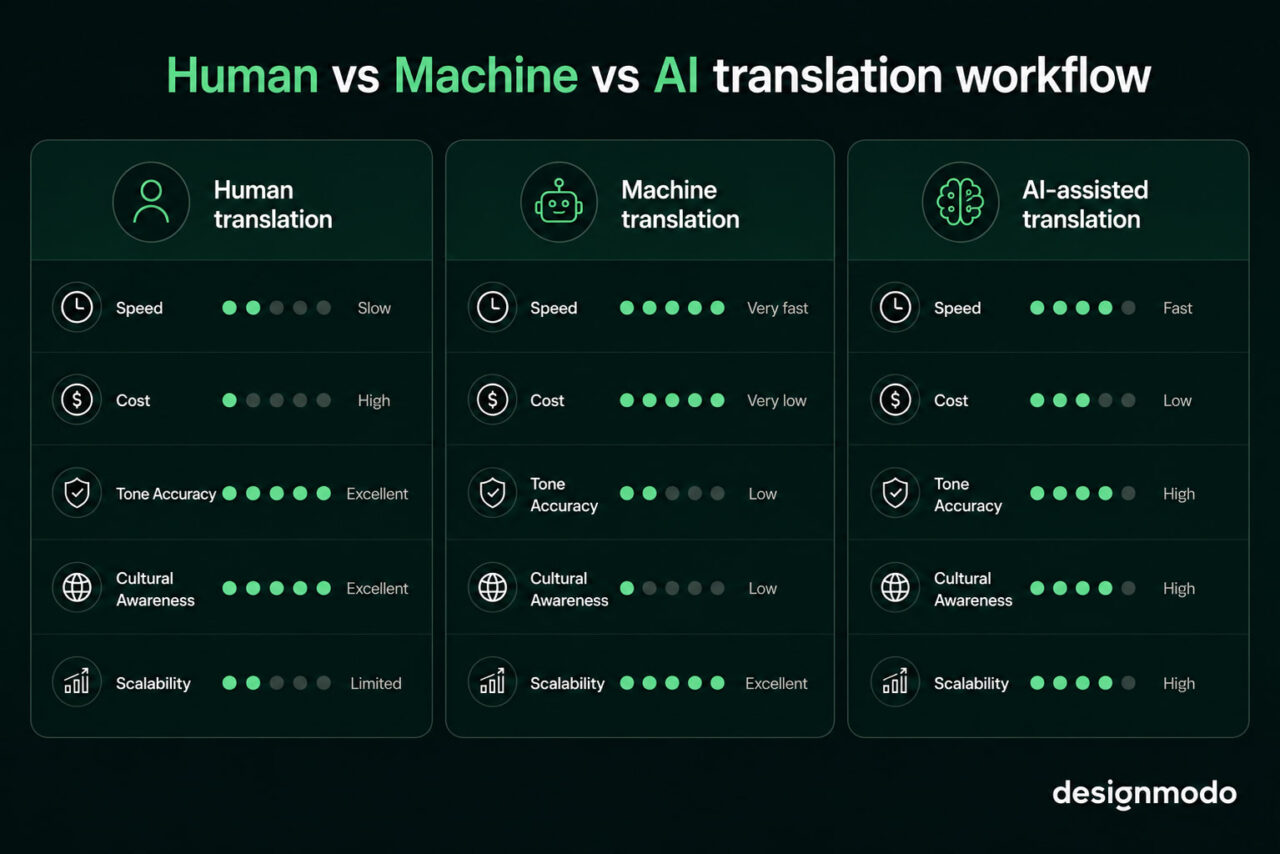
There are three ways to translate marketing emails:
- Human translators
- Machine translation
- AI tools
Human Translation
Human translation means working with a professional translator who is fluent in both languages and understands your target market.
It produces the most accurate, culturally aware copy because a human catches what a machine won’t, such as idioms that don’t carry over or a CTA that reads aggressive in one culture and neutral in another.
However, for a high-volume program sending weekly campaigns across six languages, human translation for every email isn’t realistic. It makes the most sense for product launches, high-revenue campaigns, or any email where a mistranslation would damage trust.
If a luxury fashion brand is entering the Japanese market, they should hire a local translator who knows that direct promotional language because “Buy now, limited time only” may feel pushy to Japanese consumers.
Machine Translation
Tools like Google Translate and DeepL translate content automatically. DeepL handles European languages better than Google Translate, including sentence structure, word choice, and register, which are more accurate. But for internal drafts or rough content checks, either works fine.
For emailing customers, machine translation usually isn’t enough without editing. It misses tone and produces copy that reads as translated rather than written.
Suppose you run an e-commerce store and use DeepL to draft a promotional email in French. The translation could be grammatically correct but formal throughout, including the CTA, where the brand voice is casual.
So you would need to hire an editor who will then spend 20 or more minutes fixing the tone.
AI-Assisted Translation
AI tools can translate copy and adjust tone in the same step. Unlike machine translation, you can give them context: “Translate this for a Brazilian Portuguese audience, casual tone, warm and direct.” The output will be 70-80% of that instruction.
What’s even better is that they’re faster than human translation and more flexible than machine translation.
However, the gap is in cultural depth. AI tools aren’t native speakers and don’t have on-the-ground knowledge of your specific market. So if you use AI translation for the draft, hire a native speaker to review emails before sending.
How to Localize Emails Beyond Translation
Localization means adapting the email so it feels written for a specific audience. To localize your multilingual emails:
- Research the market before writing the copy: Understand the expected formality, cultural references, and buying behavior of that audience.
- Rewrite for tone: A casual US subject line needs a different angle for a Japanese audience, not a literal translation.
- Replace culture-specific hooks: Holidays and events aren’t the same everywhere, so swap them for references that carry the same weight in that market.
- Fix every functional detail: Dates, currency, number formats, and units of measurement must match local conventions.
- Review with a native speaker before sending: They catch awkward phrasing and cultural missteps that no tool will flag.
Managing Multilingual Email Campaigns at Scale
If you plan to run the same email campaign across multiple languages without errors or inconsistent messaging, know that it can be hard but not impossible. So here are a few tips to make it manageable:
- Build a translation memory: A translation memory stores previously translated phrases and reuses them. Over time, it keeps terminology consistent across campaigns and cuts translation time significantly.
- Create a brand glossary: Define how your brand-specific terms, product names, and key phrases should be translated in each language and how they should not.
- Set a clear approval process: Every translated email should go through: translation → native speaker review → sign-off before sending.
- Use an ESP that supports multilingual sending: Use email platforms that let you manage language variants of the same campaign in one place, send based on subscriber language preference, and track performance by language.
Build and Translate Multilingual Emails With Postcards AI Suite
If you run multilingual email campaigns and have been wondering how to design emails for RTL languages, use Postcards AI Suite to translate at the template level. Postcards AI Suite is built directly into the editor and understands your email’s structure.
Here’s how it works:
- Open your email template in Postcards
- Click the pencil icon to open the AI editor
- Type your translation request, for example, “Translate this email into Arabic.”
Your entire email updates instantly: headlines, body copy, CTAs, and supporting text all switch to the target language
What you get beyond translation is the ability to make layout changes in the same session. After translating, you can type a follow-up prompt to adjust column structure, reposition a CTA, or change the color theme for a specific market, all without switching tools.
Common Mistakes in Email Marketing Translation
While translating emails, here are the mistakes most teams make:
- Translate only the body copy: Your subject line, preview text, CTAs, alt text, and footer all need translation too. Subscribers notice when the subject line is in their language, and the unsubscribe link isn’t.
- Skip native speaker review: Machine translation and AI tools produce fluent-sounding copy that is sometimes subtly wrong, which can frustrate the readers.
- Send RTL languages in a left-aligned template: If you send to Arabic or any other RTL audience and haven’t flipped the layout, the email would be harder to read.
- Treat a language as one market: A single translation sent globally will feel off to part of your audience because, for example, Spanish in Mexico, Spain, and Argentina differs in vocabulary, formality, and tone.
- Ignore text expansion: German and Finnish translations of English copy can run 30-40% longer. If your template has fixed-width buttons or tight spacing, the translated text will disturb your layout before it reaches anyone.
To avoid these mistakes, build the review into your process rather than as an afterthought.
Start With One Language, Then Scale
Most teams overcomplicate multilingual email marketing by trying to launch in five or more languages at once.
We suggest choosing your largest non-English segment, running one properly localized campaign, and measuring what changes.
Compare open rates, click-through rates, and unsubscribes against your English baseline. Once you see what localization actually does to your numbers, scaling to the next language is a much easier decision to make.
If you’re ready to build your first multilingual campaign, the Designmodo email template library is a good place to start. Browse templates by layout and use the AI editor to translate and adapt them for your target market.
FAQs
Can Outlook automatically translate emails?
Yes. Outlook has a built-in translation feature that detects foreign-language emails and offers to translate them into your preferred language. You can set it to translate automatically or prompt you each time.
Can I Google Translate an email?
You can, but you shouldn’t send the output to customers without editing it first. Google Translate works for understanding what an email says, not for writing copy that converts. It misses tone, handles idioms poorly, and produces text that reads as translated rather than written.
Can ChatGPT translate a document?
Yes, and it does a better job than Google Translate for marketing copy because you can give it context, including tone, audience, and formality level. So paste your email, tell it the target language and voice, and it produces a usable draft. But it still needs a native speaker’s review before sending.
Can MT replace human translators?
For marketing emails, not entirely. Machine translation handles straightforward copy reasonably well, but it doesn’t understand your audience’s cultural expectations or the difference between a CTA that converts and one that falls flat. That’s why human review is necessary for anything customer-facing, even if the first draft comes from a machine.