30+ AI Email Prompts & Templates For Better Emails in Less Time
Email prompts are the instructions you give an AI tool to write your emails. The right prompt gets you a ready-to-send email in minutes. The wrong one gets you something you will spend an hour rewriting or deleting entirely.
In this guide, you will find ready-to-use prompts for every email type, including subject lines, welcome emails, promotional emails, follow-ups, newsletters, and full email design.
What Are Email Prompts?
Email prompts are instructions you give to an AI tool like ChatGPT or Claude to tell it what kind of email to write. The more detail you put in, the more useful the output you get back.
Ask for “a welcome email for new subscribers,” and you get something generic. But add the brand, the audience, and the goal, and the output is actually usable.
Here’s an example of a basic prompt vs. a better prompt:
- Basic prompt: “Write a welcome email for new subscribers.”
- Better prompt: “Write a welcome email for new subscribers to a skincare brand called Lumière. The subscriber just signed up through our website. The tone should be warm and personal, like a friend recommending a product. Mention that we focus on clean, natural ingredients. Keep it under 150 words. End with a 10% discount code and a clear call to action to shop the starter kit.”
The second prompt gives the AI clear context, including brand, audience, and goal, so the result would somewhat align with what you need.
With Postcards Email Builder, you can create and edit email templates online without any coding skills! It includes more than 100 components and the AI Suite, which builds and translates full templates from a single prompt.
Free Email BuilderFree Email TemplatesNote: Most people use prompts only for copy, but you can prompt for layout, tone, and structure too.
Tools like Postcards AI Suite take that further. Instead of briefing a designer separately, you prompt once and get the full email design in one go.
How to Write Effective AI Email Prompts
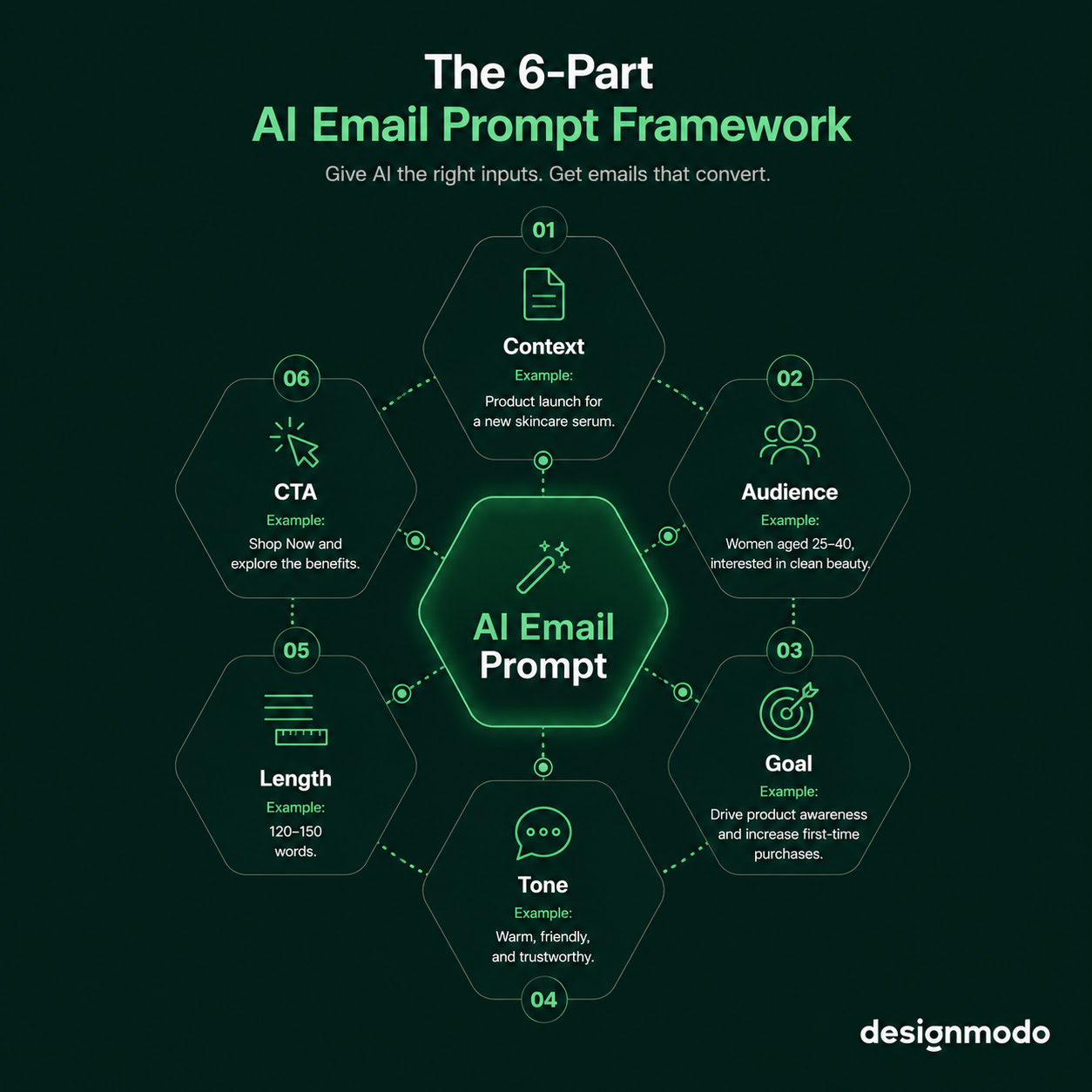
Use this six-part framework every time you write an email prompt:
- Context: What is this email about, and what is the situation?
- Audience: Who is receiving it, and what do they care about?
- Goal: What do you want the reader to do after reading?
- Tone: Friendly, professional, urgent; how should it sound?
- Length: Short and punchy, or detailed and thorough?
- CTA: What should the button or link say?
You do not need all six every time. But each one you add cuts down the editing you will do afterward.
Reusable Prompt Template
If you are writing an email and don’t want to start from scratch, copy this prompt template and fill in the brackets:
“Write a {type of email} for {brand name}. The audience is {describe audience}. The goal is to {describe goal}. The tone should be {tone}. Keep it {short/medium/long}. End with a CTA that says {CTA text}.”
Weak Prompt vs. Strong Prompt
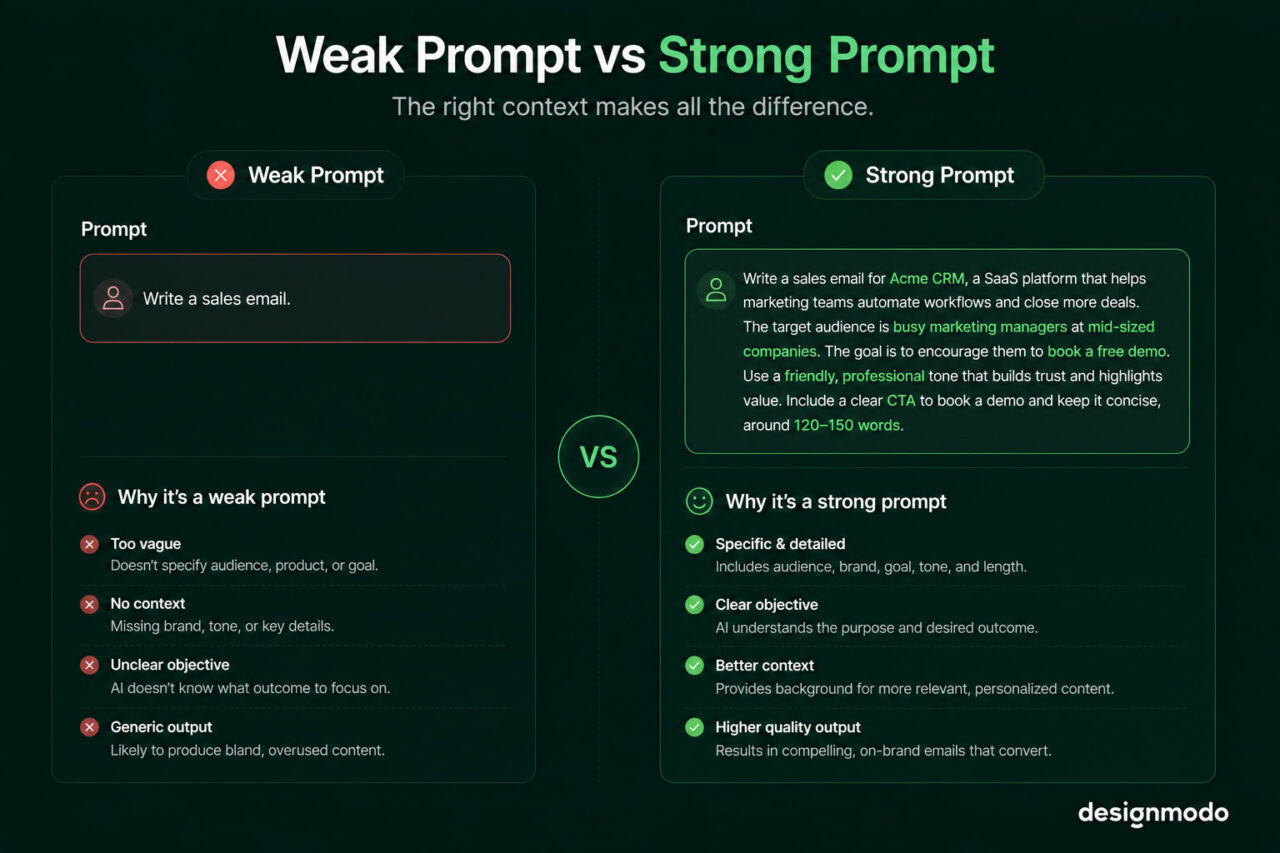
A weak AI prompt lacks detail, but a strong prompt is full of context to help AI produce a better outcome.
Weak prompt:
With Pulsetic you’ll be instantly notified the moment your website, API, or server becomes unavailable. Monitor uptime from multiple global locations and respond to incidents before your users are affected.
Create beautiful status pages in minutes to keep customers informed during outages and build trust with transparent communication.
Start Monitoring for Free“Write a sales email for my company.” No brand, no audience, no goal. So the AI fills in the gaps itself and gives you something technically correct and completely unusable.
Strong prompt:
This is the same prompt we covered above, but now it’s rewritten with the six-part framework:
“Write a promotional sales email for Herbolic, a natural skincare brand. The audience is women aged 25 to 40 who are interested in chemical-free beauty products. The goal is to get them to shop the new summer collection. The tone should be warm and confident. Keep the email under 150 words. End with a CTA button that says ‘Shop the Collection’.”
Best AI Email Writing Prompts for Beginners
Below are the types of AI prompts for email writing. You can use any of these in ChatGPT, Claude, or Postcards AI Suite. Just copy the prompt, fill in the brackets, and let the AI do the work.
Subject Line Prompts
47% of recipients open emails based on the subject line alone, and 69% mark emails as spam because of it. Get it wrong, and nothing else matters. This shows that your subject line decides whether your email gets opened or ignored.
Curiosity subject lines
1. “Write 5 subject lines for an email about {topic}. Make them curious and intriguing. Keep each one under 50 characters.”
2. “Give me 5 subject lines that tease the content of my email without giving it away. The email is about {topic}.”
Promotional subject lines
3. “Write 5 subject lines for a {X}% off sale on {product}. Make them feel urgent but not spammy.”
4. “Give me 5 bold subject lines for a product launch email. The product is {describe product}, and the audience is {describe audience}.”
5. “Write 5 subject lines for a weekly newsletter about {niche}. The tone should feel friendly and conversational.”
6. “Give me subject line ideas for a monthly roundup email. The newsletter covers {topics}. Keep them short and engaging.”
The tone you put in your prompt is the tone you get back. Ask for urgent and you get urgency. Ask for curiosity and you get intrigue. So always name the feeling you want the subject line to create.
The tone you put in your prompt is the tone you get back. Ask for urgent and you get urgency. Ask for curiosity and you get intrigue. So always name the feeling you want the subject line to create.
Welcome Email Prompts
Your welcome email is the first real message you send after someone signs up. Open rates on welcome emails average around 50% — higher than almost any other email type — so this is the one to get right.
Friendly tone
7. “Write a welcome email for new subscribers to {brand name}. Keep the tone warm and conversational. Tell them what to expect and end with an encouraging line.”
8. “Write a short welcome email for someone who just signed up for {product/service}. Sound like a friend, not a company.”
Professional tone
9. “Write a professional welcome email for new users of {software/platform}. Introduce the brand briefly, highlight 2 key features, and include a clear next step.”
10. “Draft a welcome email for new clients of {business type}. Keep it polished and confident. End with an invitation to book a call or explore the dashboard.”
With personalization
11. “Write a welcome email for {first name} who just joined {brand}. Mention their interest in {topic or product they signed up for} and guide them to the next step.”
12. “Write a welcome email that feels personal. The subscriber signed up for {lead magnet or offer}. Reference that in the opening line.”
Promotional Email Prompts
A promotional email pushes a specific offer like a sale or a limited-time deal. It only works when the offer is clear, and the reader knows exactly what to do next. These prompts help you get both right.
Product launch prompts
13. “Write a product launch email for {product name}. The audience is {describe audience}. Highlight 3 key benefits and end with a strong call to action.”
14. “Write an announcement email for the launch of {product/service}. Keep it exciting and confident. Include a launch offer if relevant.”
Discount and sale prompts
15. “Write a promotional email for a {X}% off sale on {product/service}. Add a sense of urgency without sounding pushy. Include a clear CTA button text.”
16. “Write a flash sale email for {brand}. The sale runs for {X hours/days}. Make the deadline obvious and the offer hard to ignore.”
Avoiding spammy language
17. “Write a promotional email for {offer}. Avoid words like ‘free’, ‘guaranteed’, ‘act now’, or anything that sounds like spam. Keep it natural and trustworthy.”
18. “Write a sales email for {product}. The tone should be confident but not pushy. No exclamation marks, no all-caps, no clickbait.”
Follow-Up Email Prompts
A follow-up email goes out after someone takes an action or stops taking one. It keeps the conversation moving without feeling pressure.
No-response follow-ups
19. “Write a follow-up email to someone who did not respond to my first email about {topic}. Keep it short, friendly, and give them an easy way to reply.”
20. “Write a second follow-up email for {product/service}. The person showed interest but went quiet. Do not sound desperate. Just check in naturally.”
Webinar follow-ups
21. “Write a follow-up email for attendees of a webinar about {topic}. Thank them for joining, share the key takeaway, and include a next step or resource.”
22. “Write a follow-up email for people who registered but did not attend the webinar. Let them know the recording is available and highlight what they missed.”
Abandoned cart follow-ups
23. “Write an abandoned cart email for {product name}. Remind the reader what they left behind and include a small incentive to complete the purchase.”
24. “Write a 3-email abandoned cart sequence for {product}. The first email is a gentle reminder, the second adds urgency, and the third offers a discount.”
A newsletter is a regular email you send to keep your audience informed, updated, or entertained. Unlike promotional emails, it is not always about selling; it’s more about staying present and building trust over time.
25. “Write a weekly newsletter for {brand/creator name} about {topic}. Include 3 short sections: a tip, a resource, and a closing thought. Keep the tone {friendly/professional}.”
26. “Write a weekly newsletter intro for {niche} audience. The main topic this week is {topic}. Make it feel like a note from a real person, not a company.”
27. “Write a monthly newsletter for {brand}. Include a recap of {month}, highlight 2 key updates, and end with what is coming next.”
28. “Write a monthly roundup email for {niche}. Summarise the biggest trends or news from the past month in simple language. Keep it under 400 words.”
29. “Turn this blog post into a newsletter email. Keep the key points but make it feel conversational and easy to skim. Here is the blog post: {paste content}.”
30. “Summarize this article into a 200-word newsletter section. Pull out the most useful insight and end with a line that links back to the full post: {paste article}.”
AI Email Design Prompts
AI email design prompts generate the visual layout of your email. Instead of starting from a blank canvas, you describe what you want, such as the sections, the structure, the visual feel, and the AI builds it for you.
Tools like Postcards AI Suite are built specifically for this.
Give it a prompt, and it generates a fully designed email including a hero section, feature blocks, footer. Its design would be ready to customize and send.
Layout and Structure Prompts
Use these to define how your email should be organized before you think about the words:
31. “Generate an email layout for a product launch. Include a hero section, 3 feature blocks, a testimonial, and a CTA button at the bottom.”
32. “Create an email structure for a welcome email. It should have a header image, a short intro paragraph, 2 benefit sections, and a footer with social links.”
Design Style Prompts
Use these to set the visual tone, such as minimal or festive, before you start filling in content:
33. “Design a minimal, clean email template for a {industry} brand. Use lots of white space, one accent colour, and a single CTA.”
34. “Generate an email design for a {seasonal/holiday} campaign. The brand colours are {colours}. Keep it festive but not overdone.”
Full Email Generation Prompts for Postcards AI Suite
Give these prompts to tools that generate the complete email in one go, such as the Postcards AI Suite:
Prompt 1:
“Design a full promotional email for {brand name, e.g. Lumière Skincare}. The offer is {describe offer, e.g., 30% off the summer collection, ending Sunday}. The audience is {describe audience, e.g., women aged 25–40 who buy clean beauty products}. Use a bold hero image at the top, a clear headline under it, 2–3 lines of body copy, and one CTA button that says {e.g. Shop the Sale}. Keep the layout minimal and the tone warm but urgent.”
Prompt 2:
“Generate and design a complete welcome email for {brand, e.g., Finlo, a personal finance app}. The tone is friendly and encouraging. Include a header with the brand logo, an intro paragraph that welcomes the user by first name, 3 onboarding steps explaining what to do first, second, and third inside the app, and a footer with social links and an unsubscribe option.”
How Designmodo Postcards AI Suite Helps
Postcards AI Suite is an email builder with a built-in AI that lets you generate, edit, and customize emails using plain text prompts. You type what you want, and the AI applies it directly to your email.
Here is what you can do with it.
Change Your Email Type With a Prompt
Already have an email designed but need to repurpose it for a different use? Instead of rebuilding from scratch, tell the AI what to convert it to.
Type something like: “Convert this email to a reset password email. Keep one button, write the copy, remove unnecessary elements.”
The AI restructures the whole email in seconds.
Edit Design Elements With Text
Instead of digging through settings panels, describe the change. Want an extra button in red?
Type “add one more button, red color.” Need more breathing room at the bottom? Type “add 20px bottom padding.” The AI applies it directly.
Add New Sections and Blocks
You can drop new content blocks into an existing email without rebuilding the layout.
Type “add two new feature blocks” and Postcards inserts them automatically, already styled to match the rest of the email.
Change the Colour Theme
Instead of selecting colours for one element at a time, describe the look you want, and the AI updates the theme across the whole email at once.
All of this happens inside the Postcards builder. Click the AI pen icon, type your prompt, and the tool handles the rest.
Tips for Writing Better AI Prompts for Email
These six habits will get you better outputs from any AI tool, every time.
- Be specific about your audience: “My customers” tells the AI nothing. “Women aged 30–45 who buy organic groceries online” gives it something to work with.
- Tell the AI what to avoid: Add a line like “No exclamation marks, no spam trigger words, no formal language.” Boundaries matter as much as instructions.
- Always include a tone: Without one, the AI randomly writes for you. So specify whichever you want, like warm, bold, conversational, or professional.
- Ask for multiple versions: Ask it for more than one version, then select the best one or mix parts from each.
- Iterate instead of starting over: Paste the output back and tell the AI what to fix, such as “Make this shorter” or “Make the CTA stronger.”
- Test subject lines separately: Write the email first, then ask: “Now write 5 subject lines for this email.” Separate prompts produce sharper results.
Improve Your Email Before Your Next Send
Take the weakest email in your current sequence (the one with the lowest open rate or the most rewrites) and run it through the 6-part prompt framework we gave. Generate a new version and compare the two.
The difference would be obvious.
Postcards AI Suite is a good place to do this if you want the copy and the design sorted in one go.
FAQs
How Do You Write ChatGPT Prompts to Get the Best Results?
Give it a role, a context, and a constraint in the same prompt like this: “You are an email copywriter. Write a promotional email for a sustainable clothing brand targeting millennial women. Keep it under 150 words and end with a CTA.” Role + context + constraint consistently outperforms a one-line ask.
Why Do I Struggle to Write Emails?
Usually, because you are starting with a blank page instead of a structured one. Most email writers stall at the opening line. But if you start with a prompt, even a rough one, it gives you something to react to, which is faster than writing from nothing.
Can You Auto-Generate Emails?
Yes. Tools like Postcards AI Suite generate the full email, including copy and design, from a single prompt. ChatGPT and Claude generate the copy. The difference is that general AI tools hand you text; email-specific tools hand you a finished, designed email ready to send.
What Is the Pattern of Email Writing?
Most effective emails follow the same structure: a subject line that earns the open, an opening line that hooks the reader, a body that makes one clear point, and a CTA that tells them exactly what to do next.
Are People Using AI to Write Emails?
Yes, and the numbers are growing fast. 24% of marketers already use AI for writing email copy, with adoption accelerating as tools become easier to use without technical knowledge.