Back to School Email Newsletter Ideas and Examples for 2026
Back-to-school is the second-biggest retail event of the year, right behind Christmas. And email is one of the fastest ways to capture that spending.
It kicks off a busy fall season packed with sales opportunities: new collections, mid-season markdowns, Halloween, Thanksgiving, Black Friday, and Cyber Monday. Of all of them, back-to-school is both the opener and the biggest.
In this guide, we’ll cover everything you need to know about creating back-to-school emails, including their ideas, real examples, and marketing tips.
How Much Do Americans Spend on Back-to-School Shopping?
The global back-to-school market was worth about $170 billion in 2024 and is expected to grow to nearly $292 billion by 2035. Clothing and accessories lead worldwide, making up 51.75% of global sales.
In 2025, Americans were expected to spend a combined $128.2 billion on back-to-school and back-to-college shopping.
But that number hides a big split: K-12 families and college students spend very differently, $39.4 billion for K-12 families and $88.8 billion for college students and their families.
K-12 households spend less overall but lean heavily on electronics and clothing, while college students spend roughly 1.5 times as much per household and split their budget across electronics, dorm setup, and other essentials.
With Postcards Email Builder, you can create and edit email templates online without any coding skills! It includes more than 100 components and the AI Suite, which builds and translates full templates from a single prompt.
Free Email BuilderFree Email TemplatesTarget Market
Back-to-school emails should reach five distinct groups, and each one needs its own message:
- School children
- College students
- Parents
- Grandparents
- Teachers and lecturers
Build your list segments around these groups before you write a single subject line.
Why?
Because a discount code that excites a teenager won’t work the same way on a parent comparing prices. And a message written for teachers stocking a classroom reads differently than one aimed at grandparents buying a first-day gift.
Email Ideas
Here are seven ideas to start with:
- Classroom newsletter: A recurring update for parents covering the schedule, key dates, upcoming events, and a seasonal reading list. This works best sent on a fixed cadence (weekly or biweekly), so parents start expecting it.
- A letter from the teacher: A short, personal note introducing the term ahead, written in first person. This builds the kind of ongoing parent-teacher communication that’s hard to fake with a generic template.
- School survival guide: A practical roundup of tips for the first weeks back, including organization hacks, morning routines, and what to pack. You can pair this naturally with product recommendations without feeling like a sales pitch.
- College survival guide: The same concept aimed at students living away from home for the first time, such as dorm setup, budgeting, and meal prep.
- Checklist on frequently forgotten items: A short, scannable list of things students overlook when packing for school (chargers, labels, and specific supplies).
- Early bird deals: A time-limited discount sent before the season peaks, aimed at the growing number of shoppers who now start buying in June and July rather than waiting for August.
- Recipes for lunch boxes: Seasonal, kid-friendly recipes for parents packing lunches.
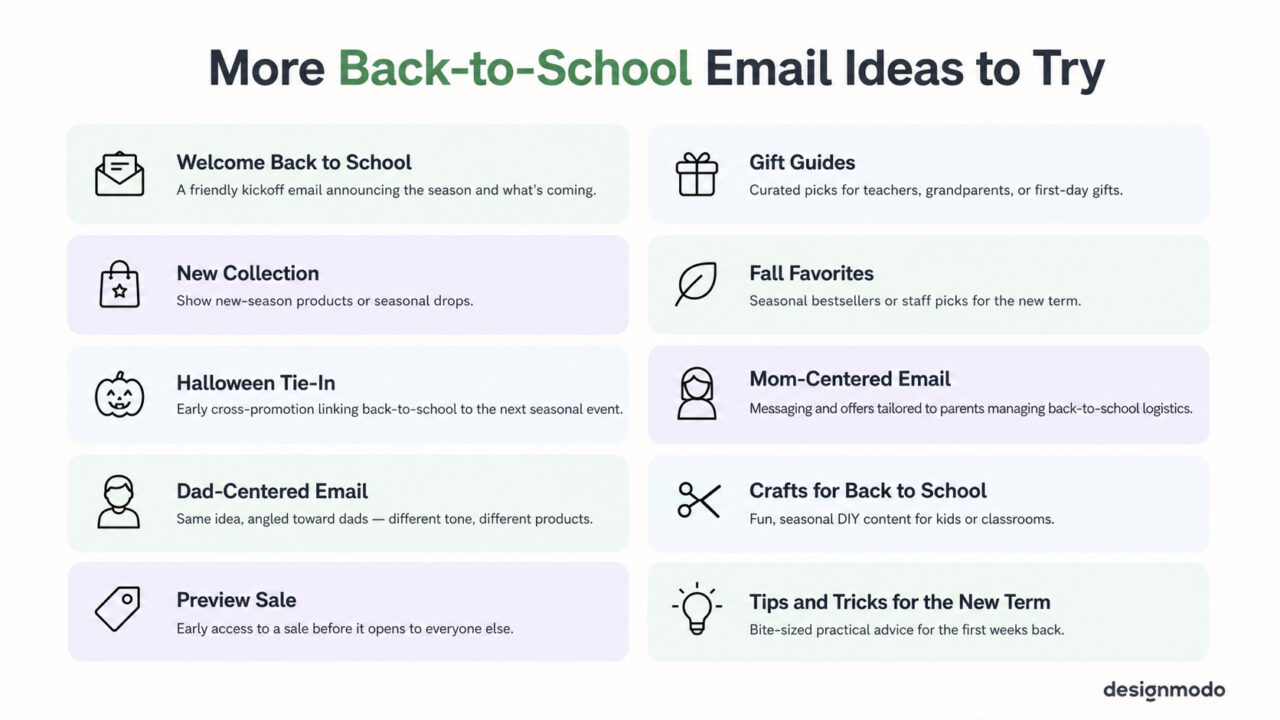
Designmodo offers free back-to-school email templates for businesses and schools. They’re easy to customize, so you can build engaging newsletters without starting from scratch, whether you’re promoting a sale or sending updates to students and parents.
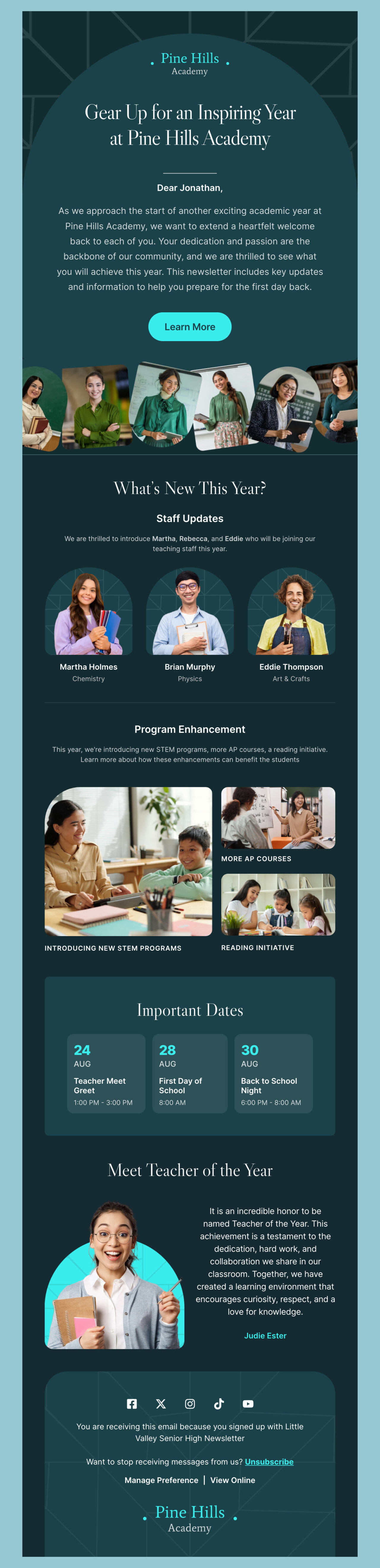
1. Pine Hills: Best for schools introducing staff and program updates alongside the welcome message.
Edit this email template in Postcards
With Pulsetic you’ll be instantly notified the moment your website, API, or server becomes unavailable. Monitor uptime from multiple global locations and respond to incidents before your users are affected.
Create beautiful status pages in minutes to keep customers informed during outages and build trust with transparent communication.
Start Monitoring for FreeIts teal-and-navy palette and clearly divided sections (welcome, staff updates, program changes, key dates, a “Teacher of the Year” spotlight) make it a good fit if your email needs to cover several distinct announcements without feeling cluttered.
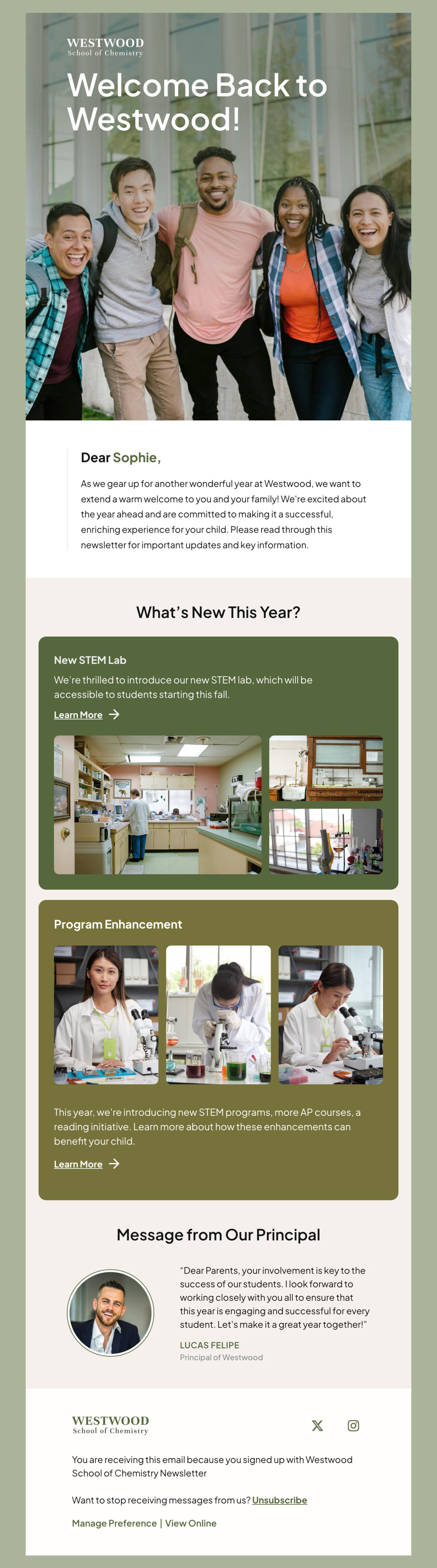
2. Westwood: Best for a warm, principal-led welcome message.
Edit this email template in Postcards
It pairs a calmer olive-and-beige palette with serif headings for a slightly more traditional, trustworthy tone, and its layout is built around a “message from the principal” section. This makes it a strong pick if leadership wants to speak directly to families at the start of the year.
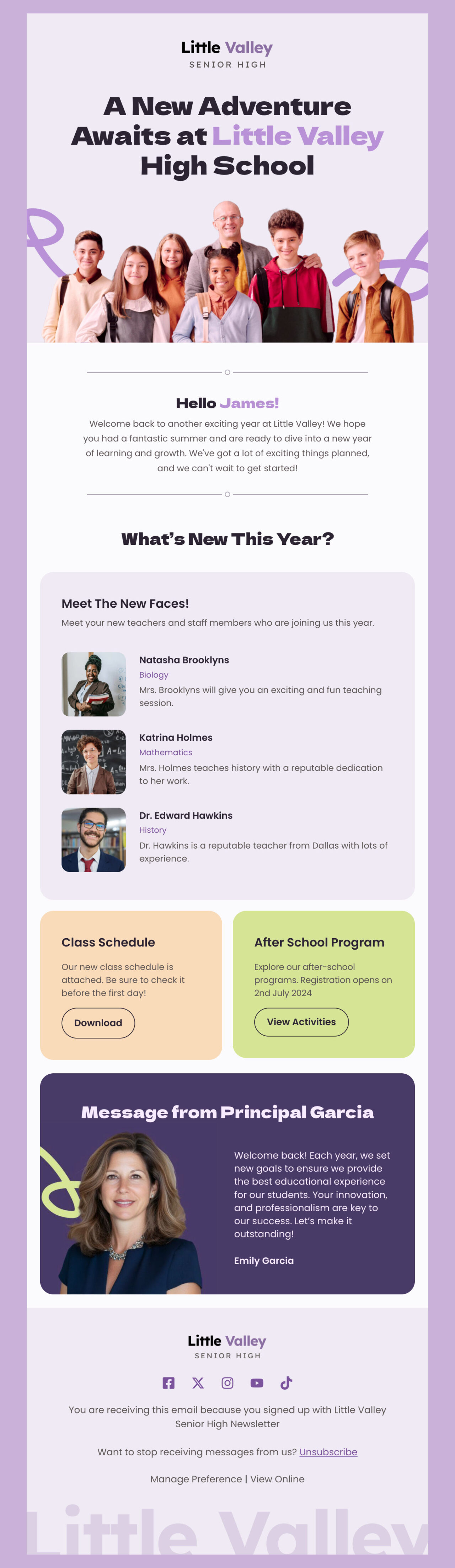
3. Little Valley: Best for schools that want to feel more casual and community-driven.
Edit this email template in Postcards
Its soft purple palette, bold sans-serif headings, and diverse student imagery lean friendly rather than formal, and it’s structured to introduce new staff and promote after-school programs.
This makes it perfect for building student and parent engagement beyond just logistics.
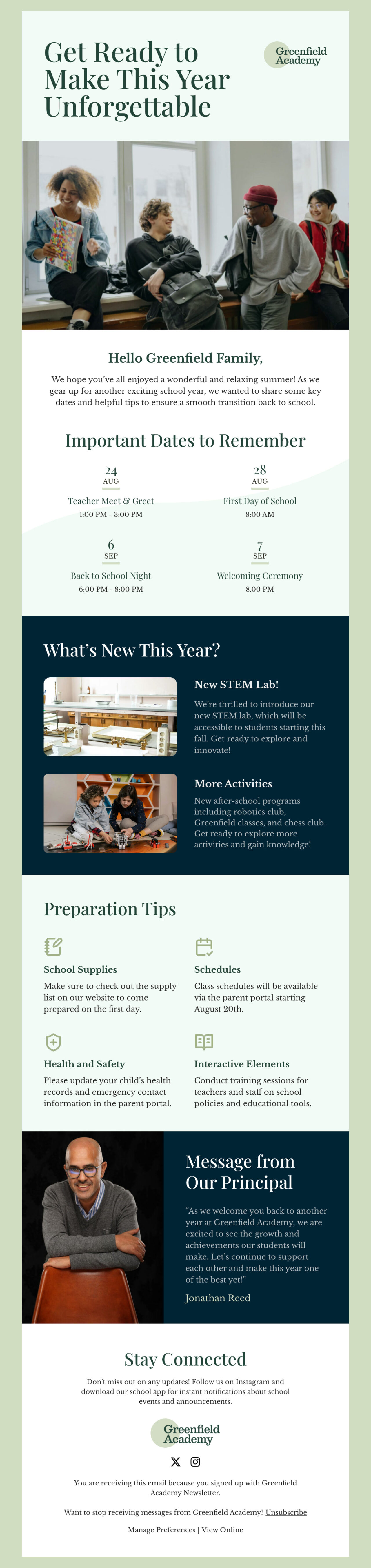
4. Greenfield Academy: Best for a more elegant, established-institution feel.
Edit this email template in Postcards
Soft greens and neutral tones paired with classic serif headings give it a slightly more upscale, traditional look, and its layout perfectly highlights important dates, new initiatives, and preparation tips.
It’s a solid choice for private schools or academies wanting a more polished tone.
Subject Lines
Write your back-to-school subject lines according to this checklist:
- Keep it short, with preview text that extends the idea.
- Use direct words like “sale,” “off,” “free,” “save,” “don’t miss,” “last chance.”
- Add school-themed phrases for extra relevance: “homework,” “class,” “beat the bell,” “A grade.”
- Include emojis (pen, notebook, star, high-five) to engage Gen Z and millennials.
- Still not sure how to get started?
Use a free AI subject line generator by Designmodo to get started. It gives the perfect ideas within seconds so you don’t have to spend hours thinking about what to start with.
Here are some example subject lines:
- BACK TO SCHOOL! Come join the FUN! 20% OFF
- Best First Day Ever!
- 30% OFF BACK TO SCHOOL SALE
- Free Shipping + 20% Off Back-to-School Must-Haves!
- Back-to-school ✔ list – 5 must-haves
- Get an A+ (but only if you hurry)
- Make the Grade: Back-to-School Favorites Up to 65% Off
- We won’t tell if you cheat — 90% off is too good to pass up
When to Start
Start your back-to-school emails in mid-August, before other brands flood inboxes with sales. If you’re in the education space, send your first email even earlier to get shoppers’ attention.
In the US, school start dates vary by state, so the shopping window stretches from mid-July to mid-September. That’s a long runway compared to other retail events.
To make the most of it, split your list by age group and location, then time each segment’s first email to match when their local school year starts.
The best time to send depends on who’s on your list. You’re managing three groups with different schedules:
- School staff whose August is flexible but tightens up once the term starts
- Parents with a few free slots during the workday
- Students who check email between classes
For teachers and school staff, Thursday performs best overall. The strongest engagement windows fall between 7–8 am, 12–1 pm, and 3–4 pm. That’s before school, at lunch, and at the end of the day.
For parents and general consumer audiences, Tuesday through Thursday between 9 am and 11 am are the safest timings.
For Gen Z, skip the general guidance and run A/B tests. Their inbox habits shift too often for a fixed rule to hold.
Best Practices to Target the Most Popular Market Segments During Back-to-School Period
The four most popular market segments during the back-to-school season are parents and caregivers, K-12 and college students, teachers and educators, and schools.
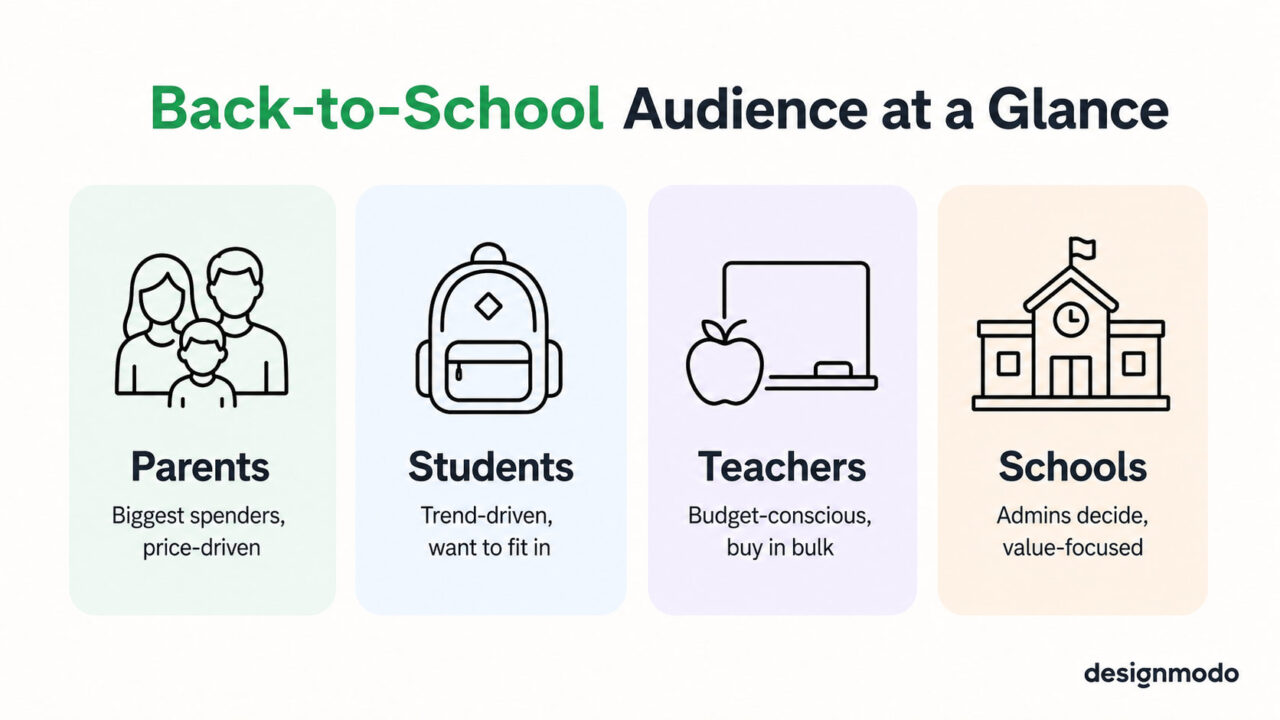
Here are the best practices for reaching each one.
Parents are the biggest buying group during the back-to-school season, even though the season is about kids, students, and teachers.
Follow these tips to create targeted newsletters for parents:
- Write copy that speaks to both parents, since millennial parents split parenting duties more evenly than past generations.
- Include testimonials and customer feedback, since millennials read reviews and trust real parent stories before they buy.
- Add video and interactive content, since this generation grew up on YouTube and responds better to GIFs, video links, and rich images than plain text.
- Promote more than basic school supplies such as electronics, clothing, shoes, and dorm items, or share helpful guides and insider tips if none of these fit your business.
- Lead with price by showing discounts, coupons, and offers up front, since millennial parents watch their budgets closely.
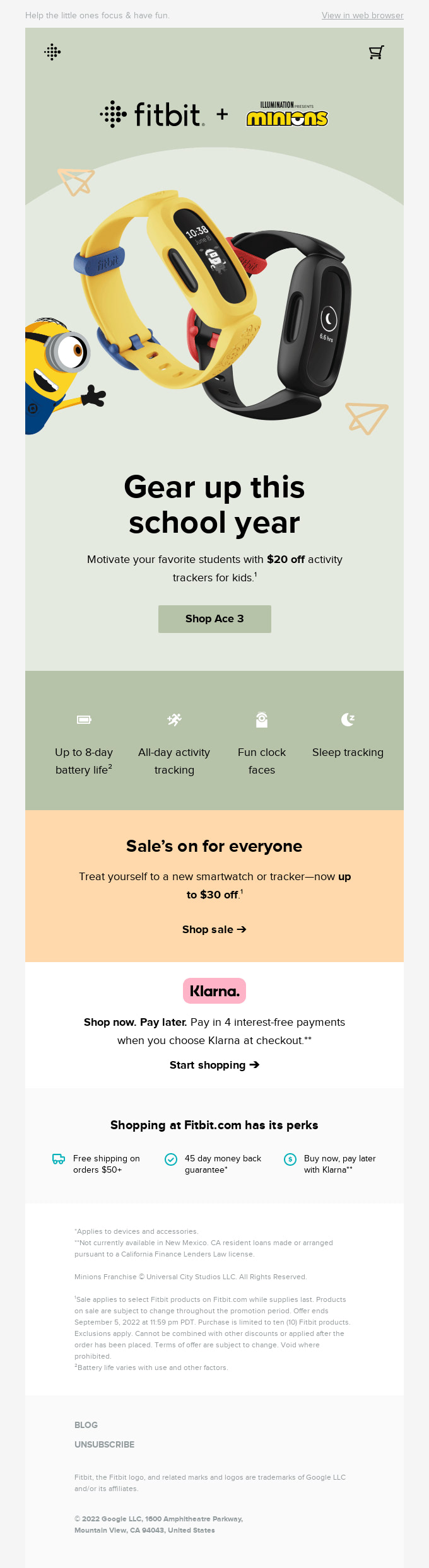
Email from Fitbit
K-12 students care about looking good and fitting in with friends more than any other back-to-school factor, so their emails need to speak that language rather than the practical, budget-first tone that works for parents.
Follow these tips to create targeted newsletters for students:
- Push trends over basics by highlighting the newest colors, styles, and must-have items instead of plain, functional supplies.
- Keep it short and visual, since students skim.
- Use bold images, short lines, and clear calls to action instead of long paragraphs.
- Use influencer or peer language, since referencing what’s popular on TikTok or among their friend group is better than a straightforward product pitch.
- Make it fun with contests, giveaways, and playful subject lines, which get more opens from this group than a standard sales email.
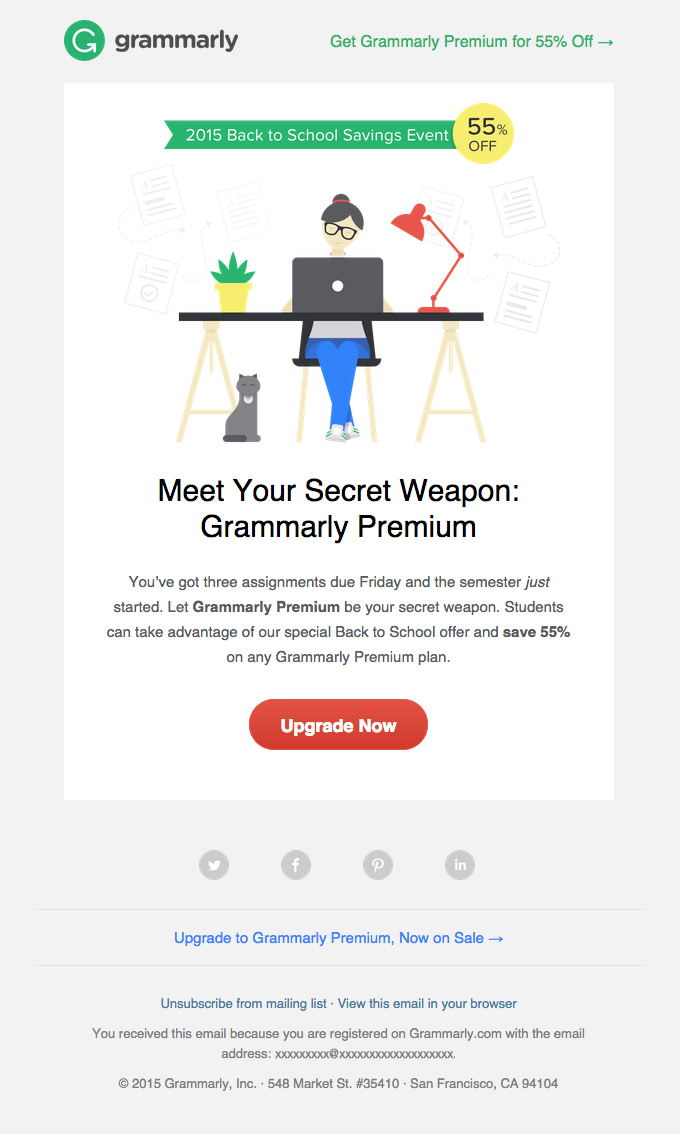
Email from Grammarly
Teachers spend their own money on classroom supplies more than any other group in this list, and they shop with a fixed personal budget in mind. So your emails must respect that reality instead of pushing premium items they can’t justify buying.
Follow these tips to create targeted newsletters for teachers:
- Lead with practicality by highlighting items that solve a real classroom need, like organization tools, durable supplies, and bulk packs that stretch further.
- Offer bulk and multi-pack pricing, since teachers buy in volume for their whole class.
- Acknowledge the spending burden with a short, genuine note recognizing that teachers often cover these costs themselves, which builds goodwill and trust.
- Keep messaging efficient by leading with the offer and keeping the copy short, since teachers have limited time to read marketing emails.
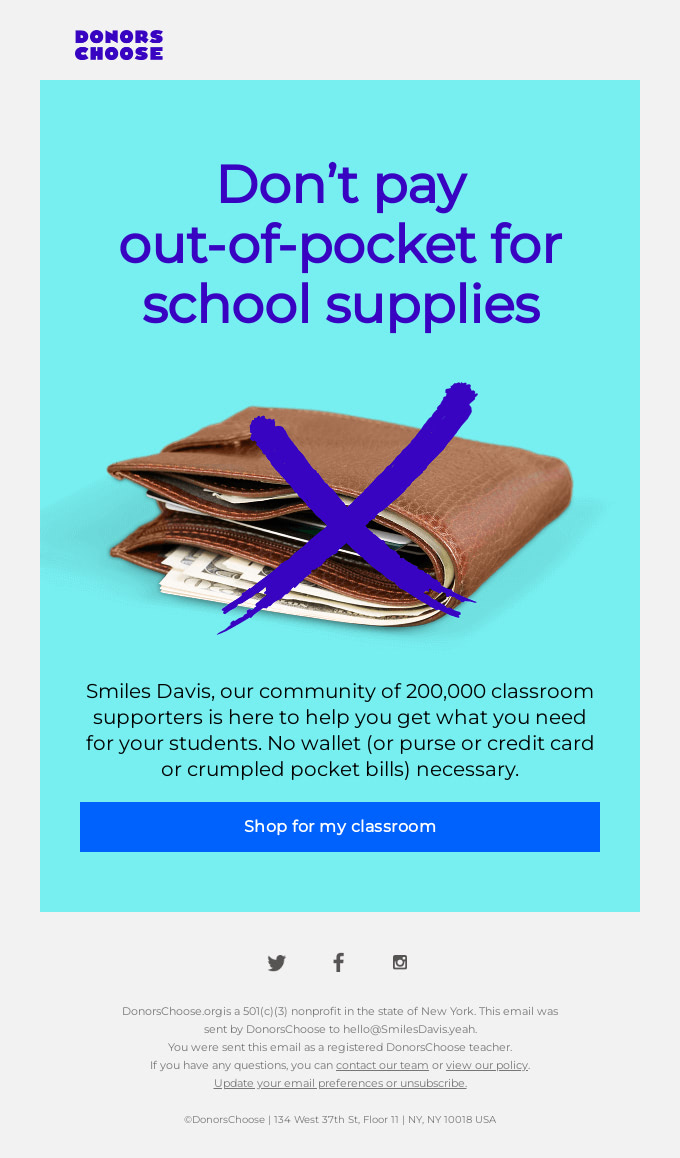
Email from DonorsChoose
Schools are the last major market segment during the back-to-school period, spanning K-12 schools, colleges, and universities scattered across the country, giving businesses ample opportunity to sell their goods.
Follow these tips to create targeted newsletters for schools:
- Bundle classroom supplies together and promote their combined value rather than pricing items individually.
- Build trust by combining quantitative data with personal feedback and reviews from teachers and students who’ve bought your goods.
- Highlight the benefits of choosing your company over competitors with clear, specific comparisons.
- Offer personalized discounts for schools in certain regions, cities, or districts.
- Win goodwill with insider tips that support administrators beyond just selling to them.
- Send a heartfelt message to school administrators and staff at the start of the new term, keeping your company top of mind when they decide to resupply.
- Share relevant research and case studies to help school stakeholders stay informed about industry trends.
- Run a poll or survey at the start of the back-to-school season to gather insights for upcoming flash sales.
- Prioritize proven incentives like volume discounts, free trials, pilot programs, and early-adopter offers, since administrators are money-conscious buyers seeking real value.
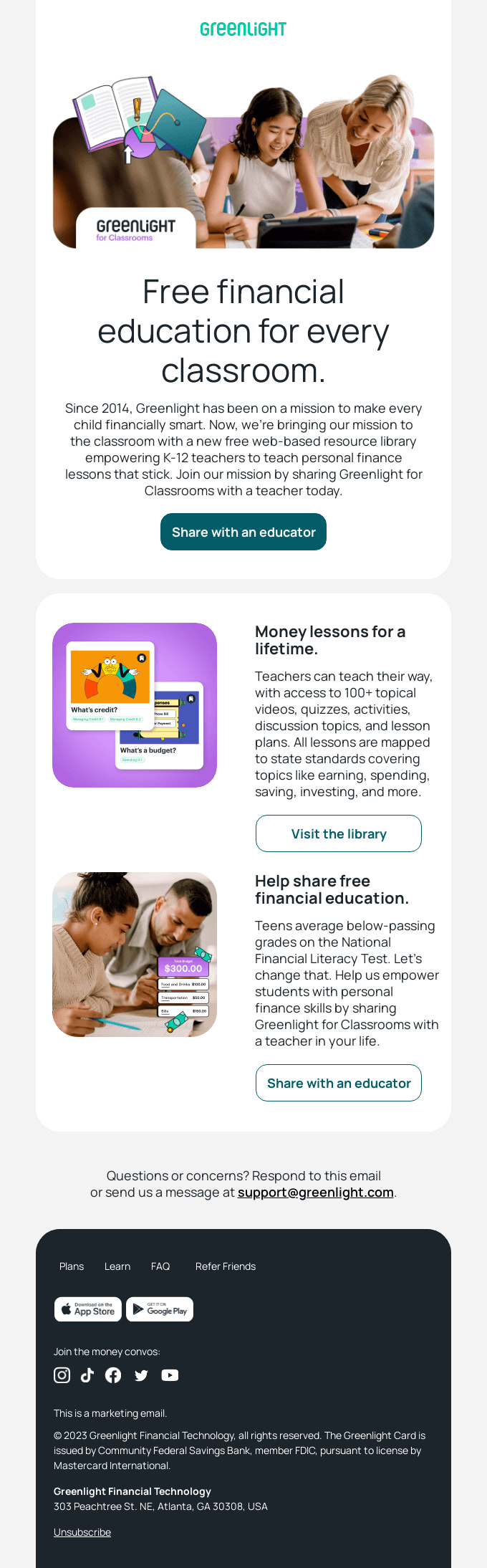
Email from Greenlight
How to Create a High-Converting Back-to-School Email
To create a high-converting back-to-school email:
1. Segment Your List Before You Build Anything
Split your subscribers into groups — parents, K-12 students, college students, teachers — based on signup source, past purchases, or a quick preference survey.
This decides how many versions of the email you’ll need before you generate one.
2. Start From a Back-to-School Template
Browse Designmodo’s email templates and select one built for your segment. When you start with a template, it already gives you a proper structure including the header, hero image, product blocks, and footer. So you’re just editing rather than building from scratch.
3. Let the AI Suite Generate a First Draft, Then Guide It Toward Your Segment
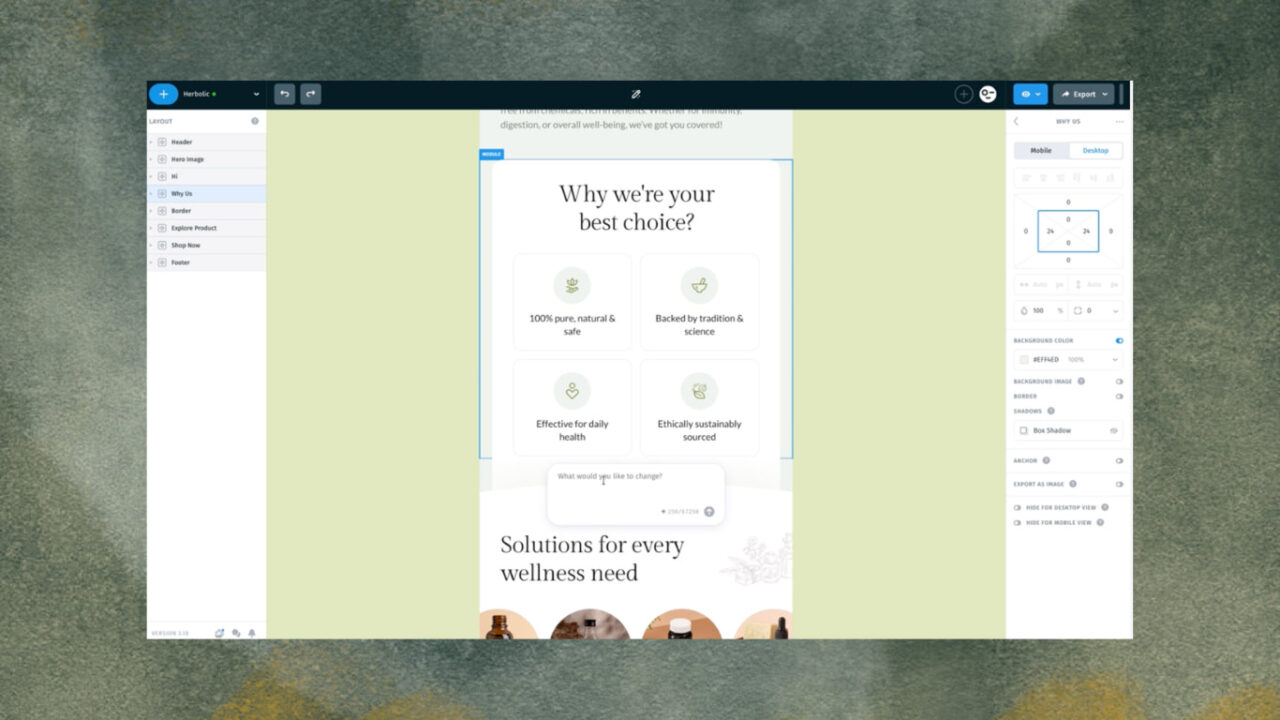
Access Designmodo’s AI Email Design Suite in Postcards email editor and describe the email you need. Include:
- Audience
- Offer
- Tone
- Any products or copy you already have
Once you define these, the first draft will already be close to what you want.
4. Review and Refine Everything the AI Gave You
Go through the draft section by section and prompt the AI to adjust anything that’s off:
- Subject line: Check the tone matches the segment, such as budget-first for parents (“Save 20% before the first bell rings”), trend-first for students (“These are back”), practical for teachers (“Bulk pricing for your classroom”). Keep it under 50 characters.
- Hero section: Make sure one or two products or a single offer lead above the fold. If it’s too crowded, ask the AI to trim it to one clear focal point with a single call to action.
- Body copy: Confirm it’s personalized to the segment, like price-led for parents, style-led for students, bulk value for teachers. Generate a separate version per segment rather than editing one email for every group.
- Visuals: Confirm the seasonal imagery (chalkboard textures, notebook icons, classroom photography) fits your brand. If it feels generic, ask the AI to regenerate in a different direction or swap in your own product photos.
- Product use case: If the copy just lists features, ask the AI to instead show the product in a real school-day moment such as a backpack packed for the walk to class.
5. Add a Concrete Incentive and a Real Deadline
Include an actual code, percentage, or dollar amount directly in the email (“Use SCHOOL20 for 20% off”) and set a specific end date (“Ends Sunday”) rather than vague urgency language.
Note: Enter these details manually to make sure they’re accurate.
6. Preview and Test Before Sending
Use the built-in preview to check how the design renders across major email clients, and send yourself a test to confirm subject line, links, and personalization tags all work correctly.
7. Schedule It as Part of a Sequence
Place this email inside a 3-5 email plan spanning the season:
- Early-bird teaser
- This email as the core push
- Restock reminder
- Last-chance email
You can generate each one the same way, adjusted by segment and stage.
8. Send, Then Feed Results Back Into Your Next Prompt
Track open rate, click rate, and conversions per segment, and use what worked (or didn’t) into your next AI prompt. For example, you could ask AI to “make the subject line punchier” or “lead with the discount higher up” for the next email in the sequence.
Let’s look at a few real examples of back-to-school newsletters:
1. Back-to-School Email From Boden
Boden is a clothes retailer that cannot afford to miss this golden opportunity. Their back-to-school email example includes all the classic tricks in design.
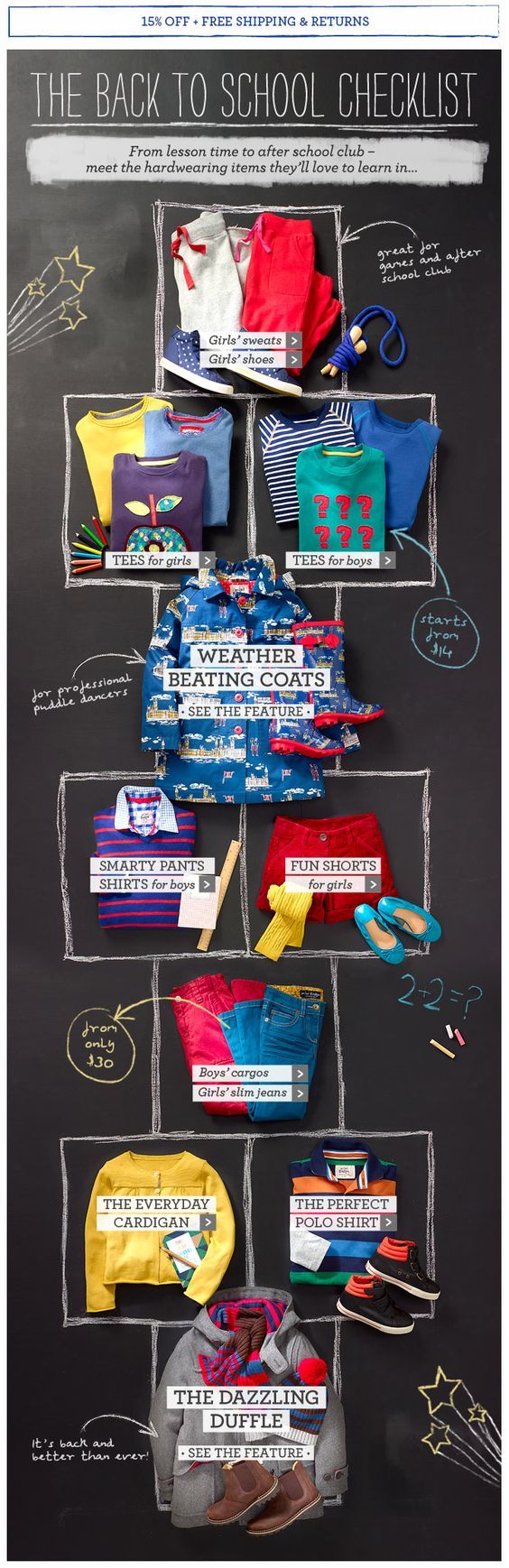
Back-to-School Email Example from Boden
You will find:
- Chalkboard-style embedded image in email background
- Fancy handwritten typography
- Hand-drawn graphics
- School-themed inscriptions
- An arrangement solution inspired by the hopscotch board that ties everything together
There is also a shopping incentive right at the top and a small eye-catching motivator for buying right near each image.
The team has undoubtedly nailed the school theme, and spiced it up with some marketing tricks.
2. Back-to-School Email From Gap
If you are not a fan of skeuomorphic solutions, then the back-to-school email example from Gap, made in a clean flat style, will undoubtedly please you.
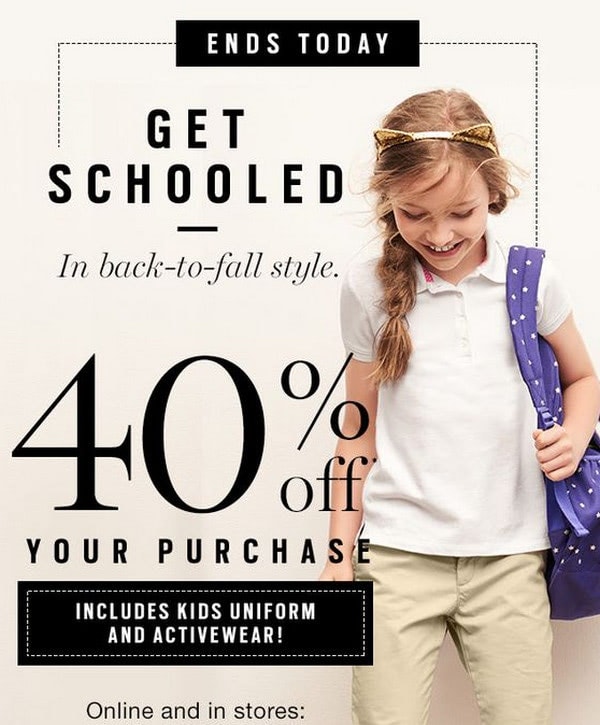
Back-to-School Email Example from Gap
It garners attention with a neat and sophisticated design. Every detail of this newsletter aims to drive traffic to the landing page and generate conversions.
The main highlights of this email are:
- A skillfully established sense of urgency right from the get-go.
- A strong shopping incentive. The 40% discount is an absolute head turner.
- The headline that announces the theme of the email sets everyone in the right mood.
- The image of the schoolgirl with a big smile on her face appeals to all categories, from youngsters to grandparents.
Note, there is no intricate layout nor extravagant details. Everything is well-organized and properly structured.
3. Back-to-School Email From Hansen
With its back-to-school email, Hansen managed to appeal to various sectors in the market and create a design with a long-lasting impression.
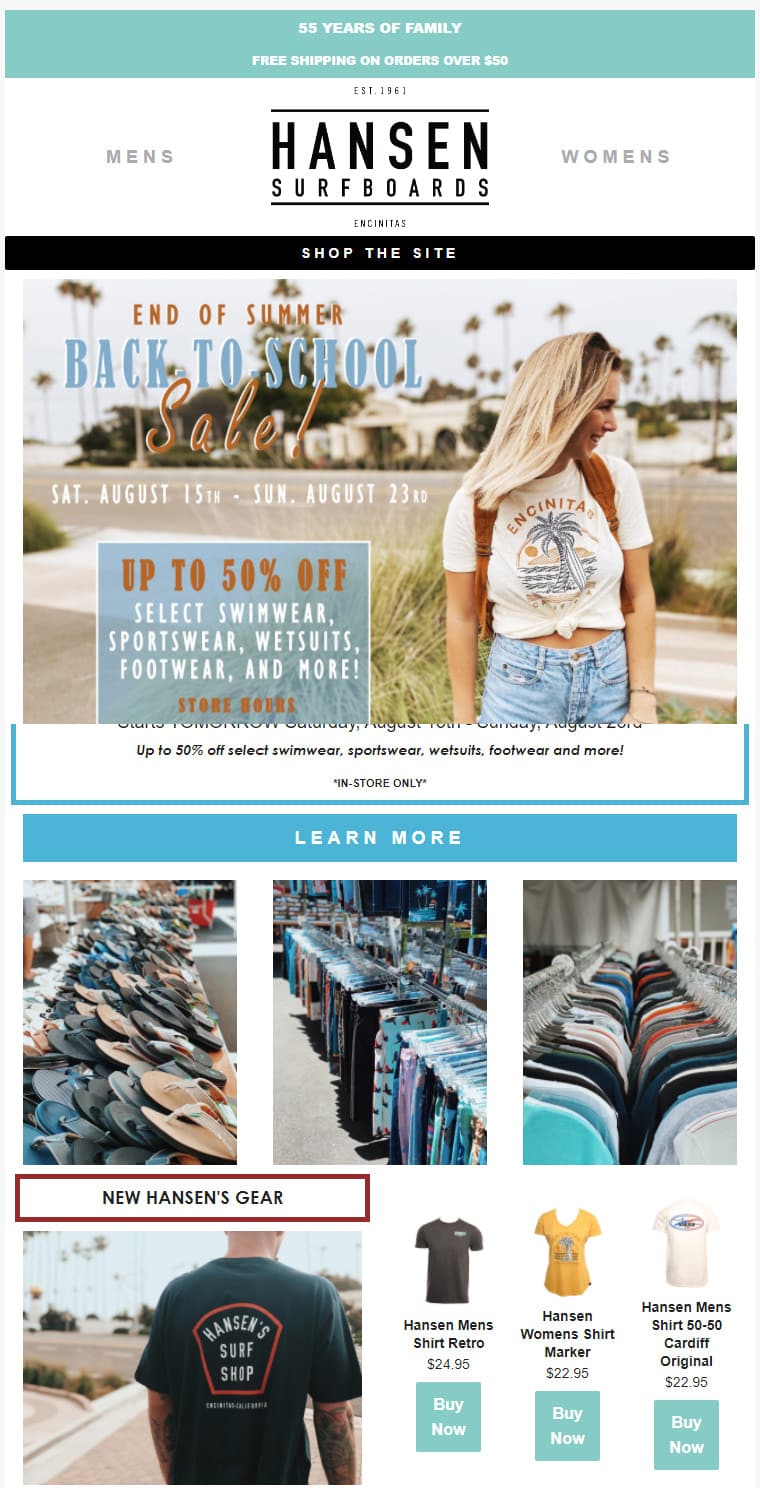
Back-to-School Email from Hansen
You can notice:
- Gorgeous imagery used as background sets the tone and makes the atmosphere unforgettable. The design oozes California appeal on all fronts.
- Beautiful typography makes the content fit the school theme. It echoes the background and throws a natural spotlight on the offer.
- The offer is highlighted and placed right in the heart of the most viewed area.
Note: Even though Hansen has nothing to do with school supplies, they have taken advantage of this event and made it work for their brand.
Here are some tips to help your back-to-school emails get opened, read, and acted on:
- Send early: Start your back-to-school emails a few weeks before the school year begins, so parents and students have time to act.
- Use strong visuals: Add high-quality photos or illustrations to catch the reader’s attention, especially in product highlights and promotional newsletters.
- Make your CTAs clear: Keep the call to action easy to spot and action-oriented, using phrases like “Shop Now” or “Find Out More.”
- Segment your audience: Split your list by grade level, past purchase behavior, or location, so each group gets content that’s actually relevant to them.
- Save time with AI tools: Use AI to draft subject lines, generate copy, or build out email designs. But always give it a human review, since AI can miss brand tone, factual details, or segment-specific nuance that only a second look will catch.
- Monitor and adjust: Track open rates, click-through rates, and conversions, then refine your approach based on what the data shows.
Build Your Back-to-School Email With Designmodo AI Suite
You have the ideas, timing, and best practices to run a back-to-school campaign that actually converts. Now put them into an email. And the fastest way there is with Designmodo’s AI Email Design Suite.
Use everything from this guide to guide your first prompt: tell it who the email is for, what tone fits them, and what offer you’re leading with.
Review the draft it gives you, adjust the copy and visuals where needed, and you’ll have a campaign-ready email far faster than building one manually.